DxGrid.EditNextCellOnEnter Property
In EditCell mode, specifies whether the Grid starts editing the next cell after a user presses Enter. Available in v26.1.4+.
Namespace: DevExpress.Blazor
Assembly: DevExpress.Blazor.Grid.v26.1.dll
NuGet Package: DevExpress.Blazor
Declaration
[DefaultValue(false)]
[Parameter]
public bool EditNextCellOnEnter { get; set; }
Property Value
| Type | Default | Description |
|---|---|---|
| Boolean | false |
|
Remarks
The Grid component supports several keyboard shortcuts that speed up navigation and editing. When a user focuses a cell and presses Enter, an in-place editor opens, where the user can modify cell content. If an in-place editor is already open, Enter applies changes and closes the editor.
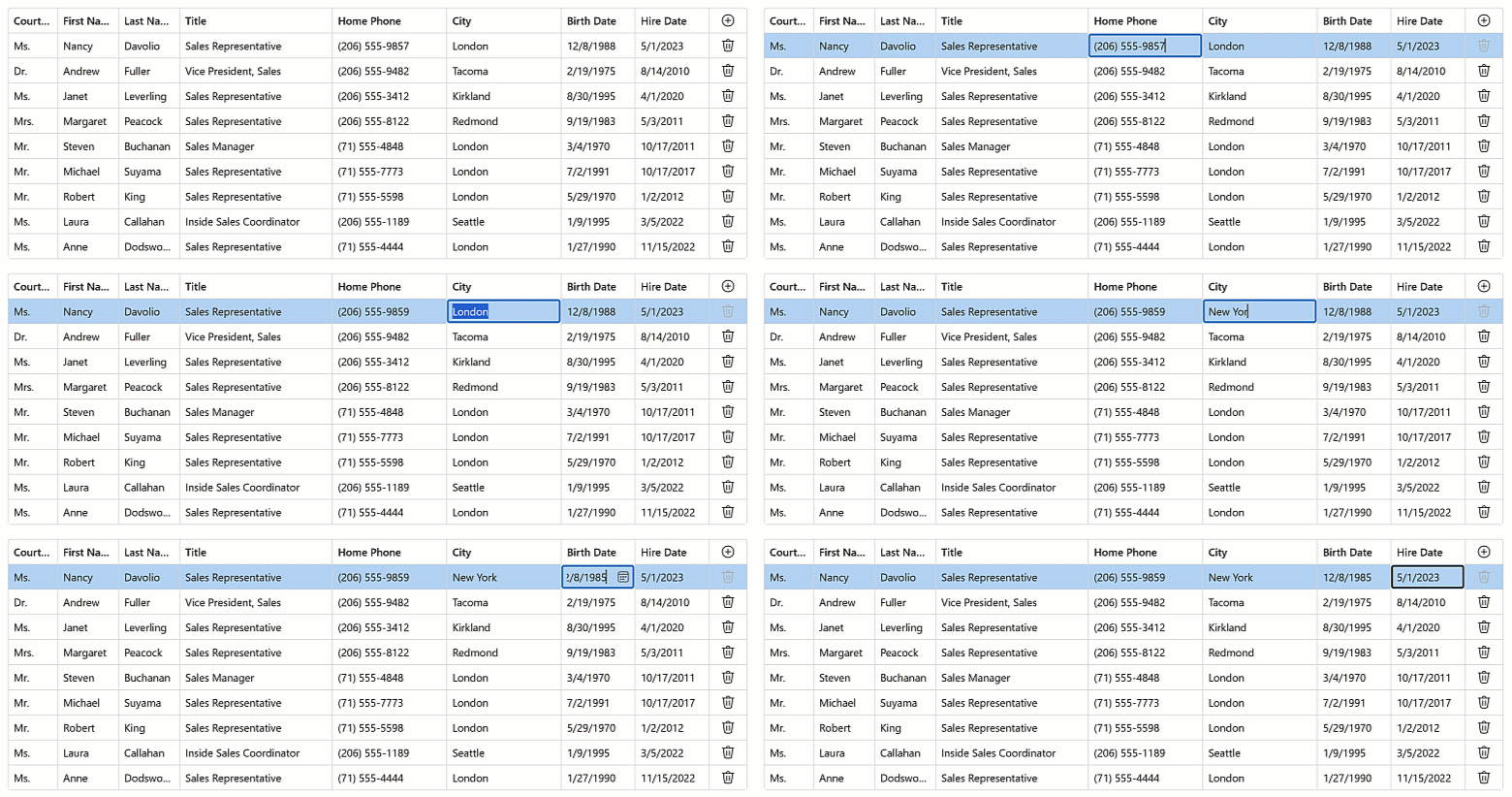
If the EnterKeyDirection property is set to Column or Row, focus moves to another cell. Use the EditNextCellOnEnter property to specify whether the Grid opens an in-place editor in the next cell. When this property is enabled, focus skips read-only cells.
Note
To use the Enter key in DevExpress Blazor Grid, set EditMode to GridEditMode.EditCell.
<DxGrid @ref="Grid"
        Data="DataSource"
        KeyFieldName="EmployeeId"
        EditMode="GridEditMode.EditCell"
        EnterKeyDirection="GridEnterKeyDirection.Row"
        EditNextCellOnEnter="true">
    <Columns>
        <DxGridCommandColumn Width="30px" />
        <DxGridDataColumn FieldName="TitleOfCourtesy" Caption="Courtesy Title" MinWidth="50" />
        <DxGridDataColumn FieldName="FirstName" MinWidth="80" />
        <DxGridDataColumn FieldName="LastName" MinWidth="80" />
        <DxGridDataColumn FieldName="Title" MinWidth="200" />
        <DxGridDataColumn FieldName="HomePhone" MinWidth="150" />
        <DxGridDataColumn FieldName="City" MinWidth="150" />
        <DxGridDataColumn FieldName="BirthDate" Width="10%" MinWidth="80" />
        <DxGridDataColumn FieldName="HireDate" Width="10%" MinWidth="80" />
    </Columns>
</DxGrid>
Tip
Shift+Enter moves focus in the opposite direction.
Enable EditOnKeyPress to make data entry smoother and faster. This option activates the focused cell editor when the user starts typing, without an extra click or key press.