TreeListContextMenuDefaultItemNames Class
Contains names of built-in TreeList commands.
Namespace: DevExpress.Blazor
Assembly: DevExpress.Blazor.Grid.v26.1.dll
NuGet Package: DevExpress.Blazor
Declaration
public static class TreeListContextMenuDefaultItemNamesRemarks
The DevExpress Blazor TreeList allows you to display context menus with predefined and custom commands. Use the ContextMenus property to activate context menus for specific TreeList elements.
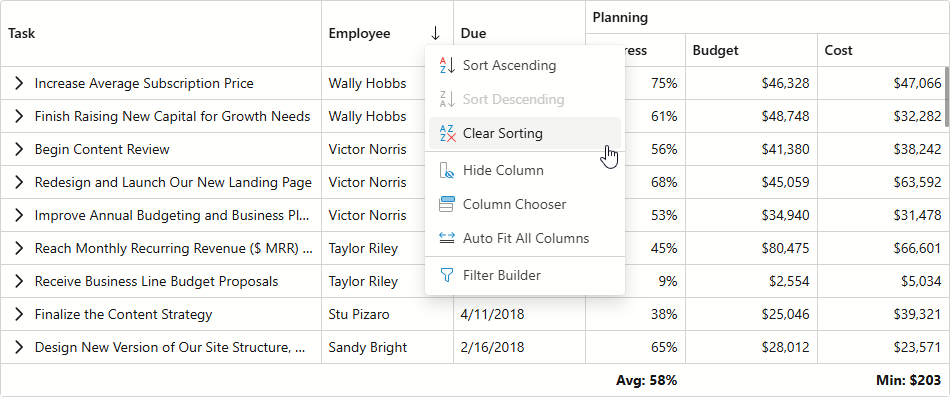
Handle the CustomizeContextMenu event to modify the menu item collection. In the event handler, use TreeListContextMenuDefaultItemNames fields to apply the following customizations:
- Access and customize built-in context menu items
- Add built-in items to TreeList context menus
- Remove built-in items from a context menu
Example
The following code snippet customizes commands available in header and data row context menus:
@inject EmployeeTaskService EmployeeTaskService

<DxTreeList Data="TreeListData"
            KeyFieldName="Id"
            ParentKeyFieldName="ParentId"
            ContextMenus="@(TreeListContextMenus.Header | TreeListContextMenus.DataRow)"
            CustomizeContextMenu="CustomizeContextMenu">
    <Columns>
        <DxTreeListSelectionColumn Width="80px"/>
        <DxTreeListDataColumn FieldName="Name" Caption="Task" />
        <DxTreeListDataColumn FieldName="EmployeeName" />
        <DxTreeListDataColumn FieldName="StartDate" />
        <DxTreeListDataColumn FieldName="DueDate" />
    </Columns>
</DxTreeList>

@code {
    List<EmployeeTask> TreeListData { get; set; }

    protected override void OnInitialized() {
        TreeListData = EmployeeTaskService.GenerateData();
    }
    void CustomizeContextMenu(TreeListCustomizeContextMenuEventArgs args) {
        // Customizes context menu commands for the selection column header
        if (args.Context is TreeListHeaderCommandContext headerContext) {
            if (headerContext.Column is ITreeListSelectionColumn selectionColumn) {
                var isFixed = selectionColumn.FixedPosition != TreeListColumnFixedPosition.None;
                string itemText = isFixed ? "Unfix Column" : "Fix Column to the Left";
                var newValue = isFixed ? TreeListColumnFixedPosition.None : TreeListColumnFixedPosition.Left;
                args.Items.AddCustomItem(itemText, () => {
                    headerContext.TreeList.BeginUpdate();
                    headerContext.Column.FixedPosition = newValue;
                    headerContext.TreeList.EndUpdate();
                });
            }
        }
        // Adds context menu commands for data rows
        if (args.Context is TreeListDataRowCommandContext) {
            args.Items.Add(TreeListContextMenuDefaultItemNames.ExpandAll);
            args.Items.Add(TreeListContextMenuDefaultItemNames.CollapseAll);
        }
    }
}
Inheritance
Object
TreeListContextMenuDefaultItemNames
See Also