TreeListElementType Enum
Lists values that define a TreeList element’s type.
Namespace: DevExpress.Blazor
Assembly: DevExpress.Blazor.v25.2.dll
NuGet Package: DevExpress.Blazor
Declaration
public enum TreeListElementTypeMembers
| Name | Description |
|---|---|
DataRow
|
A data row. |
DataCell
|
A data column cell. |
CommandCell
|
A command column cell. |
SelectionCell
|
A selection column cell. |
EditRow
|
An edit row. |
EditCell
|
A cell displayed in the edited row. |
EditCommandCell
|
A command column cell displayed in the edited row. |
EditSelectionCell
|
A selection column cell displayed in the edited row. |
EditFormCell
|
An edit form cell. |
PopupEditForm
|
|
FilterRow
|
The filter row. |
FilterCell
|
A filter row’s edit cell. |
FilterCommandCell
|
A filter row‘s command column cell. |
FilterSelectionCell
|
A filter row’s selection column cell. |
HeaderRow
|
A row that contains TreeList column headers. |
HeaderCell
|
A data column header cell. |
HeaderCommandCell
|
A command column header cell. |
HeaderSelectionCell
|
A selection column‘s header cell. |
FooterRow
|
The footer. |
FooterCell
|
A band‘s footer cell. |
FooterCommandCell
|
The footer‘s command column cell. |
FooterSelectionCell
|
The selection column’s footer cell. |
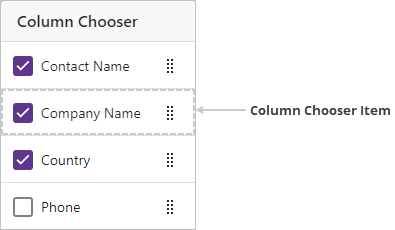
ColumnChooserItem
|
A column chooser item. |
PagerContainer
|
A container that stores the TreeList pager. |
SearchBoxContainer
|
A container that stores the TreeList search box. |
ToolbarContainer
|
A container that stores the TreeList toolbar. |
EmptyDataArea
|
An empty data area. |
EmptyBandCell
|
A band‘s empty data cell. |
HeaderBandCell
|
A band‘s header cell. |
FooterBandCell
|
A footer cell. |
RowDragAnchorCell
|
A drag anchor. |
DragHint
|
A drag hint. |
EditNewRootItemRow
|
A new item row. |
FilterPanel
|
The filter panel. |
Related API Members
The following properties accept/return TreeListElementType values:
Remarks
Use this enumeration’s values to define an element type when you handle the CustomizeElement event.
The following code customizes the appearance of TreeList elements that meet the following criteria:
- Rows that have child rows are highlighted.
- Cells in March Change and September Change columns that display values larger than
5%are colored green. - Cells in March Change and September Change columns that display negative values are colored red.
<DxTreeList Data="Data"
            KeyFieldName="ID"
            ParentKeyFieldName="RegionID"
            CustomizeElement="TreeList_CustomizeElement">
    <Columns>
        <DxTreeListDataColumn FieldName="Region" />
        <DxTreeListDataColumn FieldName="MarchSales" DisplayFormat="c0" />
        <DxTreeListDataColumn FieldName="SeptemberSales" DisplayFormat="c0" />
        <DxTreeListDataColumn FieldName="MarchChange" DisplayFormat="p2" />
        <DxTreeListDataColumn FieldName="SeptemberChange" DisplayFormat="p2" />
        <DxTreeListDataColumn FieldName="MarketShare" DisplayFormat="p0" />
    </Columns>
</DxTreeList>

@code {
    object Data { get; set; }

    protected override void OnInitialized () {
        Data = SalesByRegionDataProvider.GenerateData();
    }

    void TreeList_CustomizeElement(TreeListCustomizeElementEventArgs e) {
        if(e.ElementType == TreeListElementType.DataRow
                         && (int)e.TreeList.GetRowValue(e.VisibleIndex, "RegionID") == 0) {
            e.CssClass = "parent-region-row";
        }
        if(e.ElementType == TreeListElementType.DataCell && e.Column is ITreeListDataColumn dataColumn) {
            if(dataColumn.FieldName == "MarchChange" || dataColumn.FieldName == "SeptemberChange") {
                var value = (decimal)e.TreeList.GetRowValue(e.VisibleIndex, dataColumn.FieldName);
                if(value > 0.05M) {
                    e.CssClass = "win-threshold";
                }
                else if(value < 0) {
                    e.CssClass = "loss-threshold";
                }
            }
        }
    }
}
.parent-region-row {
    --dxbl-grid-row-bg: var(--dxds-color-surface-neutral-subdued-rest);
}
td.loss-threshold {
    background-color: rgba(245, 198, 203, 0.5);
}
td.win-threshold {
    background-color: rgba(198, 245, 203, 0.5);
}

Images
TreeList Rows

Data Row

Empty Data Area

Edit Elements


Header and Footer

Search Box Panel

Header Band Elements
On the image below, the Contact Information column is an empty band:

Filter Elements

Toolbar Container

Column Chooser
Drag Elements
