GridGroupPanelCommandContext Class
Contains contextual information for the Grid group panel context menu.
Namespace: DevExpress.Blazor
Assembly: DevExpress.Blazor.Grid.v26.1.dll
NuGet Package: DevExpress.Blazor
Declaration
public class GridGroupPanelCommandContext :
    GridCommandContextBase,
    IGridCommandContext,
    ICommandContextBase
Remarks
The DevExpress Blazor Grid allows you to display context menus with predefined and custom commands. Use the ContextMenus property to activate context menus for specific Grid elements.
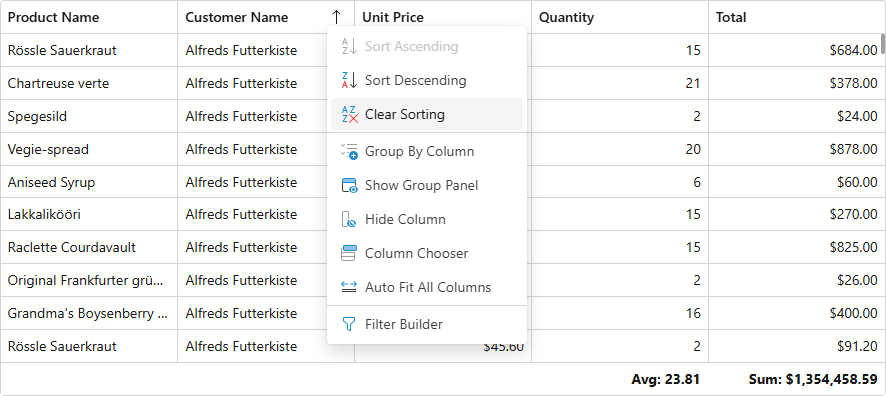
Handle the CustomizeContextMenu event to modify the menu item collection. Use the Context event argument to identify the target Grid element and obtain contextual information.
| Target Element | Context Type | Contextual information |
|---|---|---|
| Any | GridCommandContext | Grid |
| Data Row | GridDataRowCommandContext | Grid, Column, DataItem, RowVisibleIndex |
| Footer | GridFooterCommandContext | Grid, Column, SummaryItems |
| Group Footer | GridGroupFooterCommandContext | Grid, Column, GroupRowVisibleIndex, SummaryItems |
| Group Panel | GridGroupPanelCommandContext |
Grid |
| Group Row | GridGroupRowCommandContext | Grid, GroupColumn, RowVisibleIndex |
| Header | GridHeaderCommandContext | Grid, Column |
Example
The following example adds custom Show Grouped Columns/Hide Grouped Columns commands to the group panel context menu:
@inject WeatherForecastService ForecastService

<DxGrid Data="@forecasts"
        ShowGroupPanel="true"
        ContextMenus="GridContextMenus.GroupPanel"
        CustomizeContextMenu="OnCustomizeContextMenu">
    <Columns>
        <DxGridSelectionColumn />
        <DxGridDataColumn FieldName=@nameof(WeatherForecast.TemperatureC) Caption="Temp. (C)" />
        <DxGridDataColumn FieldName=@nameof(WeatherForecast.TemperatureF) Caption="Temp. (F)" />
        <DxGridDataColumn FieldName=@nameof(WeatherForecast.Summary) Caption="Summary" GroupIndex="0" />
        <DxGridDataColumn FieldName=@nameof(WeatherForecast.Date) DisplayFormat="dd/MM/yyyy" />
    </Columns>
    <GroupSummary>
        <DxGridSummaryItem SummaryType="GridSummaryItemType.Count" FieldName="Date" FooterColumnName="Date" />
    </GroupSummary>
</DxGrid>

@code {
    private List<WeatherForecast>? forecasts;

    protected override async Task OnInitializedAsync() {
        forecasts = await ForecastService.GetForecastAsync();
    }
    void OnCustomizeContextMenu(GridCustomizeContextMenuEventArgs args) {
        if (args.Context is GridGroupPanelCommandContext groupPanelContext) {
            var isGroupedColumnsVisible = groupPanelContext.Grid.ShowGroupedColumns;
            string itemText = isGroupedColumnsVisible ? "Hide Grouped Columns" : "Show Grouped Columns";
            args.Items.AddCustomItem(0, itemText, () => {
                groupPanelContext.Grid.BeginUpdate();
                groupPanelContext.Grid.ShowGroupedColumns = !isGroupedColumnsVisible;
                groupPanelContext.Grid.EndUpdate();
            });
        }
    }
}
Inheritance
Object
DevExpress.Blazor.Grid.Internal.Base.ContextMenu.GridCommandContextBase
GridGroupPanelCommandContext
See Also