IContextMenuItemCollection Interface
A collection of root-level or nested context menu items in the Grid, Rich Text Editor, or TreeList component.
Namespace: DevExpress.Blazor
Assembly: DevExpress.Blazor.v26.1.dll
NuGet Package: DevExpress.Blazor
Declaration
public interface IContextMenuItemCollection :
    IReadOnlyList<IContextMenuItem>,
    IEnumerable<IContextMenuItem>,
    IEnumerable,
    IReadOnlyCollection<IContextMenuItem>
Related API Members
The following members return IContextMenuItemCollection objects:
Remarks
Handle the CustomizeContextMenu event to modify context commands available in the Grid, Rich Text Editor, or TreeList component. In the event handler, use the IContextMenuItemCollection interface members to perform the following operations:
- Access root-level or nested items
- Add default or custom items to the main menu or its sub-menus.
- Remove individual or all items from a collection
- Convert an item collection into a flattened collection
- Get information about the number of items and their positions in item collections
Grid Example
The following code snippet customizes commands available in the header context menu:
@inject NwindDataService NwindDataService

<DxGrid Data="Data"
        ShowGroupPanel="true"
        ContextMenus="@(GridContextMenus.Header)"
        CustomizeContextMenu="CustomizeContextMenu">
    <Columns>
        <DxGridSelectionColumn />
        <DxGridDataColumn FieldName="City" />
        <DxGridDataColumn FieldName="Country" />
        <DxGridDataColumn FieldName="CustomerName" GroupIndex="0" />
        <DxGridDataColumn FieldName="ProductName" />
        <DxGridDataColumn FieldName="Total"
                          UnboundType="GridUnboundColumnType.Decimal"
                          UnboundExpression="[UnitPrice] * [Quantity]"
                          DisplayFormat="c"
                          MinWidth="100" />
    </Columns>
</DxGrid>

@code {
    BindingList<Invoice> Data { get; set; }

    void CustomizeContextMenu(GridCustomizeContextMenuEventArgs args) {
        if (args.Context is GridHeaderCommandContext headerContext) {
            // Customizes context menu commands for the Total column header
            if (headerContext.Column is IGridDataColumn dataColumn && dataColumn.FieldName == "Total") {
                args.Items.Remove(GridContextMenuDefaultItemNames.GroupByColumn);
                args.Items.Remove(GridContextMenuDefaultItemNames.UngroupColumn);
            }
            // Customizes context menu commands for the selection column header
            if (headerContext.Column is IGridSelectionColumn selectionColumn) {
                var isFixed = selectionColumn.FixedPosition != GridColumnFixedPosition.None;
                string itemText = isFixed ? "Unfix Column" : "Fix Column to the Left";
                var newValue = isFixed ? GridColumnFixedPosition.None : GridColumnFixedPosition.Left;

                args.Items.AddCustomItem(itemText, () => {
                    headerContext.Grid.BeginUpdate();
                    headerContext.Column.FixedPosition = newValue;
                    headerContext.Grid.EndUpdate();
                });
            }
        }
    }

    protected override async Task OnInitializedAsync() {
        var invoices = await NwindDataService.GetInvoicesAsync();
        Data = new BindingList<Invoice>(invoices.ToList());
    }
}
Rich Text Editor Example
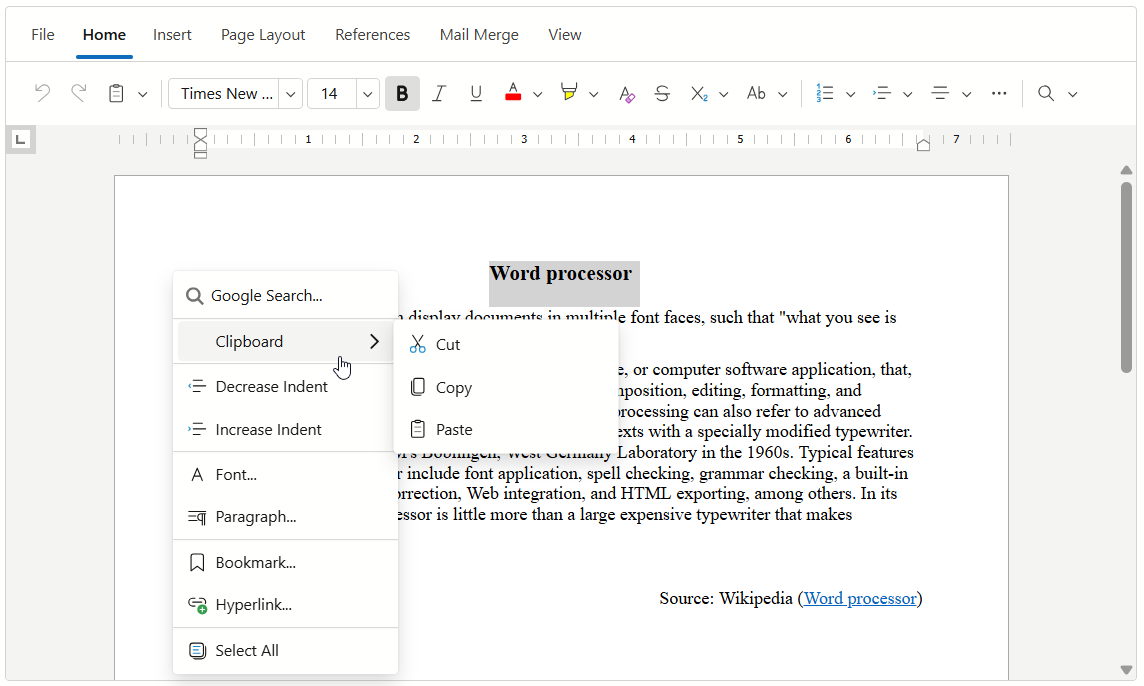
The following code snippet operates with item collections in the CustomizeContextMenu event handler:
<DxRichEdit CustomizeContextMenu=OnCustomizeContextMenu />

@code {
    void OnCustomizeContextMenu(IContextMenuItemCollection items) {
        // Inserts a custom item at the first position in the item collection
        var searchItem = items.AddCustomItem(0, "Google Search...", ...);
        var openHyperlinkItem = items[RichEditContextMenuItemNames.OpenHyperlink];
        openHyperlinkItem.BeginGroup = false;
        // Gets the built-in item's position in the item collection
        var index = items.IndexOf(openHyperlinkItem);
        // Inserts a custom item at the specified position in the main menu's item collection
        var showURLItem = items.AddCustomItem(index, "Show URL", ...);
        showURLItem.BeginGroup = true;
        // Removes built-in items from the item collection
        items.Remove(RichEditContextMenuItemNames.CutSelection);
        items.Remove(RichEditContextMenuItemNames.CopySelection);
        items.Remove(RichEditContextMenuItemNames.Paste);
        // Inserts a custom item at the second position in the item collection
        var clipboardItem = items.AddCustomItem(1, "Clipboard");
        clipboardItem.BeginGroup = true;
        // Adds default items to the item collection of the inserted item
        clipboardItem.Items.Add(RichEditContextMenuItemNames.CutSelection);
        clipboardItem.Items.Add(RichEditContextMenuItemNames.CopySelection);
        clipboardItem.Items.Add(RichEditContextMenuItemNames.Paste);
    }
}
TreeList Example
The following code snippet customizes commands available in header and data row context menus:
@inject EmployeeTaskService EmployeeTaskService

<DxTreeList Data="TreeListData"
            KeyFieldName="Id"
            ParentKeyFieldName="ParentId"
            ContextMenus="@(TreeListContextMenus.Header | TreeListContextMenus.DataRow)"
            CustomizeContextMenu="CustomizeContextMenu">
    <Columns>
        <DxTreeListSelectionColumn Width="80px"/>
        <DxTreeListDataColumn FieldName="Name" Caption="Task" />
        <DxTreeListDataColumn FieldName="EmployeeName" />
        <DxTreeListDataColumn FieldName="StartDate" />
        <DxTreeListDataColumn FieldName="DueDate" />
    </Columns>
</DxTreeList>

@code {
    List<EmployeeTask> TreeListData { get; set; }

    protected override void OnInitialized() {
        TreeListData = EmployeeTaskService.GenerateData();
    }
    void CustomizeContextMenu(TreeListCustomizeContextMenuEventArgs args) {
        // Customizes context menu commands for the selection column header
        if (args.Context is TreeListHeaderCommandContext headerContext) {
            if (headerContext.Column is ITreeListSelectionColumn selectionColumn) {
                var isFixed = selectionColumn.FixedPosition != TreeListColumnFixedPosition.None;
                string itemText = isFixed ? "Unfix Column" : "Fix Column to the Left";
                var newValue = isFixed ? TreeListColumnFixedPosition.None : TreeListColumnFixedPosition.Left;
                args.Items.AddCustomItem(itemText, () => {
                    headerContext.TreeList.BeginUpdate();
                    headerContext.Column.FixedPosition = newValue;
                    headerContext.TreeList.EndUpdate();
                });
            }
        }
        // Adds context menu commands for data rows
        if (args.Context is TreeListDataRowCommandContext) {
            args.Items.Add(TreeListContextMenuDefaultItemNames.ExpandAll);
            args.Items.Add(TreeListContextMenuDefaultItemNames.CollapseAll);
        }
    }
}