DxRibbonColorPaletteItem Class
A ribbon item that displays a color palette.
Namespace: DevExpress.Blazor
Assembly: DevExpress.Blazor.v26.1.dll
NuGet Package: DevExpress.Blazor
Declaration
public class DxRibbonColorPaletteItem :
    DxRibbonButtonBase<RibbonColorPaletteClickEventArgs>,
    IRibbonColorPalette,
    IRibbonButtonBase<RibbonColorPaletteClickEventArgs>,
    IRibbonGroupItem,
    IRibbonGroupElement,
    IRibbonElement,
    IRibbonNode,
    IRibbonInteractiveElement,
    IRibbonIconSource,
    IRibbonClickableItem<RibbonColorPaletteClickEventArgs>
Remarks
The color palette item displays the color palette and allows users to select a color.
...
<DxRibbonColorPaletteItem @bind-Value="CurrentColor" />
...
@code {
    string CurrentColor = "";
}

Use the Value property to specify the item’s value or to bind the value to a data source object. Handle the ValueChanged event to respond to the value change.
Custom Color Palette
Specify the Colors property to populate the drop-down palette with predefined or custom colors.
...
<DxRibbonColorPaletteItem @bind-Value="CurrentColor"
                          Colors="@DxColorPalettePresets.GetPalette(ColorPalettePresetType.FluentThemeGradient)" />
...
@code {
    string CurrentColor = "";
}

Automatic Color
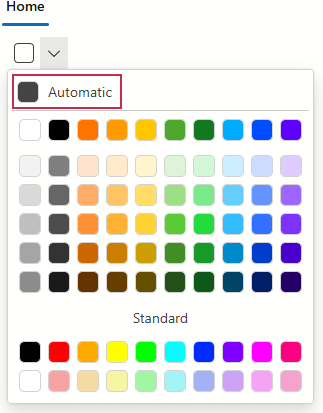
When the AutomaticColor property is specified, the Ribbon’s color palette displays an additional section at the top with a color swatch. This swatch is commonly referred to as the automatic color. The value of AutomaticColor determines the automatic swatch’s color.
Use the AutomaticColorCaption property to specify the label shown alongside the automatic color swatch.
<DxRibbon>
    <DxRibbonTab Text="Home">
        <DxRibbonGroup Text="Style">
            <DxRibbonColorPaletteItem @bind-Value="SelectedColor"
                                      AutomaticColor="#444444"
                                      AutomaticColorCaption="Automatic" />
        </DxRibbonGroup>
    </DxRibbonTab>
</DxRibbon>

@code {
    string SelectedColor = "";
}
Note
The automatic color swatch and its label will not be displayed if the AutomaticColor property is missing.
Multiple Color Groups
Populate the Groups property with DxRibbonColorGroup objects to add predefined and custom color groups to the palette.
...
<DxRibbonColorPaletteItem @bind-Value="CurrentColor">
    <Groups>
        <DxRibbonColorGroup Header="Pastel" Colors="@DxColorPalettePresets.GetPalette(ColorPalettePresetType.Pastel)" />
        <DxRibbonColorGroup Header="Aqua" Colors="@AquaColors" />
        <DxRibbonColorGroup Header="Pink" Colors="@PinkColors" />
    </Groups>
</DxRibbonColorPaletteItem>
...
@code {
    string CurrentColor = "";
    public List<string> AquaColors = new List<string> {
        "#184E77", "#1E6091", "#1A759F", "#1A759F", "#34A0A4", "#52B69A", "#76C893", "#99D98C", "#B5E48C", "#D9ED92"
    };
    public List<string> PinkColors = new List<string> {
        "#FF0A54", "#FF477E", "#FF5C8A", "#FF7096", "#FF85A1", "#FF99AC", "#FBB1BD", "#F9BEC7", "#F7CAD0", "#FAE0E4"
};
