TreeListFilterPanelDisplayMode Enum
Lists values that specify filter panel visibility.
Namespace: DevExpress.Blazor
Assembly: DevExpress.Blazor.Grid.v26.1.dll
NuGet Package: DevExpress.Blazor
Declaration
public enum TreeListFilterPanelDisplayModeMembers
| Name | Description |
|---|---|
Never
|
The filter panel is hidden. |
Always
|
The filter panel is always visible. |
Auto
|
The filter panel appears when data is filtered (otherwise, the panel is hidden). |
Related API Members
The following properties accept/return TreeListFilterPanelDisplayMode values:
Remarks
The TreeList component ships with an integrated filter panel, which includes the following elements:
- The filter toggle that allows users to temporarily deactivate the filter.
- The current filter condition. Users can click it to open the filter builder dialog and customize the filter.
- The Clear Filter button.
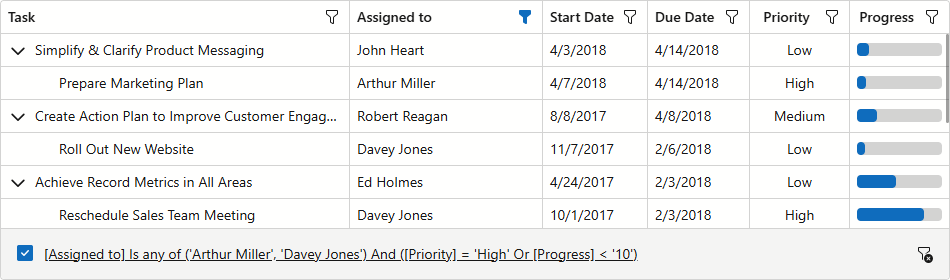
Assign Auto to FilterPanelDisplayMode to display the filter panel only when TreeList data is filtered. The panel remains visible after the filter is temporarily deactivated (disappears only after the filter is cleared).
To always display the filter panel, set the FilterPanelDisplayMode property to Always:
@inject EmployeeTaskService EmployeeTaskService

<DxTreeList Data="TreeListData" KeyFieldName="Id" ParentKeyFieldName="ParentId"
            FilterMenuButtonDisplayMode="TreeListFilterMenuButtonDisplayMode.Always"
            FilterPanelDisplayMode="TreeListFilterPanelDisplayMode.Always">
    <Columns>
        <DxTreeListDataColumn FieldName="Name" Caption="Task" />
        <DxTreeListDataColumn FieldName="EmployeeName" />
        <DxTreeListDataColumn FieldName="StartDate" />
        <DxTreeListDataColumn FieldName="DueDate" />
    </Columns>
</DxTreeList>

@code {
    List<EmployeeTask> TreeListData { get; set; }

    protected override void OnInitialized() {
        TreeListData = EmployeeTaskService.GenerateData();
    }
}