TreeListVirtualScrollingMode Enum
Lists virtual scrolling modes for the TreeList component.
Namespace: DevExpress.Blazor
Assembly: DevExpress.Blazor.Grid.v26.1.dll
NuGet Package: DevExpress.Blazor
Declaration
public enum TreeListVirtualScrollingModeMembers
| Name | Description |
|---|---|
Rows
|
Only rows are virtualized. |
Columns
|
Only columns are virtualized. |
RowsAndColumns
|
Rows and columns are virtualized. |
Related API Members
The following properties accept/return TreeListVirtualScrollingMode values:
Remarks
Column/row virtualization allows you to optimize TreeList performance when working with large datasets. Set the VirtualScrollingEnabled property to true to activate virtual scrolling. Use the VirtualScrollingMode property to specify whether to virtualize rows, columns, or both.
Note
The VirtualScrollingMode property is ignored when the VirtualScrollingEnabled property is set to false (default).
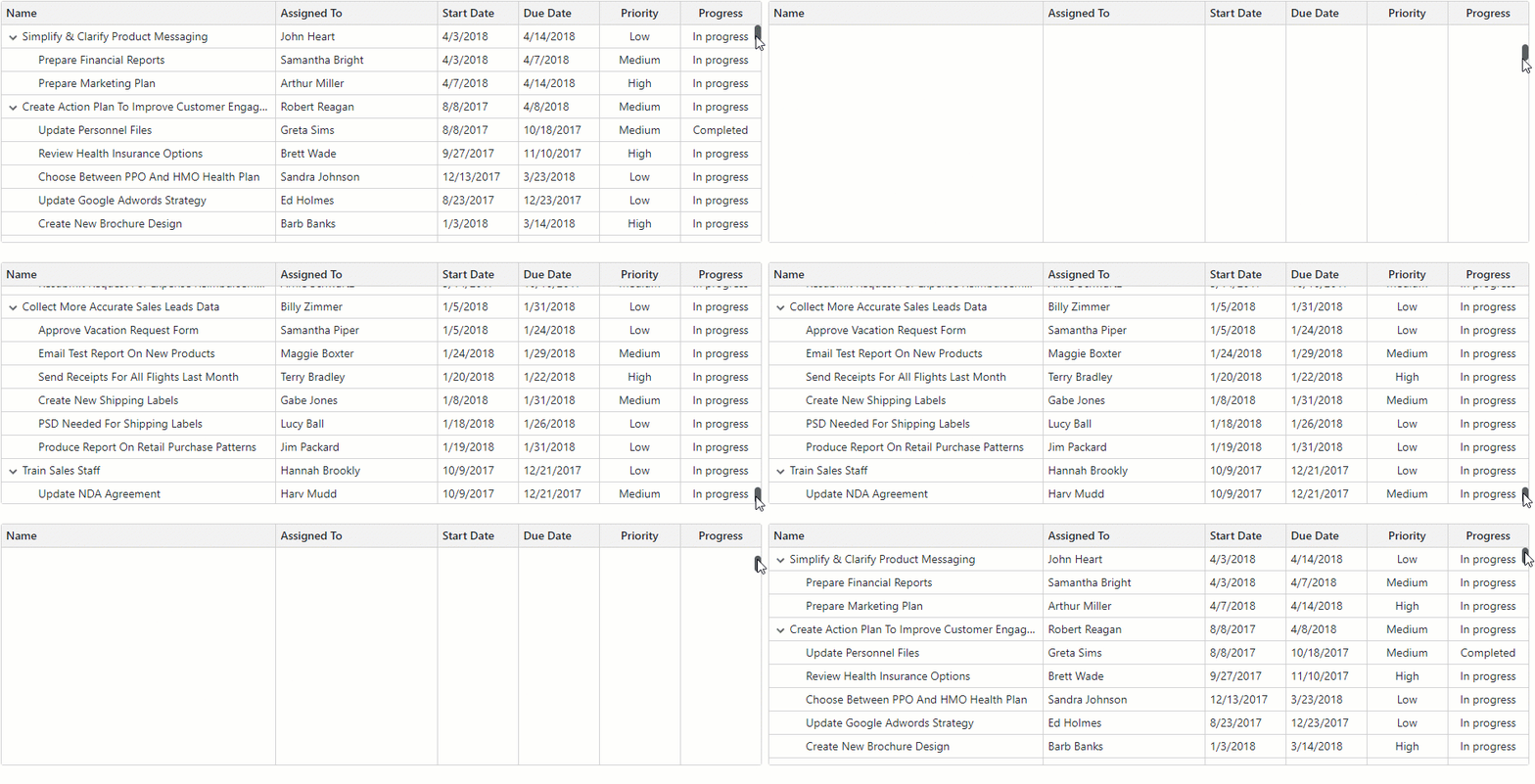
Row Virtualization (Vertical)
The TreeList virtualizes only rows when the VirtualScrollingMode is set to Rows (default). Switch to the RowsAndColumns mode to activate both vertical and horizontal virtualization.
When virtualized vertically, the TreeList renders all rows that are in the viewport and several rows above and below that viewport. The additional row count depends on the bound data source and TreeList layout.
Specifics and Limitations
Note the following specifics and limitations when using row virtualization:
- TreeList Height
- For optimal performance, define a CSS constraint for TreeList height. Without it, the TreeList automatically adjusts its height (up to a maximum of 10,000 pixels) to fit all rows.
- Paging
- The PageSize property has no effect and all data rows are on one page. The TreeList hides the pager and displays the vertical scrollbar that allows users to navigate through data.
- Row Height
- To optimize scrolling performance, you can set the TreeList’s TextWrapEnabled property to
false. This option disables word wrap in TreeList cells and ensures all rows have the same height. Identical row height allows faster layout calculation. - Select All Checkbox
- Vertical virtual scrolling mode affects Select All checkbox appearance and behavior. Refer to the following topic for additional information: SelectAllCheckboxMode.
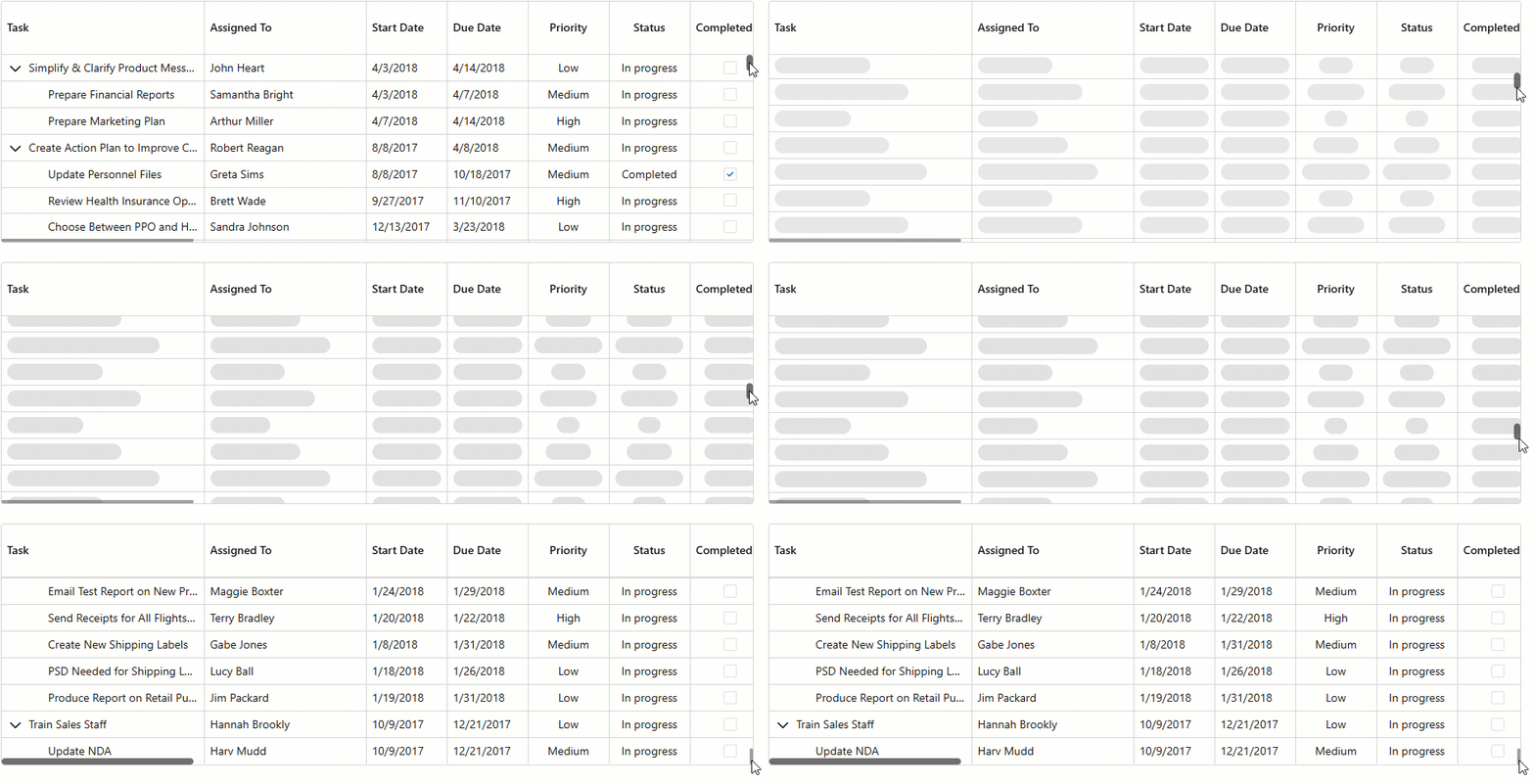
- Skeleton Rows
- The TreeList component renders skeleton rows when it retrieves data from a remote data source. When the component retrieves data from an in-memory data source, skeletons are disabled (since response times are shorter). Use the SkeletonRowsEnabled property to alter skeleton behavior.
Column Virtualization (Horizontal)
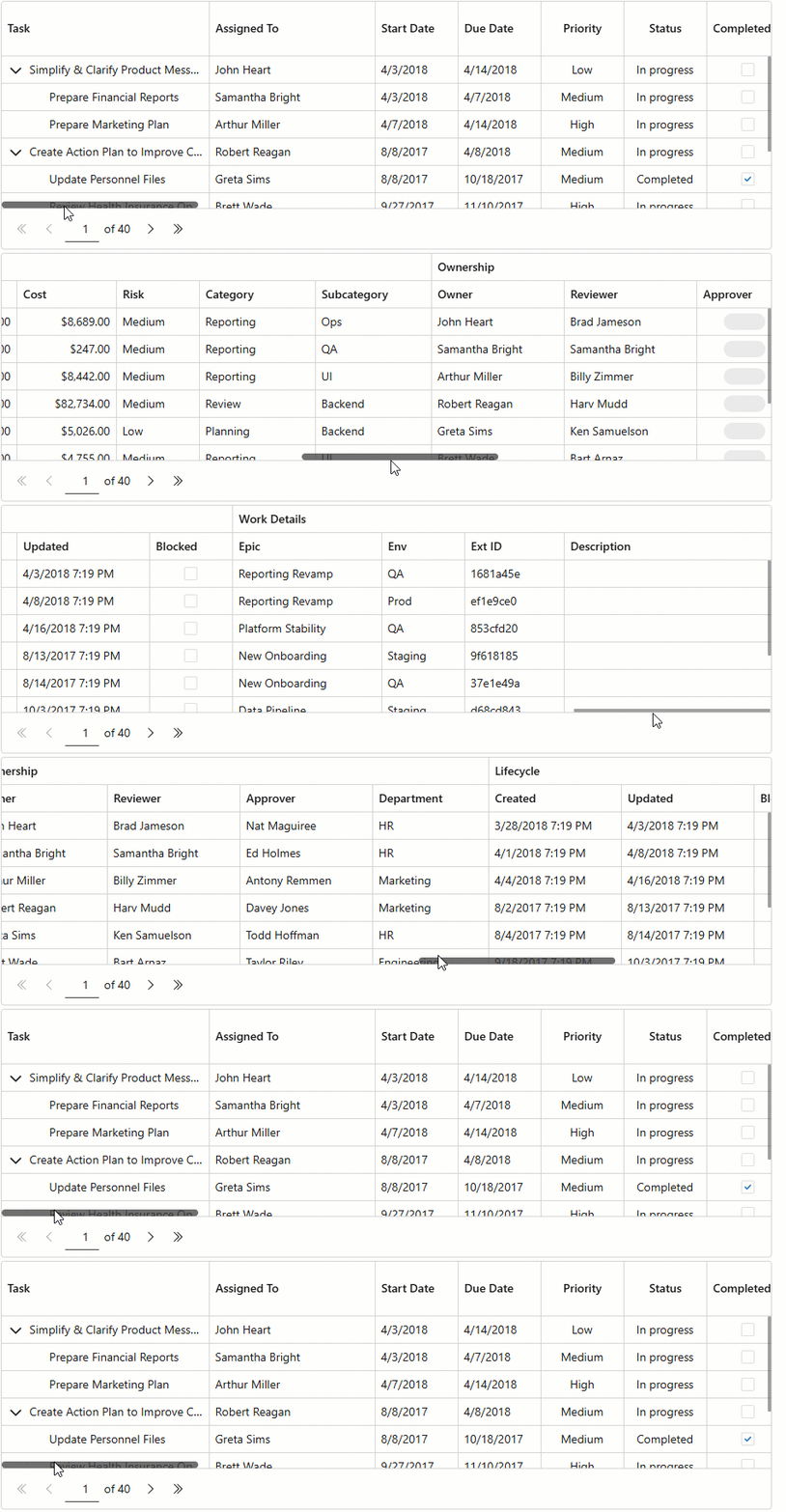
Set the VirtualScrollingMode to Columns to virtualize only TreeList columns. Switch to the RowsAndColumns mode to activate both horizontal and vertical virtualization.
When virtualized horizontally, the TreeList renders only columns that are in the viewport and dynamically renders additional cells as users scroll right or left.
Specifics and Limitations
Note the following specifics and limitations when using column virtualization:
- Auto Fit
- The AutoFitColumnWidths() method has no effect. The Auto Fit All Columns context menu command is disabled.
- Fixed Columns
- Specify a column’s FixedPosition property to freeze (anchor) the column and keep it visible on screen while a user scrolls content horizontally.
- Header Rendering
- To additionally improve performance, the TreeList component does not render column filter menus and sort glyphs for virtualized data columns. Use the following template context properties to display a specific caption when a column is virtualized:
- Max Allowed Column Count
- A TreeList containing more than 1,000 columns cannot be virtualized horizontally due to CSS limitations.
- Skeleton Columns
- The TreeList component renders skeleton columns when it retrieves data from a remote data source. When the component retrieves data from an in-memory data source, skeletons are disabled (since response times are shorter). Use the SkeletonRowsEnabled property to alter skeleton behavior.
- Keyboard Navigation
- When you navigate TreeList cells horizontally using the keyboard, row height may change based on cell content size. To ensure all cells have the same height, set the TreeList’s TextWrapEnabled property to
falseor set a fixed row height using the CustomizeElement event.
Example
The following example activates virtualization for both rows and columns:
@inject IEmployeeTaskDataProvider EmployeeTaskDataProvider
<DxTreeList Data="Data"
            KeyFieldName="Id"
            ParentKeyFieldName="ParentId"
            VirtualScrollingEnabled="true"
            VirtualScrollingMode="TreeListVirtualScrollingMode.RowsAndColumns"
            SkeletonRowsEnabled="true"
            TextWrapEnabled="false"
            CssClass="my-treelist"
            AutoExpandAllNodes="true">
    <Columns>
        <DxTreeListDataColumn FieldName="Name" Caption="Task" Width="250px" />
        <DxTreeListDataColumn FieldName="EmployeeName" Caption="Assigned To" Width="200px"/>
        <DxTreeListDataColumn FieldName="StartDate" Width="100px"/>
        <DxTreeListDataColumn FieldName="DueDate" Width="100px"/>
        <DxTreeListDataColumn FieldName="Priority" Width="100px">
            <CellDisplayTemplate>
                @{
                  var displayText = EmployeeTask.EmployeeTaskPriorityToString((EmployeeTask)context.DataItem);
                }
                <span title="@displayText priority">@displayText</span>
            </CellDisplayTemplate>
        </DxTreeListDataColumn>
        <DxTreeListDataColumn Caption="Status" FieldName="Status" Width="100px">
            <CellDisplayTemplate>
                <span>@EmployeeTask.EmployeeTaskStatusToString((EmployeeTask)context.DataItem)</span>
            </CellDisplayTemplate>
        </DxTreeListDataColumn>
        <DxTreeListDataColumn FieldName="IsCompleted" Caption="Completed" Width="100px" />
        <DxTreeListBandColumn Caption="Planning">
            <Columns>
                <DxTreeListDataColumn FieldName="EstimatedHours" Caption="Est. Hours" Width="120px" />
                <DxTreeListDataColumn FieldName="ActualHours" Caption="Actual Hours" Width="120px" />
                <DxTreeListDataColumn FieldName="Progress" DisplayFormat="p0" Width="120px" />
                <DxTreeListDataColumn FieldName="Budget" DisplayFormat="c" Width="120px" />
                <DxTreeListDataColumn FieldName="Cost" DisplayFormat="c" Width="120px" />
                <DxTreeListDataColumn FieldName="RiskLevel" Caption="Risk" Width="100px" />
                <DxTreeListDataColumn FieldName="Category" Caption="Category" Width="140px" />
                <DxTreeListDataColumn FieldName="SubCategory" Caption="Subcategory" Width="140px" />
            </Columns>
        </DxTreeListBandColumn>
        <DxTreeListBandColumn Caption="Ownership">
            <Columns>
                <DxTreeListDataColumn FieldName="Owner" Width="160px" />
                <DxTreeListDataColumn FieldName="Reviewer" Width="160px" />
                <DxTreeListDataColumn FieldName="Approver" Width="160px" />
                <DxTreeListDataColumn FieldName="Department" Width="140px" />
            </Columns>
        </DxTreeListBandColumn>
        <DxTreeListBandColumn Caption="Lifecycle">
            <Columns>
                <DxTreeListDataColumn FieldName="CreatedAt" Caption="Created" Width="160px" />
                <DxTreeListDataColumn FieldName="UpdatedAt" Caption="Updated" Width="160px" />
                <DxTreeListDataColumn FieldName="IsBlocked" Caption="Blocked" Width="100px" />
            </Columns>
        </DxTreeListBandColumn>
        <DxTreeListBandColumn Caption="Work Details">
            <Columns>
                <DxTreeListDataColumn FieldName="Epic" Width="180px" />
                <DxTreeListDataColumn FieldName="Environment" Caption="Env" Width="100px" />
                <DxTreeListDataColumn FieldName="ExternalId" Caption="Ext ID" Width="120px" />
                <DxTreeListDataColumn FieldName="Description" Width="250px" />
            </Columns>
        </DxTreeListBandColumn>
    </Columns>
</DxTreeList>

@code {
    ITreeList TreeList { get; set; }
    object Data { get; set; }

    protected override void OnInitialized () {
        Data = EmployeeTaskDataProvider.GenerateExtendedData();
    }
}