TreeListUnboundColumnType Enum
Lists values that specify unbound column data types.
Namespace: DevExpress.Blazor
Assembly: DevExpress.Blazor.Grid.v26.1.dll
NuGet Package: DevExpress.Blazor
Declaration
public enum TreeListUnboundColumnTypeMembers
| Name | Description |
|---|---|
Bound
|
The column is bound to a data field. This field specifies the column data type. |
Integer
|
The column contains Int32 values. |
Decimal
|
The column contains Decimal values. |
DateTime
|
The column contains DateTime values. |
String
|
The column contains String values. |
Boolean
|
The column contains Boolean values. |
Object
|
The column contains Object values. |
Related API Members
The following properties accept/return TreeListUnboundColumnType values:
Remarks
Unbound columns display values that are not stored in the assigned data collection. To create an unbound column, declare a DxTreeListDataColumn object in the Columns template and specify the following properties:
- UnboundType
- Indicates that the column is unbound and specifies its data type.
- FieldName
- Specifies a unique name that does not match field names in the bound data source.
Note
The TreeList does not support unbound columns when bound to a GridDevExtremeDataSource.
You can use one of the following APIs to populate unbound columns with data:
- UnboundExpression
- Specifies an expression used to calculate column values. An expression should use our Criteria Language Syntax and include field names, constants, operators, or functions. Unbound expression samples:
"[Quantity] * [UnitPrice] * (1 - [BonusAmount])""[FirstName] + ' ' + [LastName]""[Country] == 'USA'""[OrderDate] > #8/16/1994# AND [Quantity] > 20"
- UnboundColumnData
- Allows you to implement custom logic or obtain column values from a custom/external data source.
Example
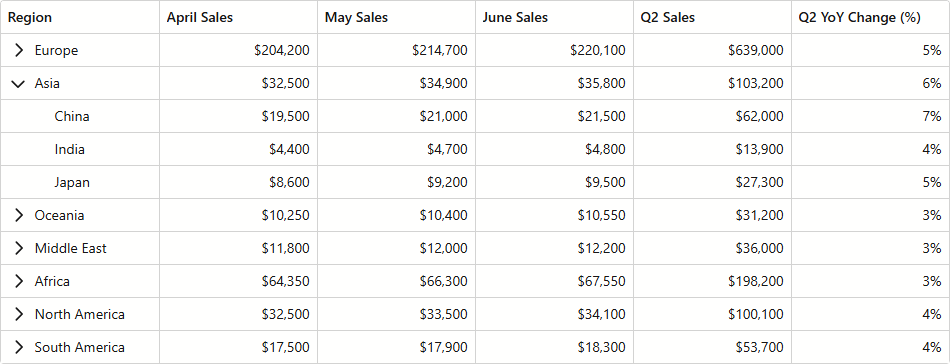
The following code snippet creates two unbound columns:
- Q2 Sales uses UnboundExpression to calculate cell values.
- Q2 YoY Change (%) uses a UnboundColumnData event handler to obtain column data.
@inject ISalesByRegionDataProvider SalesByRegionDataProvider

<DxTreeList Data="TreeListData"
            KeyFieldName="ID"
            ParentKeyFieldName="RegionID"
            ShowAllRows="true"
            ColumnResizeMode="TreeListColumnResizeMode.NextColumn"
            TextWrapEnabled="false"
            SizeMode="Params.SizeMode"
            CssClass="max-h-480"
            UnboundColumnData="TreeList_UnboundColumnData">
    <Columns>
        <DxTreeListDataColumn FieldName="Region" />
        <DxTreeListDataColumn FieldName="AprilSales" DisplayFormat="c0" />
        <DxTreeListDataColumn FieldName="MaySales" DisplayFormat="c0" />
        <DxTreeListDataColumn FieldName="JuneSales" DisplayFormat="c0" />
        <DxTreeListDataColumn FieldName="Q2Sales"
                              Caption="Q2 Sales"
                              DisplayFormat="c0"
                              UnboundType="TreeListUnboundColumnType.Decimal"
                              UnboundExpression="[AprilSales] + [MaySales] + [JuneSales]" />
        <DxTreeListDataColumn FieldName="Q2YoYChange"
                              Caption="Q2 YoY Change (%)"
                              DisplayFormat="p0"
                              UnboundType="TreeListUnboundColumnType.Decimal" />
    </Columns>
</DxTreeList>

@code {
    object TreeListData { get; set; }

    protected override void OnInitialized() {
        TreeListData = SalesByRegionDataProvider.GenerateData();
    }

    void TreeList_UnboundColumnData(TreeListUnboundColumnDataEventArgs e) {
        if(e.FieldName == "Q2YoYChange") {
            var sales = ((SalesByRegion) e.DataItem);
            var currentValue = (decimal)e.GetRowValue("Q2Sales");
            var prevValue = sales.MonthlySalesPrev[3] + sales.MonthlySalesPrev[4] + sales.MonthlySalesPrev[5];
            e.Value = (currentValue - prevValue) / currentValue;
        }
    }
}