DxTreeList.PagerSummaryVisible Property
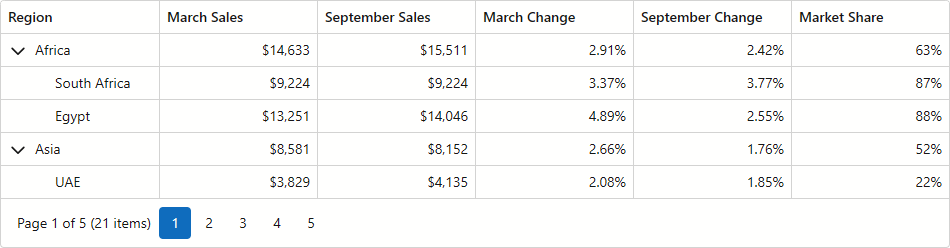
Specifies whether the pager displays a summary item.
Namespace: DevExpress.Blazor
Assembly: DevExpress.Blazor.Grid.v26.1.dll
NuGet Package: DevExpress.Blazor
Declaration
[DefaultValue(false)]
[Parameter]
public bool PagerSummaryVisible { get; set; }
Property Value
| Type | Default | Description |
|---|---|---|
| Boolean | false |
|
Remarks
Activate the PagerSummaryVisible property to add a summary item to the TreeList pager. The summary displays the current page number, page count, and data row count.
Note
When the TreeList is bound to the GridDevExtremeDataSource, GridCustomDataSource, or loads data on demand, it retrieves data in small portions instead of loading the entire dataset. In these cases, the pager summary may display the number of loaded rows instead of the total row count.
The following code snippet displays the pager summary in the TreeList component:
<DxTreeList Data="TreeListData"
            KeyFieldName="ID"
            ParentKeyFieldName="RegionID"
            PageSize="5"
            PagerSummaryVisible="true"
            AutoExpandAllNodes="true">
    <Columns>
        <DxTreeListDataColumn FieldName="Region" />
        <DxTreeListDataColumn FieldName="MarchSales" DisplayFormat="c0" />
        <DxTreeListDataColumn FieldName="SeptemberSales" DisplayFormat="c0" />
        <DxTreeListDataColumn FieldName="MarchChange" DisplayFormat="p2" />
        <DxTreeListDataColumn FieldName="SeptemberChange" DisplayFormat="p2" />
        <DxTreeListDataColumn FieldName="MarketShare" DisplayFormat="p0" />
    </Columns>
</DxTreeList>

@code {
    List<SalesByRegion>? TreeListData { get; set; }

    protected override void OnInitialized() {
        int id = 0;
        TreeListData = Regions
            .Select(region => new { region.Key, region.Value, RegionId = ++id })
            .SelectMany(region => new[] { GetSales(region.RegionId, 0, region.Key) }
                .Concat(region.Value.Select(country => GetSales(++id, region.RegionId, country))))
            .ToList();
    }

    SalesByRegion GetSales(int id, int regionId, string region) {
        decimal march = Random.Shared.Next(2000, 30000);
        decimal september = march * Random.Shared.Next(90, 110) / 100;
        return new SalesByRegion {
            ID = id,
            RegionID = regionId,
            Region = region,
            MarchSales = march,
            SeptemberSales = september,
            MarchChange = Random.Shared.Next(100, 500) / 10000m,
            SeptemberChange = Random.Shared.Next(100, 500) / 10000m,
            MarketShare = Random.Shared.Next(10, 95) / 100.0
        };
    }

    class SalesByRegion {
        public int ID { get; set; }
        public int RegionID { get; set; }
        public required string Region { get; set; }
        public decimal MarchSales { get; set; }
        public decimal SeptemberSales { get; set; }
        public decimal MarchChange { get; set; }
        public decimal SeptemberChange { get; set; }
        public double MarketShare { get; set; }
    }

    static readonly Dictionary<string, string[]> Regions = new() {
        ["Africa"] = ["South Africa", "Egypt"],
        ["Asia"] = ["UAE", "Japan", "India"],
        ["Australia"] = ["Australia"],
        ["Europe"] = ["United Kingdom", "Germany", "Spain"],
        ["North America"] = ["USA", "Canada", "Mexico"],
        ["South America"] = ["Brazil", "Argentina", "Chile"]
    };
}