DxTreeList.ExportToPdfAsync(Stream, TreeListPdfExportOptions) Method
Exports TreeList data in PDF format to a stream.
Namespace: DevExpress.Blazor
Assembly: DevExpress.Blazor.Grid.v26.1.dll
NuGet Package: DevExpress.Blazor
Declaration
public Task ExportToPdfAsync(
    Stream stream,
    TreeListPdfExportOptions options = null
)
Parameters
| Name | Type | Description |
|---|---|---|
| stream | Stream | The target stream for TreeList data export. |
Optional Parameters
| Name | Type | Default | Description |
|---|---|---|---|
| options | TreeListPdfExportOptions | null | PDF export options. |
Returns
| Type | Description |
|---|---|
| Task | The task that is completed when the file is exported. |
Remarks
Call the ExportToPdfAsync method to export TreeList data to PDF. Method overloads allow you to write the result to a stream (the current overload) or to a file downloaded onto a client machine (ExportToPdfAsync(String, TreeListPdfExportOptions)).
The method accepts a TreeListPdfExportOptions object as a parameter. Use this parameter to configure export settings.
Example
The following example exports selected rows to PDF and customizes the output document’s appearance:
@rendermode InteractiveServer
@using DevExpress.Drawing
@inject SpaceObjectDataProvider SpaceObjectDataProvider

<DxTreeList @ref="TreeList" Data="TreeListData" ChildrenFieldName="Satellites">
    <Columns>
        <DxTreeListSelectionColumn Width="60px" AllowSelectAll="true" />
        <DxTreeListDataColumn FieldName="Name" />
        <DxTreeListDataColumn FieldName="TypeOfObject" Caption="Type" />
        <DxTreeListDataColumn FieldName="Mass10pow21kg" Caption="Mass, kg" DisplayFormat="N2" />
        <DxTreeListDataColumn FieldName="MeanRadiusInKM" Caption="Radius, km" DisplayFormat="N2"/>
    </Columns>
    <ToolbarTemplate>
        <DxToolbar>
            <DxToolbarItem Text="Export to PDF" Click="ExportPdf_Click" BeginGroup="true" />
        </DxToolbar>
    </ToolbarTemplate>
</DxTreeList>

@code {
    ITreeList TreeList { get; set; }
    object TreeListData { get; set; }
    DXFont defaultFont = new DXFont("Times New Roman", 12, DXFontStyle.Regular);

    protected override async Task OnInitializedAsync() {
        TreeListData = SpaceObjectDataProvider.GenerateData();
    }
    async Task ExportPdf_Click() {
        var myStream = new System.IO.MemoryStream();
        await TreeList.ExportToPdfAsync(myStream, new TreeListPdfExportOptions() {
            ExportSelectedRowsOnly = true, // Exports only selected rows
            CustomizeCell = OnCustomizeCell, // Customizes table cell appearance
            CustomizeDocument = OnCustomizeDocument, // Customizes overall document appearance
            CustomizeDocumentHeader = OnCustomizeDocumentHeader, // Adds and customizes a document header
        });
        // Process myStream here
    }
    void OnCustomizeDocument(TreeListDocumentExportCustomizeDocumentEventArgs args) {
        // Sets default font settings for all elements
        args.DefaultElementStyle.Font = new DXFont("Times New Roman", 12, DXFontStyle.Regular);
        // Switches the page orientation to landscape
        args.Landscape = true;
    }
    void OnCustomizeCell(TreeListDocumentExportCustomizeCellEventArgs args) {
        // Sets border settings for all table cells
        args.ElementStyle.BorderColor = System.Drawing.Color.DarkGray;
        args.ElementStyle.BorderDashStyle = DevExpress.XtraPrinting.BorderDashStyle.Dash;
        // Sets style settings for header cells
        if (args.AreaType == DocumentExportAreaType.Header) {
            args.ElementStyle.BackColor = System.Drawing.Color.LightGray;
            args.ElementStyle.TextAlignment = DevExpress.XtraPrinting.TextAlignment.MiddleCenter;
            args.ElementStyle.Font = new DXFont("Arial", 12, DXFontStyle.Bold);
        }
        args.Handled = true;
    }
    void OnCustomizeDocumentHeader(TreeListDocumentExportCustomizeDocumentHeaderFooterEventArgs args) {
        // Adds a document header
        args.Text = "Space Objects";
        // Sets header style settings
        args.ElementStyle.Font = new DXFont("Arial", 12, DXFontStyle.Regular);
        args.ElementStyle.TextAlignment = DevExpress.XtraPrinting.TextAlignment.MiddleCenter;
    }
}
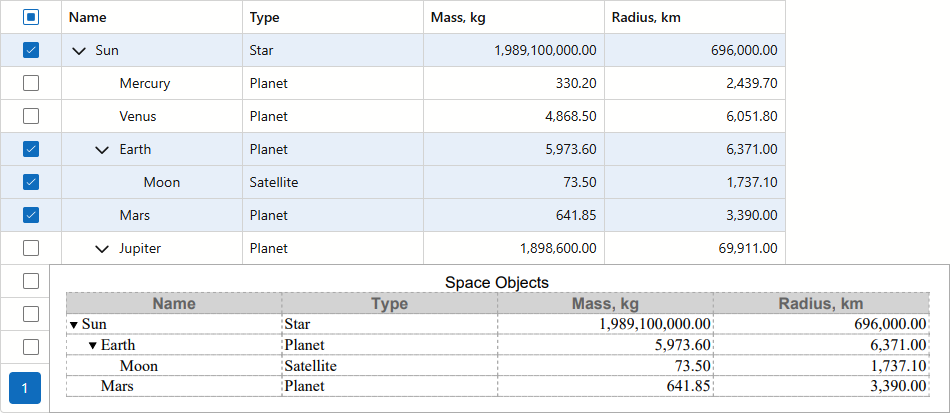
Prerequisites
- Blazor WebAssembly Apps
- PDF export in WebAssembly applications has the following prerequisites:
- DevExpress.Drawing.Skia NuGet package.
- SkiaSharp.NativeAssets.WebAssembly NuGet package.
- HarfBuzzSharp.NativeAssets.WebAssembly NuGet package.
- WebAssembly build tools:
- If the target framework matches the latest installed .NET SDK, use
wasm-tools. - If the target framework precedes the latest installed .NET SDK, use
wasm-tools-netX(where X is the framework’s major version).
- If the target framework matches the latest installed .NET SDK, use
- Blazor Server Apps
For non-Windows environments (Linux, macOS, and Azure/AWS cloud platforms), install the DevExpress.Drawing.Skia NuGet package.
On Linux, you must also install the following font libraries:
sudo apt-get install -y libc6 libicu-dev libfontconfig1
Limitations and Specifics
- Template content is not exported.
- CSS classes applied to the TreeList and its elements do not affect the exported document’s appearance. Handle the CustomizeCell event to customize the output table.
- The TreeList does not export columns whose Visible property is set to
false. Handle the CustomizeColumn event to add hidden columns to the output file. - The TreeList exports all data rows that match the current filter criteria (including children of collapsed nodes). Handle the RowExporting event to exclude specific rows from export.
- In on-demand data loading mode, an export operation forces the component to load all data.
- When the TreeList is bound to a GridDevExtremeDataSource, you must specify the KeyFieldName property to export only selected rows.