DxTreeList.LoadLayout(TreeListPersistentLayout) Method
Restores the TreeList layout.
Namespace: DevExpress.Blazor
Assembly: DevExpress.Blazor.Grid.v26.1.dll
NuGet Package: DevExpress.Blazor
Declaration
public void LoadLayout(
    TreeListPersistentLayout layout
)
Parameters
| Name | Type | Description |
|---|---|---|
| layout | TreeListPersistentLayout | The layout to be applied. |
Remarks
The TreeList allows you to save and restore the component’s layout when necessary. You can use SaveLayout() and LoadLayout(TreeListPersistentLayout) methods for this purpose. The saved layout object includes the current page, page size, column sort order/direction, column position, and filter values. Information about row expanded states is not saved.
Use the LoadLayout method to restore the grid’s layout on demand. To restore the layout when the component is initialized, handle the LayoutAutoLoading event.
You can obtain an object that stores the TreeList layout in one of the following ways:
- Use the LayoutAutoSaving event’s Layout argument.
- Use the object returned by the SaveLayout() method.
- Create an object that stores the TreeList layout manually and use the Deserialize method to convert the object to the TreeListPersistentLayout type.
Note that when <DxTreeList> loads a layout, the component validates the layout object. If the column collection was modified, the TreeList component does not restore the column layout or column-related settings. The control only loads component-level settings, such as page size or active page index. You need to update the column collection manually.
Example
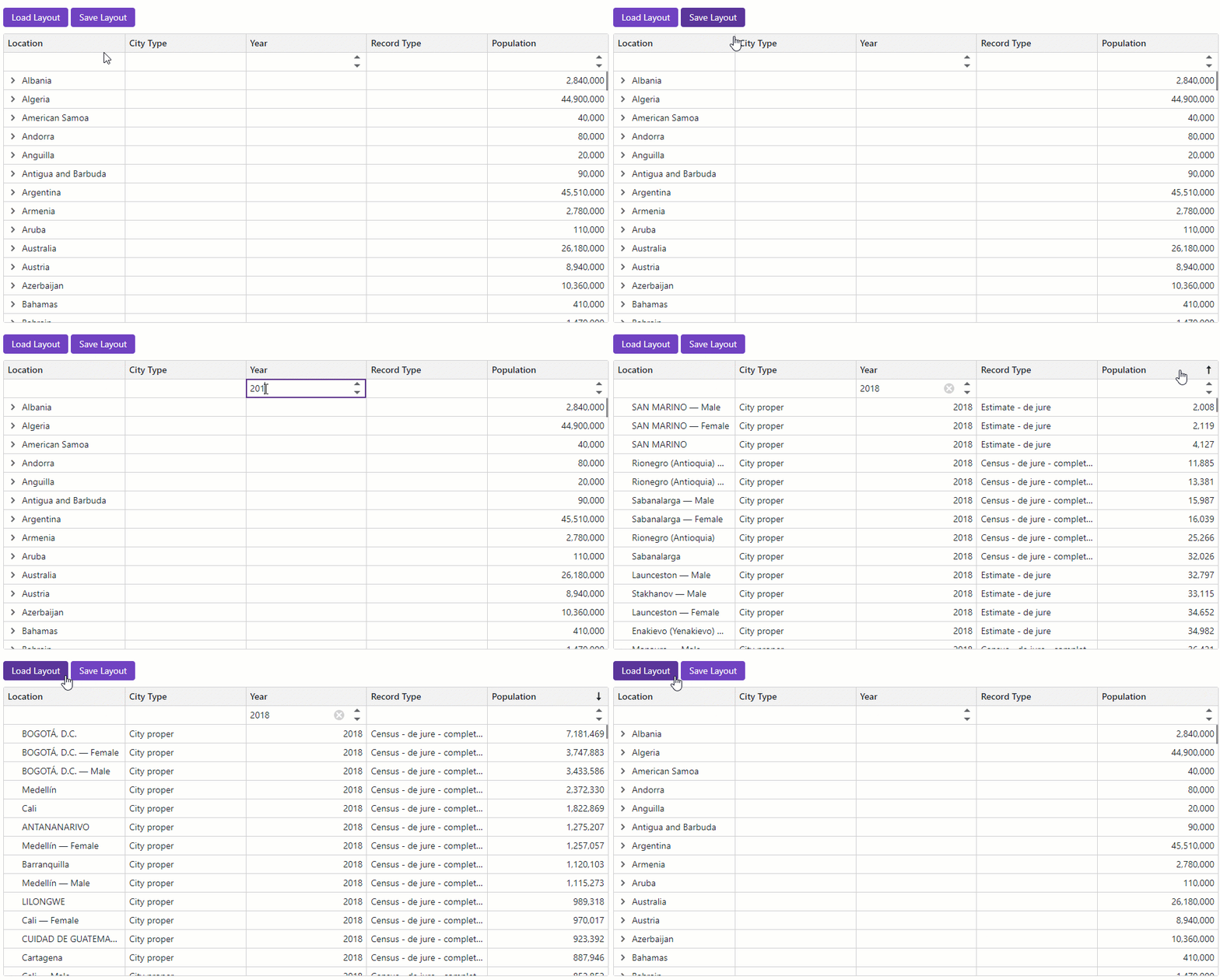
The following code snippet displays two buttons: Save Layout and Load Layout. When a user clicks Save Layout, the component saves the current TreeList layout to the Layout parameter. When the user clicks Load Layout, the component loads the most recently saved layout from the Layout parameter and applies it to the TreeList.
<DxTreeList @ref="TreeList"
Data="TreeListData"
ChildrenFieldName="Satellites"
ShowAllRows="true"
ShowFilterRow="true"
ColumnResizeMode="TreeListColumnResizeMode.NextColumn"
TextWrapEnabled="false"
AutoExpandAllNodes="true">
<Columns>
<DxTreeListDataColumn FieldName="Name" />
<DxTreeListDataColumn FieldName="TypeOfObject" Caption="Type" FilterRowOperatorType="TreeListFilterRowOperatorType.Equal">
<EditSettings>
<DxComboBoxSettings Data="TreeListRenderHelper.SpaceObjectTypes" SearchMode="@ListSearchMode.AutoSearch"
SearchFilterCondition="@ListSearchFilterCondition.Contains" />
</EditSettings>
</DxTreeListDataColumn>
<DxTreeListDataColumn FieldName="Mass10pow21kg" Caption="Mass, kg" DisplayFormat="N2">
<HeaderCaptionTemplate>Mass, 10<sup>21</sup> × kg</HeaderCaptionTemplate>
</DxTreeListDataColumn>
<DxTreeListDataColumn FieldName="MeanRadiusInKM" Caption="Radius, km" DisplayFormat="N2">
<HeaderCaptionTemplate>Radius, km</HeaderCaptionTemplate>
</DxTreeListDataColumn>
<DxTreeListDataColumn FieldName="Volume10pow9KM3" DisplayFormat="N2" Caption="Volume">
<HeaderCaptionTemplate>Volume, 10<sup>9</sup> × km<sup>3</sup></HeaderCaptionTemplate>
</DxTreeListDataColumn>
<DxTreeListDataColumn FieldName="SurfaceGravity" Caption="Gravity" DisplayFormat="N2">
<HeaderCaptionTemplate>Gravity, m/s<sup>2</sup></HeaderCaptionTemplate>
</DxTreeListDataColumn>
</Columns>
<ToolbarTemplate>
<DxToolbar ItemRenderStyleMode="ToolbarRenderStyleMode.Contained">
<Items>
<DxToolbarItem Text="Save Layout" Click="OnSaveClick" />
<DxToolbarItem Text="Load Layout" Click="OnLoadClick" />
</Items>
</DxToolbar>
</ToolbarTemplate>
</DxTreeList>
@code {
ITreeList TreeList { get; set; }
object TreeListData { get; set; }
TreeListPersistentLayout Layout { get; set; }
void OnSaveClick() {
Layout = TreeList.SaveLayout();
}
void OnLoadClick() {
TreeList.LoadLayout(Layout);
}
}