DxTreeList.ShowFilterBuilder() Method
Opens the filter builder dialog.
Namespace: DevExpress.Blazor
Assembly: DevExpress.Blazor.Grid.v26.1.dll
NuGet Package: DevExpress.Blazor
Declaration
public void ShowFilterBuilder()Remarks
The filter builder dialog is a centralized viewer/editor for TreeList component’s filter conditions. Users can edit and combine filter criteria applied to any number of columns, all within the same window.
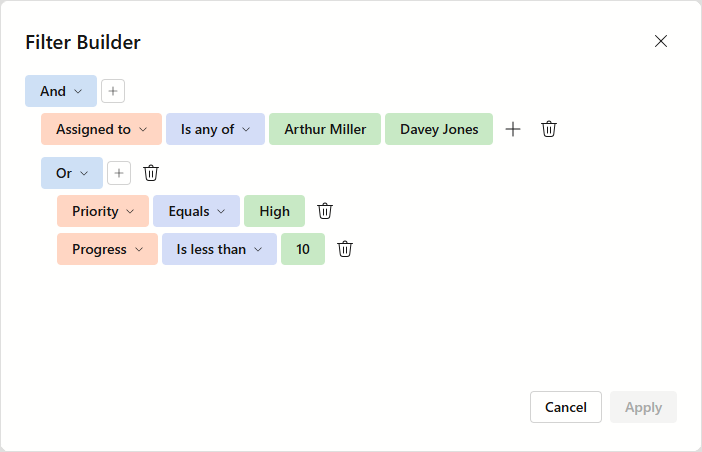
To open this dialog, users can click the current filter region in the filter panel. Call the ShowFilterBuilder method to open this dialog from code.
The following code snippet creates a toolbar button that opens the filter builder dialog:
@inject EmployeeTaskService EmployeeTaskService

<DxTreeList @ref="TreeList" Data="TreeListData" KeyFieldName="Id" ParentKeyFieldName="ParentId"
            FilterMenuButtonDisplayMode="TreeListFilterMenuButtonDisplayMode.Always"
            FilterPanelDisplayMode="TreeListFilterPanelDisplayMode.Always">
    <Columns>
        <DxTreeListDataColumn FieldName="Name" Caption="Task" />
        <DxTreeListDataColumn FieldName="EmployeeName" />
        <DxTreeListDataColumn FieldName="StartDate" />
        <DxTreeListDataColumn FieldName="DueDate" />
    </Columns>
    <ToolbarTemplate>
        <DxToolbar ItemRenderStyleMode="ToolbarRenderStyleMode.Contained">
            <Items>
                <DxToolbarItem Alignment="ToolbarItemAlignment.Right"
                               Text="Filter Builder" RenderStyle="ButtonRenderStyle.Secondary"
                               Click="() => TreeList.ShowFilterBuilder()"  />
            </Items>
        </DxToolbar>
    </ToolbarTemplate>
</DxTreeList>

@code {
    ITreeList TreeList { get; set; }
    List<EmployeeTask> TreeListData { get; set; }

    protected override void OnInitialized() {
        TreeListData = EmployeeTaskService.GenerateData();
    }
}
See Also