GridDocumentExportOptionsBase.ExportSelectedRowsOnly Property
Specifies whether the component exports only selected rows.
Namespace: DevExpress.Blazor
Assembly: DevExpress.Blazor.Grid.v26.1.dll
NuGet Package: DevExpress.Blazor
Declaration
[DefaultValue(false)]
public bool ExportSelectedRowsOnly { get; set; }
Property Value
| Type | Default | Description |
|---|---|---|
| Boolean | false |
|
Remarks
When exporting Grid or TreeList data to PDF, enable the ExportSelectedRowsOnly property to export selected rows only. To implement this behavior when the component is bound to a GridDevExtremeDataSource<T>, you must also specify the KeyFieldName property.
Grid Example
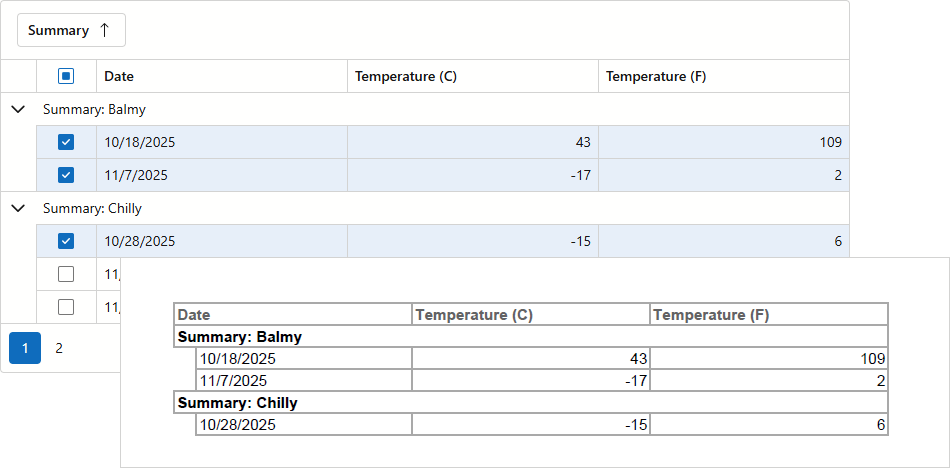
When ExportSelectedRowsOnly is enabled, the Grid component ignores group settings and exports records as flat data. Set SelectedRowsExportMode to KeepGrouping to preserve row hierarchy.
The following example exports selected records and corresponding group rows to PDF:
@rendermode InteractiveServer
@using DevExpress.Drawing;
@inject WeatherForecastService ForecastService

<DxGrid @ref="Grid" Data="@forecasts" ShowGroupPanel="true">
    <Columns>
        <DxGridSelectionColumn Width="60px" AllowSelectAll="true" />
        <DxGridDataColumn Caption="Date" FieldName="Date" />
        <DxGridDataColumn Caption="Temperature (C)" FieldName="TemperatureC" />
        <DxGridDataColumn Caption="Temperature (F)" FieldName="TemperatureF" />
        <DxGridDataColumn Caption="Summary" FieldName="Summary" GroupIndex="0" />
    </Columns>
    <ToolbarTemplate>
        <DxToolbar>
            <DxToolbarItem Text="Export to PDF" Click="ExportPdf_Click" BeginGroup="true" />
        </DxToolbar>
    </ToolbarTemplate>
</DxGrid>

@code {
    IGrid Grid;
    object forecasts;

    protected override async Task OnInitializedAsync() {
        forecasts = await ForecastService.GetForecastAsync();
    }
    async Task ExportPdf_Click() {
        await Grid.ExportToPdfAsync("ExportResult", new GridPdfExportOptions() {
            ExportSelectedRowsOnly = true,
            SelectedRowsExportMode = GridSelectedRowsExportMode.KeepGrouping
        });
    }
}
TreeList Example
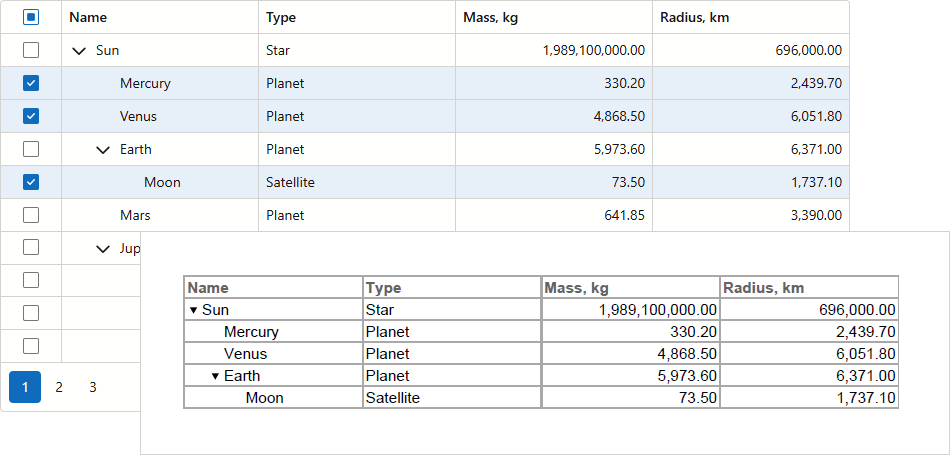
When ExportSelectedRowsOnly is enabled, the TreeList component ignores hierarchy and exports selected records as flat data. Set SelectedRowsExportMode to KeepHierarchy to export selected rows and their parents.
Note
When bound to a hierarchical data source, the TreeList component exports children of each selected row (even if children are unselected).
The following example exports selected rows and their parents to PDF:
@rendermode InteractiveServer
@using DevExpress.Drawing
@inject SpaceObjectDataProvider SpaceObjectDataProvider

<DxTreeList @ref="TreeList" Data="TreeListData" ChildrenFieldName="Satellites">
    <Columns>
        <DxTreeListSelectionColumn Width="60px" AllowSelectAll="true" />
        <DxTreeListDataColumn FieldName="Name" />
        <DxTreeListDataColumn FieldName="TypeOfObject" Caption="Type" />
        <DxTreeListDataColumn FieldName="Mass10pow21kg" Caption="Mass, kg" DisplayFormat="N2" />
        <DxTreeListDataColumn FieldName="MeanRadiusInKM" Caption="Radius, km" DisplayFormat="N2"/>
    </Columns>
    <ToolbarTemplate>
        <DxToolbar>
            <DxToolbarItem Text="Export to PDF" Click="ExportPdf_Click" BeginGroup="true" />
        </DxToolbar>
    </ToolbarTemplate>
</DxTreeList>

@code {
    ITreeList TreeList { get; set; }
    object TreeListData { get; set; }

    protected override async Task OnInitializedAsync() {
        TreeListData = SpaceObjectDataProvider.GenerateData();
    }
    async Task ExportPdf_Click() {
        await TreeList.ExportToPdfAsync("ExportResult", new TreeListPdfExportOptions() {
            ExportSelectedRowsOnly = true,
            SelectedRowsExportMode = TreeListSelectedRowsExportMode.KeepHierarchy
        });
    }
}