DxTreeList.SaveLayout() Method
Saves information about the TreeList layout.
Namespace: DevExpress.Blazor
Assembly: DevExpress.Blazor.Grid.v26.1.dll
NuGet Package: DevExpress.Blazor
Declaration
public TreeListPersistentLayout SaveLayout()Returns
| Type | Description |
|---|---|
| TreeListPersistentLayout | The current layout. |
Remarks
The TreeList allows you to save and restore the component’s layout when necessary. You can use SaveLayout() and LoadLayout(TreeListPersistentLayout) methods for this purpose. The saved layout object includes the current page, page size, column sort order/direction, column position, and filter values. Information about row expanded states is not saved.
Use the SaveLayout method to save the TreeList layout on demand. To respond to each layout change automatically, handle the LayoutAutoSaving event.
To restore the saved layout, pass an object returned by the SaveLayout method to any of the following members:
- The LayoutAutoLoading event’s Layout argument.
- The LoadLayout(TreeListPersistentLayout) method’s parameter.
Important
DevExpress components can incorrectly serialize custom enumeration values in criteria operators. Refer to the following troubleshooting topic for additional information: The XXX enumeration type is not registered for the parse operation…
Example
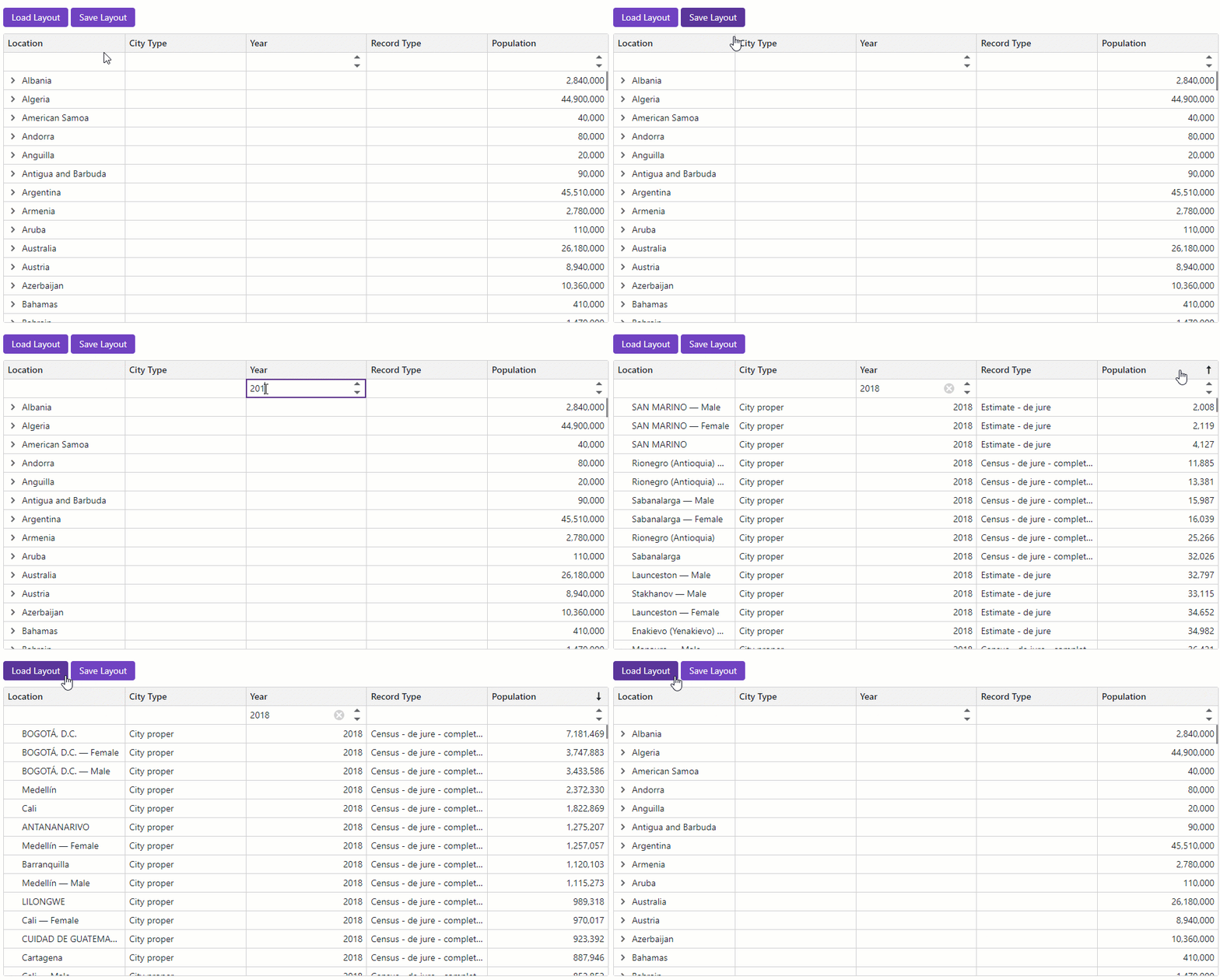
The following code snippet displays two buttons: Save Layout and Load Layout. When a user clicks Save Layout, the component saves the current TreeList layout to the Layout parameter. When the user clicks Load Layout, the component loads the most recently saved layout from the Layout parameter and applies it to the TreeList.
<DxTreeList @ref="TreeList"
Data="TreeListData"
ChildrenFieldName="Satellites"
ShowAllRows="true"
ShowFilterRow="true"
ColumnResizeMode="TreeListColumnResizeMode.NextColumn"
TextWrapEnabled="false"
AutoExpandAllNodes="true">
<Columns>
<DxTreeListDataColumn FieldName="Name" />
<DxTreeListDataColumn FieldName="TypeOfObject" Caption="Type" FilterRowOperatorType="TreeListFilterRowOperatorType.Equal">
<EditSettings>
<DxComboBoxSettings Data="TreeListRenderHelper.SpaceObjectTypes" SearchMode="@ListSearchMode.AutoSearch"
SearchFilterCondition="@ListSearchFilterCondition.Contains" />
</EditSettings>
</DxTreeListDataColumn>
<DxTreeListDataColumn FieldName="Mass10pow21kg" Caption="Mass, kg" DisplayFormat="N2">
<HeaderCaptionTemplate>Mass, 10<sup>21</sup> × kg</HeaderCaptionTemplate>
</DxTreeListDataColumn>
<DxTreeListDataColumn FieldName="MeanRadiusInKM" Caption="Radius, km" DisplayFormat="N2">
<HeaderCaptionTemplate>Radius, km</HeaderCaptionTemplate>
</DxTreeListDataColumn>
<DxTreeListDataColumn FieldName="Volume10pow9KM3" DisplayFormat="N2" Caption="Volume">
<HeaderCaptionTemplate>Volume, 10<sup>9</sup> × km<sup>3</sup></HeaderCaptionTemplate>
</DxTreeListDataColumn>
<DxTreeListDataColumn FieldName="SurfaceGravity" Caption="Gravity" DisplayFormat="N2">
<HeaderCaptionTemplate>Gravity, m/s<sup>2</sup></HeaderCaptionTemplate>
</DxTreeListDataColumn>
</Columns>
<ToolbarTemplate>
<DxToolbar ItemRenderStyleMode="ToolbarRenderStyleMode.Contained">
<Items>
<DxToolbarItem Text="Save Layout" Click="OnSaveClick" />
<DxToolbarItem Text="Load Layout" Click="OnLoadClick" />
</Items>
</DxToolbar>
</ToolbarTemplate>
</DxTreeList>
@code {
ITreeList TreeList { get; set; }
object TreeListData { get; set; }
TreeListPersistentLayout Layout { get; set; }
void OnSaveClick() {
Layout = TreeList.SaveLayout();
}
void OnLoadClick() {
TreeList.LoadLayout(Layout);
}
}