DxTreeListDataColumn.UnboundExpression Property
Specifies an expression used to calculate unbound column values.
Namespace: DevExpress.Blazor
Assembly: DevExpress.Blazor.Grid.v26.1.dll
NuGet Package: DevExpress.Blazor
Declaration
[DefaultValue(null)]
[Parameter]
public string UnboundExpression { get; set; }
Property Value
| Type | Default | Description |
|---|---|---|
| String | null | An expression. |
Remarks
Unbound columns display values that are not stored in the assigned data collection. To create an unbound column, declare a DxTreeListDataColumn object in the Columns template and specify the following properties:
- UnboundType
- Indicates that the column is unbound and specifies its data type.
- FieldName
- Specifies a unique name that does not match field names in the bound data source.
Note
The TreeList does not support unbound columns when bound to a GridDevExtremeDataSource.
You can use one of the following APIs to populate unbound columns with data:
UnboundExpression- Specifies an expression used to calculate column values. An expression should use our Criteria Language Syntax and include field names, constants, operators, or functions. Unbound expression samples:
"[Quantity] * [UnitPrice] * (1 - [BonusAmount])""[FirstName] + ' ' + [LastName]""[Country] == 'USA'""[OrderDate] > #8/16/1994# AND [Quantity] > 20"
- UnboundColumnData
- Allows you to implement custom logic or obtain column values from a custom/external data source.
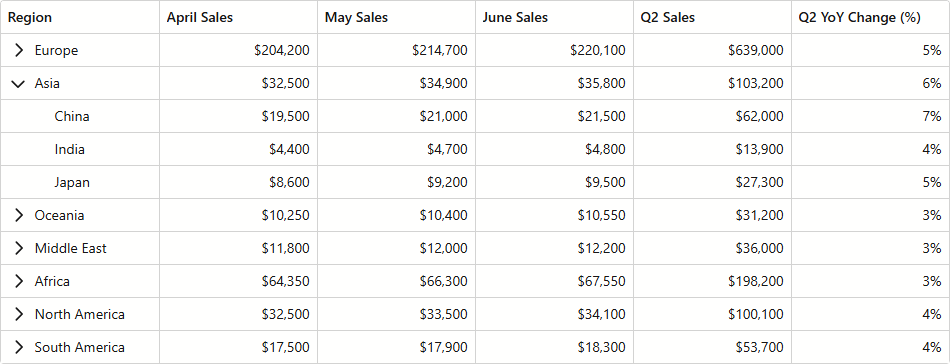
Create Unbound Columns Example
The following code snippet creates two unbound columns:
- Q2 Sales uses
UnboundExpressionto calculate cell values. - Q2 YoY Change (%) uses a UnboundColumnData event handler to obtain column data.
@inject ISalesByRegionDataProvider SalesByRegionDataProvider

<DxTreeList Data="TreeListData"
            KeyFieldName="ID"
            ParentKeyFieldName="RegionID"
            ShowAllRows="true"
            ColumnResizeMode="TreeListColumnResizeMode.NextColumn"
            TextWrapEnabled="false"
            SizeMode="Params.SizeMode"
            CssClass="max-h-480"
            UnboundColumnData="TreeList_UnboundColumnData">
    <Columns>
        <DxTreeListDataColumn FieldName="Region" />
        <DxTreeListDataColumn FieldName="AprilSales" DisplayFormat="c0" />
        <DxTreeListDataColumn FieldName="MaySales" DisplayFormat="c0" />
        <DxTreeListDataColumn FieldName="JuneSales" DisplayFormat="c0" />
        <DxTreeListDataColumn FieldName="Q2Sales"
                              Caption="Q2 Sales"
                              DisplayFormat="c0"
                              UnboundType="TreeListUnboundColumnType.Decimal"
                              UnboundExpression="[AprilSales] + [MaySales] + [JuneSales]" />
        <DxTreeListDataColumn FieldName="Q2YoYChange"
                              Caption="Q2 YoY Change (%)"
                              DisplayFormat="p0"
                              UnboundType="TreeListUnboundColumnType.Decimal" />
    </Columns>
</DxTreeList>

@code {
    object TreeListData { get; set; }

    protected override void OnInitialized() {
        TreeListData = SalesByRegionDataProvider.GenerateData();
    }

    void TreeList_UnboundColumnData(TreeListUnboundColumnDataEventArgs e) {
        if(e.FieldName == "Q2YoYChange") {
            var sales = ((SalesByRegion) e.DataItem);
            var currentValue = (decimal)e.GetRowValue("Q2Sales");
            var prevValue = sales.MonthlySalesPrev[3] + sales.MonthlySalesPrev[4] + sales.MonthlySalesPrev[5];
            e.Value = (currentValue - prevValue) / currentValue;
        }
    }
}
Export Unbound Expression as Formulas
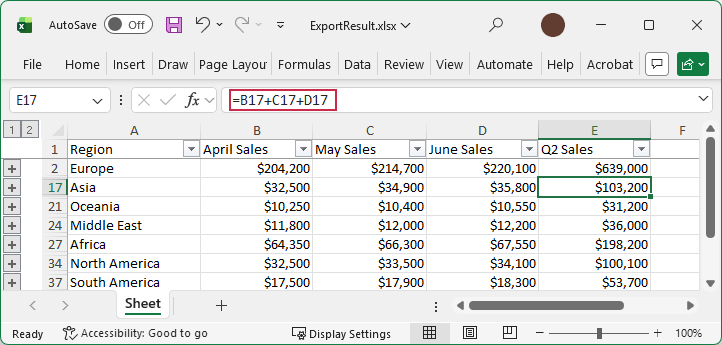
If unbound column values are calculated using the UnboundExpression property, the TreeList component can export column data as results (default mode) or as formulas. To export unbound values as formulas, set the ExportUnboundExpressionAsFunction option to true.
The following code snippet exports Q2 Sales column values as formulas:
@inject ISalesByRegionDataProvider SalesByRegionDataProvider

<DxButton Text="Export to XLSX" Click="ExportXlsx_Click" />
<DxTreeList Data="TreeListData"
            KeyFieldName="ID"
            ParentKeyFieldName="RegionID">
    <Columns>
        <DxTreeListDataColumn FieldName="Region" />
        <DxTreeListDataColumn FieldName="AprilSales" DisplayFormat="c0" />
        <DxTreeListDataColumn FieldName="MaySales" DisplayFormat="c0" />
        <DxTreeListDataColumn FieldName="JuneSales" DisplayFormat="c0" />
        <DxTreeListDataColumn FieldName="Q2Sales"
                              Caption="Q2 Sales"
                              DisplayFormat="c0"
                              UnboundType="TreeListUnboundColumnType.Decimal"
                              UnboundExpression="[AprilSales] + [MaySales] + [JuneSales]" />
    </Columns>
</DxTreeList>

@code {
    object TreeListData { get; set; }

    protected override void OnInitialized() {
        TreeListData = SalesByRegionDataProvider.GenerateData();
    }

    async Task ExportXlsx_Click() {
        await TreeList.ExportToXlsxAsync("ExportResult", new TreeListXlExportOptions() {
            ExportUnboundExpressionAsFunction = true,
        });
    }
}