GridCustomizeContextMenuEventArgs.Items Property
Contains context menu items.
Namespace: DevExpress.Blazor
Assembly: DevExpress.Blazor.v25.2.dll
Declaration
public IContextMenuItemCollection Items { get; }Property Value
| Type | Description |
|---|---|
| IContextMenuItemCollection | A context menu item collection. |
Remarks
The DevExpress Blazor Grid allows you to display context menus with predefined and custom commands. Use the ContextMenus property to activate context menus for specific Grid elements.
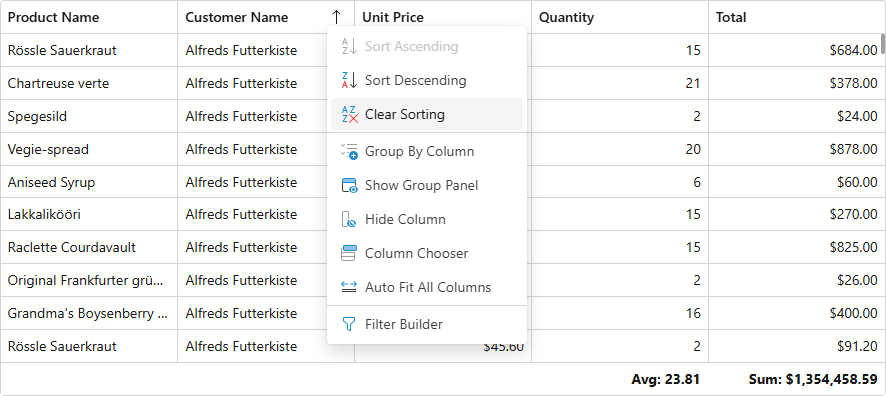
Handle the CustomizeContextMenu event to modify the menu item collection. The Items event argument stores commands to display in the context menu.
Built-in Commands
The initial Items collection depends on the menu type, Grid settings, and component state. For instance, a header context menu contains the SortColumnAscending command only if sorting is allowed (on both Grid and column levels). The ClearColumnSorting command is disabled if the target column is not sorted.
The table below lists context menu types and built-in commands available in the Grid:
 - The context menu includes this item by default.
 - You can add this item to the context menu.
 - The context menu does not support this item.
| Menu Item | Data Row | Footer | Group Footer | Group Panel | Group Row | Header |
|---|---|---|---|---|---|---|
| AutoFitAll | |
|
|
|
|
|
| ClearColumnSorting | |
|
|
|
|
|
| ClearGrouping | |
|
|
|
|
|
| CollapseAll | |
|
|
|
|
|
| ExpandAll | |
|
|
|
|
|
| GroupByColumn | |
|
|
|
|
|
| HideColumn | |
|
|
|
|
|
| HideGroupPanel | |
|
|
|
|
|
| ShowColumnChooser | |
|
|
|
|
|
| ShowFilterBuilder | |
|
|
|
|
|
| ShowGroupPanel | |
|
|
|
|
|
| SortColumnAscending | |
|
|
|
|
|
| SortColumnDescending | |
|
|
|
|
|
| UngroupColumn | |
|
|
|
|
|
Example
The following code snippet customizes commands available in the header context menu:
@inject WeatherForecastService ForecastService

<DxGrid Data="@Data" ContextMenus="GridContextMenus.Header" CustomizeContextMenu="CustomizeContextMenu">
    <Columns>
        <DxGridSelectionColumn />
        <DxGridDataColumn FieldName="Date" DisplayFormat="D" />
        <DxGridDataColumn FieldName="TemperatureC" Caption="@("Temp. (\x2103)")" Width="120px" />
        <DxGridDataColumn FieldName="TemperatureF" Caption="@("Temp. (\x2109)")" Width="120px" />
        <DxGridDataColumn FieldName="Forecast" />
        <DxGridDataColumn FieldName="CloudCover" />
    </Columns>
</DxGrid>

@code {
    object Data { get; set; }

    protected override void OnInitialized() {
        Data = ForecastService.GetForecast();
    }

    void CustomizeContextMenu(GridCustomizeContextMenuEventArgs args) {
        if (args.Context is GridHeaderCommandContext headerContext) {
            // Customizes context menu commands for the Date column header
            if (headerContext.Column is IGridDataColumn dataColumn && dataColumn.FieldName == "Date") {
                args.Items.Remove(GridContextMenuDefaultItemNames.GroupByColumn);
                args.Items.Remove(GridContextMenuDefaultItemNames.UngroupColumn);
            }
            // Customizes context menu commands for the selection column header
            if (headerContext.Column is IGridSelectionColumn selectionColumn) {
                var isFixed = selectionColumn.FixedPosition != GridColumnFixedPosition.None;
                string itemText = isFixed ? "Unfix Column" : "Fix Column to the Left";
                var newValue = isFixed ? GridColumnFixedPosition.None : GridColumnFixedPosition.Left;

                args.Items.AddCustomItem(itemText, () => {
                    headerContext.Grid.BeginUpdate();
                    headerContext.Column.FixedPosition = newValue;
                    headerContext.Grid.EndUpdate();
                });
            }
        }
    }
}