TreeListDataColumnCellDisplayTemplateContext.GetHighlightedText(String) Method
Accepts a plain text string and returns a formatted fragment with highlighted search matches. Available in v26.1.4+.
Namespace: DevExpress.Blazor
Assembly: DevExpress.Blazor.Grid.v26.1.dll
NuGet Package: DevExpress.Blazor
Declaration
public RenderFragment GetHighlightedText(
    string text
)
Parameters
| Name | Type | Description |
|---|---|---|
| text | String | The text where search matches are highlighted. |
Returns
| Type | Description |
|---|---|
| RenderFragment | A delegate that returns formatted text with search result highlights. |
Remarks
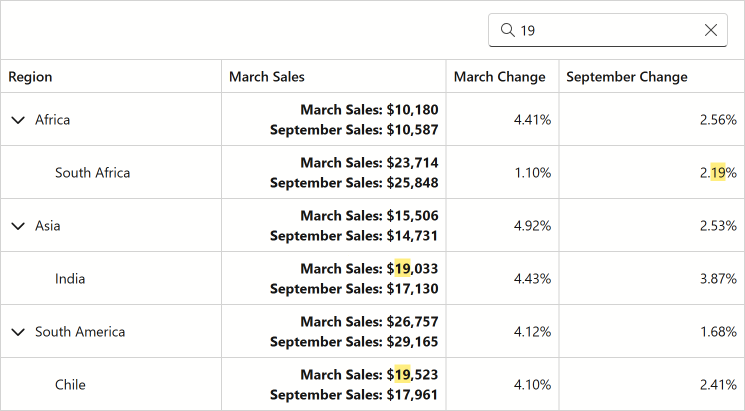
The GetHighlightedText method highlights text fragments based on the current search box content.
The following code snippet uses a cell template in the “MarchSales” column. The GetHighlightedText method formats template text to highlight search matches:
<DxTreeList Data="TreeListData"
            KeyFieldName="ID"
            ParentKeyFieldName="RegionID"
            ShowSearchBox="true">
    <Columns>
        <DxTreeListDataColumn FieldName="Region"/>
        <DxTreeListDataColumn FieldName="MarchSales" Name="Sales" DisplayFormat="c0">
            <CellDisplayTemplate Context="cellContext">
                @{
                    var items = (SalesByRegion)cellContext.DataItem;
                }
                <div>
                    <div><b>March Sales: @cellContext.GetHighlightedText(items.MarchSales.ToString("c0"))</b></div>
                    <div><b>September Sales: @cellContext.GetHighlightedText(items.SeptemberSales.ToString("c0"))</b></div>
                </div>
            </CellDisplayTemplate>
            </DxTreeListDataColumn>
        <DxTreeListDataColumn FieldName="MarchChange" DisplayFormat="p2" />
        <DxTreeListDataColumn FieldName="SeptemberChange" DisplayFormat="p2" />
    </Columns>
</DxTreeList>

@code {
    List<SalesByRegion>? TreeListData { get; set; }

    protected override void OnInitialized() {
        int id = 0;
        TreeListData = Regions
            .Select(region => new { region.Key, region.Value, RegionId = ++id })
            .SelectMany(region => new[] { GetSales(region.RegionId, 0, region.Key) }
                .Concat(region.Value.Select(country => GetSales(++id, region.RegionId, country))))
            .ToList();
    }

    SalesByRegion GetSales(int id, int regionId, string region) {
        decimal march = Random.Shared.Next(2000, 30000);
        decimal september = march * Random.Shared.Next(90, 110) / 100;
        return new SalesByRegion {
            ID = id,
            RegionID = regionId,
            Region = region,
            MarchSales = march,
            SeptemberSales = september,
            MarchChange = Random.Shared.Next(100, 500) / 10000m,
            SeptemberChange = Random.Shared.Next(100, 500) / 10000m,
            MarketShare = Random.Shared.Next(10, 95) / 100.0
        };
    }

    class SalesByRegion {
        public int ID { get; set; }
        public int RegionID { get; set; }
        public required string Region { get; set; }
        public decimal MarchSales { get; set; }
        public decimal SeptemberSales { get; set; }
        public decimal MarchChange { get; set; }
        public decimal SeptemberChange { get; set; }
        public double MarketShare { get; set; }
    }

    static readonly Dictionary<string, string[]> Regions = new() {
        ["Africa"] = ["South Africa", "Egypt"],
        ["Asia"] = ["UAE", "Japan", "India"],
        ["Australia"] = ["Australia"],
        ["Europe"] = ["United Kingdom", "Germany", "Spain"],
        ["North America"] = ["United States of America", "Canada", "Mexico"],
        ["South America"] = ["Brazil", "Argentina", "Chile"]
    };
}
For additional information about search in the TreeList component, refer to the following topic: Search Box in Blazor TreeList.