IDialogService.AlertAsync(MessageBoxOptions, RenderFragment) Method
Shows an alert dialog (message box).
Namespace: DevExpress.Blazor
Assembly: DevExpress.Blazor.v26.1.dll
NuGet Package: DevExpress.Blazor
Declaration
Task AlertAsync(
    MessageBoxOptions messageBoxOptions,
    RenderFragment childContent = null
)
Parameters
| Name | Type | Description |
|---|---|---|
| messageBoxOptions | MessageBoxOptions | An object that contains message box options. |
Optional Parameters
| Name | Type | Default | Description |
|---|---|---|---|
| childContent | RenderFragment | null | Custom content displayed in the message box body. |
Returns
| Type | Description |
|---|---|
| Task | The task that is completed when the dialog is closed. |
Remarks
Call the AlertAsync method to show a message box of the Alert type. Use the method parameter to set up message box settings.
<DxDialogProvider />
<DxButton Text="Show a message box window" Click="@OpenConfirmDialogAsync" />

@code {
    [Inject] IDialogService DialogService { get; set; }

    private async Task OpenConfirmDialogAsync() {
        await DialogService.AlertAsync(new MessageBoxOptions() {
            Title = "Error",
            Text = "Unable to process the request. Please try again later or contact support.",
            RenderStyle = MessageBoxRenderStyle.Danger
        });
    }
}

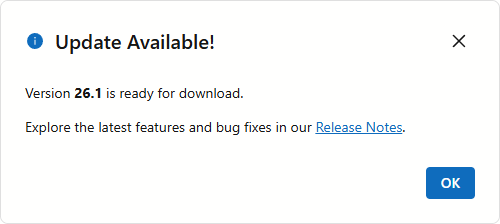
Display Custom Content
To display custom content in a message box created by the dialog service, pass a RenderFragment to the AlertAsync(MessageBoxOptions, RenderFragment) method.
<DxDialogProvider />
<DxButton Text="Check for Updates" Click="@OpenAlertDialogAsync" />

@code {
    [Inject] IDialogService DialogService { get; set; }
    private bool? Result { get; set; }

    private async Task OpenAlertDialogAsync() {
        await DialogService.AlertAsync(
            new MessageBoxOptions() {
                Title = "Update Available!"
            },
            @<div>
                <p>Version <b>26.1</b> is ready for download.</p>
                <p>
                    Explore the latest features and bug fixes in our
                    <a href = "https://www.devexpress.com/subscriptions/whats-new/">Release Notes</a>.
                </p>
            </div>
        );
    }
}
See Also