GridDataColumnCellDisplayTemplateContext.GetHighlightedText(String) Method
Accepts a plain text string and returns a formatted fragment with highlighted search matches. Available in v26.1.4+.
Namespace: DevExpress.Blazor
Assembly: DevExpress.Blazor.Grid.v26.1.dll
NuGet Package: DevExpress.Blazor
Declaration
public RenderFragment GetHighlightedText(
    string text
)
Parameters
| Name | Type | Description |
|---|---|---|
| text | String | The text where search matches are highlighted. |
Returns
| Type | Description |
|---|---|
| RenderFragment | A delegate that returns formatted text with highlighted search matches. |
Remarks
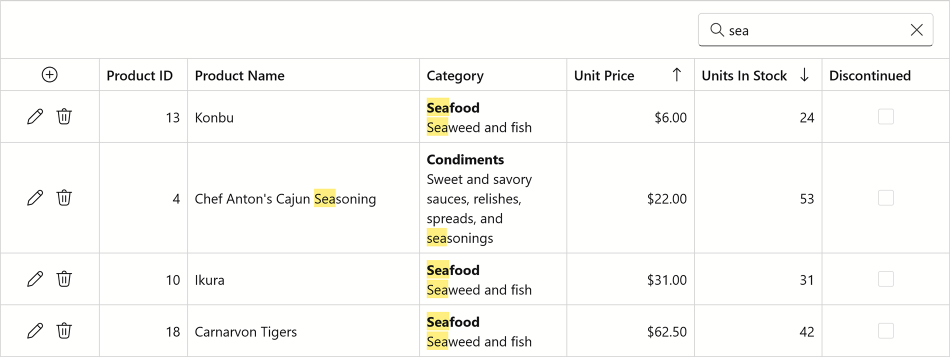
The GetHighlightedText method highlights text fragments based on the current search box content.
The following code snippet uses a cell template in the “Category” column. The GetHighlightedText method formats the template text to highlight search matches:
<DxGrid Data="@products"
        ShowSearchBox="true"
        @ref="grid">
    <Columns>
        <DxGridCommandColumn Width="100px" />
        <DxGridDataColumn FieldName="@nameof(Product.ProductID)" Width="90px" ReadOnly="true" />
        <DxGridDataColumn FieldName="@nameof(Product.ProductName)" MinWidth="200" Width="50%" />
        <DxGridDataColumn FieldName="@nameof(Product.CategoryID)" Caption="Category" MinWidth="150">
            <EditSettings>
                <DxComboBoxSettings Data="@categories"
                                    ValueFieldName="@nameof(Category.CategoryID)"
                                    TextFieldName="@nameof(Category.CategoryName)" />
            </EditSettings>
            <CellDisplayTemplate Context="cellContext">
                @{
                    var items = (Product)cellContext.DataItem;
                    var category = (Category)categories.FirstOrDefault(c => c.CategoryID == items.CategoryID);
                }
                <div>
                    <div><b>@cellContext.GetHighlightedText(category.CategoryName)</b></div>
                    <para>@cellContext.GetHighlightedText(category.Description)</para>
                </div>
            </CellDisplayTemplate>
        </DxGridDataColumn>
        <DxGridDataColumn FieldName="@nameof(Product.UnitPrice)" />
        <DxGridDataColumn FieldName="@nameof(Product.UnitsInStock)" />
        <DxGridDataColumn FieldName="@nameof(Product.RestockDate)" />
        <DxGridDataColumn FieldName="@nameof(Product.Discontinued)" MinWidth="130" />
    </Columns>
</DxGrid>

@code {
    DxGrid grid;
    private List<Product> products = new();
    private List<Category> categories = new();

    protected override void OnInitialized() {
        products = DataService.GetProducts().ToList();
        categories = DataService.GetCategories().ToList();
    }
}
For additional information about search in the Grid component, refer to the following topic: Search Box in Blazor Grid.