DxSparkline.LineColor Property
Specifies the series color. Does not apply to Bar and WinLoss series types.
Namespace: DevExpress.Blazor
Assembly: DevExpress.Blazor.v26.1.dll
NuGet Package: DevExpress.Blazor
Declaration
[DefaultValue("#666666")]
[Parameter]
public string LineColor { get; set; }
Property Value
| Type | Default | Description |
|---|---|---|
| String | "#666666" | The series color. |
Remarks
The LineColor property accepts the following formats:
- Longhand and shorthand hexadecimal color values:
#ffff00,#ff0. - RGB and RGBA color codes:
rgb(255, 0, 0),rgba(0, 230, 0, 0.3). - HTML color name (case-insensitive):
red,DarkGreen.
The following code snippet customizes the appearance of a spline area series:
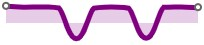
<DxSparkline Data="@DataSource"
             Type="SparklineType.SplineArea"
             ArgumentFieldName="Month"
             ValueFieldName="VisitorCount"
             LineWidth="5"
             LineColor="Purple"
             Height="10%"
             Width="200px" />

@code {
    IEnumerable<SparklineDataPoint> DataSource = Enumerable.Empty<SparklineDataPoint>();
    protected override void OnInitialized() {
        DataSource = GenerateData();
    }
}
See Also