DxDateEditSettings.ApplyValueOnOutsideClick Property
Specifies whether the Date Edit hides action buttons (OK and Cancel) and updates the value on outside click.
Namespace: DevExpress.Blazor
Assembly: DevExpress.Blazor.v26.1.dll
NuGet Package: DevExpress.Blazor
Declaration
[DefaultValue(false)]
[Parameter]
public bool ApplyValueOnOutsideClick { get; set; }
Property Value
| Type | Default | Description |
|---|---|---|
| Boolean | false |
|
Remarks
The Date Edit component displays OK and Cancel buttons in the drop-down menu if the time section is visible:
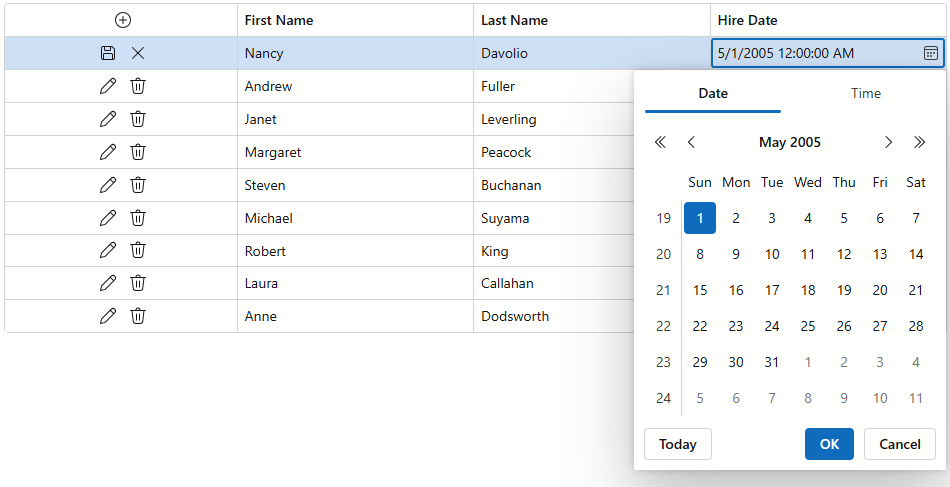
Enable the ApplyValueOnOutsideClick property to hide these buttons and update a bound value when a user clicks outside component boundaries:
<DxGrid Data="@employees" EditMode="GridEditMode.EditRow">
    <Columns>
        <DxGridCommandColumn />
        <DxGridDataColumn FieldName="FirstName" />
        <DxGridDataColumn FieldName="LastName" />
        <DxGridDataColumn FieldName="HireDate">
            <EditSettings>
                <DxDateEditSettings TimeSectionVisible="true"
                                    TimeSectionScrollPickerFormat="tt h m"
                                    ApplyValueOnOutsideClick="true" />
            </EditSettings>
        </DxGridDataColumn>
    </Columns>
</DxGrid>
Tip
Without the Cancel button, users can discard changes in the following ways:
- Press Esc to close the drop-down without changes
- Press Alt + Del or click the Clear button in the editor input to remove/clear previously applied value.
To change the maximum date at runtime, use the IDateEditSettings.ApplyValueOnOutsideClick property instead.