IContextMenuItemCollection.Add(Int32, String) Method
Adds a predefined item to the specified position in the item collection.
Namespace: DevExpress.Blazor
Assembly: DevExpress.Blazor.v26.1.dll
NuGet Package: DevExpress.Blazor
Declaration
IContextMenuItem Add(
    int index,
    string name
)
Parameters
| Name | Type | Description |
|---|---|---|
| index | Int32 | A position that marks where to insert the item. |
| name | String | Item name. |
Returns
| Type | Description |
|---|---|
| IContextMenuItem | The inserted menu item. |
Remarks
Grid
Specify the ContextMenus property to display context menus in the Grid component. Handle the CustomizeContextMenu event to modify available context commands. In the event handler, use the GridContextMenuDefaultItemNames class to obtain names of all built-in items. Pass an item name to the Add method to add this item to a context menu.
The following code snippet adds Expand All/Collapse All items to all context menus:
@inject WeatherForecastService ForecastService

<DxGrid Data="@Data"
        ShowGroupPanel="true"
        AutoExpandAllGroupRows="true"
        ContextMenus="GridContextMenus.All"
        CustomizeContextMenu="CustomizeContextMenu">
    <Columns>
        <DxGridDataColumn FieldName="Date" DisplayFormat="D" />
        <DxGridDataColumn FieldName="TemperatureC" Caption="@("Temp. (\x2103)")" Width="120px" />
        <DxGridDataColumn FieldName="TemperatureF" Caption="@("Temp. (\x2109)")" Width="120px" />
        <DxGridDataColumn FieldName="Forecast" GroupIndex="0" />
        <DxGridDataColumn FieldName="CloudCover" />
    </Columns>
</DxGrid>

@code {
    object Data { get; set; }

    protected override void OnInitialized() {
        Data = ForecastService.GetForecast();
    }
    void CustomizeContextMenu(GridCustomizeContextMenuEventArgs args) {
        // Inserts the "Collapse All" item at the end of the item collection
        if(!args.Items.Contains(GridContextMenuDefaultItemNames.CollapseAll) && args.Grid.GetGroupCount() > 0)
            args.Items.Add(GridContextMenuDefaultItemNames.CollapseAll);
        // Inserts the "Expand All" item at the first position in the item collection
        if(!args.Items.Contains(GridContextMenuDefaultItemNames.ExpandAll) && args.Grid.GetGroupCount() > 0)
            args.Items.Add(0, GridContextMenuDefaultItemNames.ExpandAll);
    }
}
Rich Text Editor
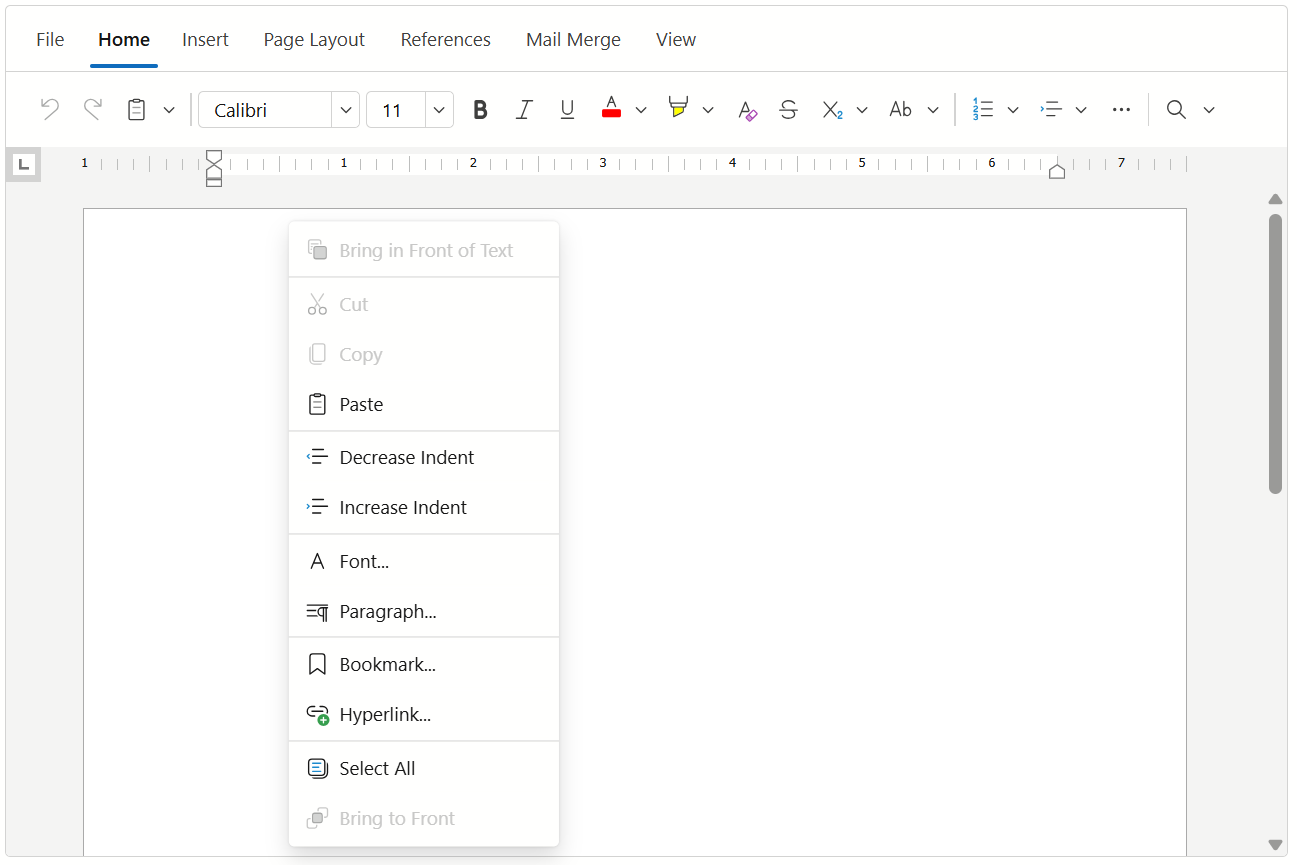
Handle the CustomizeContextMenu event to modify commands available in the Rich Text Editor’s context menu. In the event handler, use the RichEditContextMenuItemNames class to obtain names of all built-in items. Pass an item name to the Add method to add the item to the main context menu or its sub-menus.
The following code snippet adds default Bring to Front and Bring in Front of Text items to the context menu:
<DxRichEdit CustomizeContextMenu=OnCustomizeContextMenu />

@code {
    void OnCustomizeContextMenu(IContextMenuItemCollection items) {
        // Inserts the "Bring to Front" item at the end of the item collection
        items.Add(RichEditContextMenuItemNames.BringToFront);
        // Inserts the "Bring in Front of Text" item at the first position in the item collection
        items.Add(0, RichEditContextMenuItemNames.BringInFrontOfText);
    }
}
TreeList
Specify the ContextMenus property to display context menus in the TreeList component. Handle the CustomizeContextMenu event to modify available context commands. In the event handler, use the TreeListContextMenuDefaultItemNames class to obtain names of all built-in items. Pass an item name to the Add method to add this item to a context menu.
The following code snippet adds Expand All/Collapse All items to all context menus:
@inject EmployeeTaskService EmployeeTaskService

<DxTreeList Data="TreeListData"
            KeyFieldName="Id"
            ParentKeyFieldName="ParentId"
            ContextMenus="TreeListContextMenus.All"
            CustomizeContextMenu="CustomizeContextMenu">
    <Columns>
        <DxTreeListDataColumn FieldName="Name" Caption="Task" ShowInColumnChooser="false" />
        <DxTreeListDataColumn FieldName="EmployeeName" />
        <DxTreeListDataColumn FieldName="StartDate" />
        <DxTreeListDataColumn FieldName="DueDate" />
    </Columns>
</DxTreeList>

@code {
    List<EmployeeTask> TreeListData { get; set; }

    protected override void OnInitialized() {
        TreeListData = EmployeeTaskService.GenerateData();
    }
    void CustomizeContextMenu(TreeListCustomizeContextMenuEventArgs args) {
        // Inserts the "Collapse All" item at the end of the item collection
        args.Items.Add(GridContextMenuDefaultItemNames.CollapseAll);
        // Inserts the "Expand All" item at the first position in the item collection
        args.Items.Add(0, GridContextMenuDefaultItemNames.ExpandAll);
    }
}