DxSchedulerTimelineView.LastAppointmentIndent Property
Specifies the indent from the last appointment to the cell border in the timeline view.
Namespace: DevExpress.Blazor
Assembly: DevExpress.Blazor.v26.1.dll
NuGet Package: DevExpress.Blazor
Declaration
[DefaultValue(15)]
[Parameter]
public int LastAppointmentIndent { get; set; }
Property Value
| Type | Default | Description |
|---|---|---|
| Int32 | 15 | The indent in pixels. The value should be greater than |
Remarks
The Scheduler component adjusts cell height to display all appointments and other elements, such as resource caption or space reserved for creating new appointments. In the following image, an appointment occupies almost the entire vertical space. The Scheduler adds an indent to allocate space for a cell click.
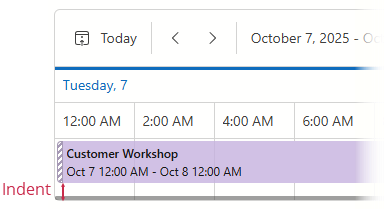
Use the LastAppointmentIndent property to adjust the indent value. The following code snippet sets LastAppointmentIndent to 5:
<DxScheduler @bind-StartDate="@StartDate"
             DataStorage="@DataStorage"
             ResourceNavigatorVisible="false">
    <DxSchedulerTimelineView Duration="@TimeSpan.FromHours(48)"
                             CellMinWidth="80"
                             LastAppointmentIndent="5">
        <Scales>
            <DxSchedulerTimeScale Unit="@SchedulerTimeScaleUnit.Day" UnitCount="1" />
        </Scales>
    </DxSchedulerTimelineView>
</DxScheduler>