DxSchedulerTimelineView.CellMinHeight Property
Specifies the minimum cell height in the timeline view.
Namespace: DevExpress.Blazor
Assembly: DevExpress.Blazor.v26.1.dll
NuGet Package: DevExpress.Blazor
Declaration
[DefaultValue(0)]
[Parameter]
public int CellMinHeight { get; set; }
Property Value
| Type | Default | Description |
|---|---|---|
| Int32 | 0 | The minimum cell height in pixels. |
Remarks
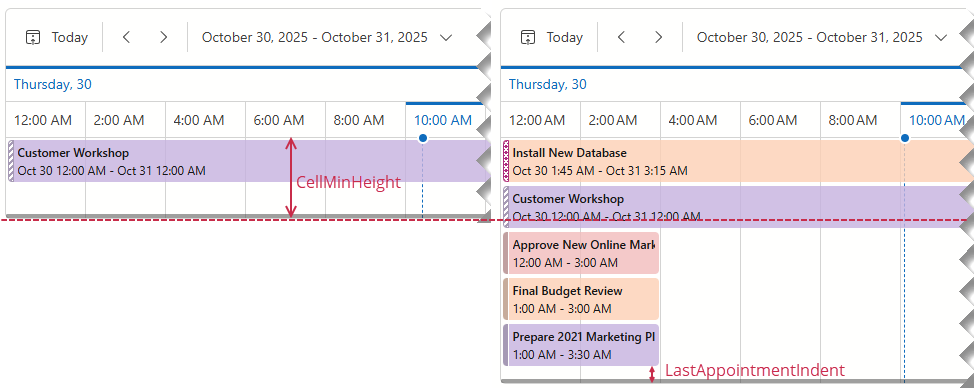
The CellMinHeight property specifies the minimum height of time/resource cells that display appointments. The Scheduler component can increase the height if the specified value does not accommodate the following elements:
- All appointments.
- Resource caption, if visible.
- Empty space under the last appointment (LastAppointmentIndent). Users can click this area to create new appointments.
The following image displays two timeline views with the same CellMinHeight but a different number of appointments:
Code Example
The following example sets CellMinHeight to 65:
<DxScheduler @bind-StartDate="@StartDate"
             DataStorage="@DataStorage"
             ResourceNavigatorVisible="false">
    <DxSchedulerTimelineView Duration="@TimeSpan.FromHours(48)"
                             CellMinWidth="80"
                             CellMinHeight="65">
        <Scales>
            <DxSchedulerTimeScale Unit="@SchedulerTimeScaleUnit.Day" UnitCount="1" />
            <DxSchedulerTimeScale Unit="@SchedulerTimeScaleUnit.Hour" UnitCount="2" />
        </Scales>
    </DxSchedulerTimelineView>
</DxScheduler>
See Also