DxRibbonColorPaletteItem.AutomaticColorCaption Property
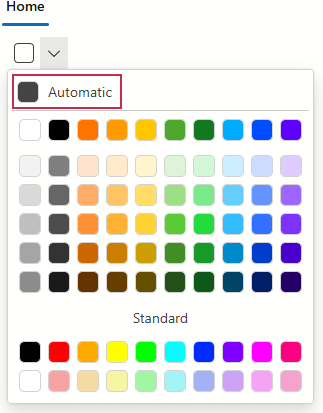
Specifies the label displayed next to the automatic color swatch.
Namespace: DevExpress.Blazor
Assembly: DevExpress.Blazor.v26.1.dll
NuGet Package: DevExpress.Blazor
Declaration
[DefaultValue(null)]
[Parameter]
public string AutomaticColorCaption { get; set; }
Property Value
| Type | Default | Description |
|---|---|---|
| String | null | The label text. |
Remarks
When the AutomaticColor property is specified, the Ribbon’s color palette displays the automatic color swatch in its top section. Use the AutomaticColorCaption property to specify the label displayed next to this color swatch.
<DxRibbon>
    <DxRibbonTab Text="Home">
        <DxRibbonGroup Text="Style">
            <DxRibbonColorPaletteItem @bind-Value="SelectedColor"
                                      AutomaticColor="#444444"
                                      AutomaticColorCaption="Automatic" />
        </DxRibbonGroup>
    </DxRibbonTab>
</DxRibbon>

@code {
    string SelectedColor = "";
}
Note
The color swatch and its label will not be displayed if the AutomaticColor property is not specified.
Implements
See Also