DxRibbonColorPaletteItem.AutomaticColor Property
Displays the automatic color swatch on the palette and specifies the color associated with it.
Namespace: DevExpress.Blazor
Assembly: DevExpress.Blazor.v26.1.dll
NuGet Package: DevExpress.Blazor
Declaration
[DefaultValue(null)]
[Parameter]
public string AutomaticColor { get; set; }
Property Value
| Type | Default | Description |
|---|---|---|
| String | null | The color value. |
Remarks
When the AutomaticColor property is specified, the Ribbon’s color palette displays the automatic color swatch in its top section. This swatch’s color is determined by the AutomaticColor property’s value.
The property accepts the following formats:
- Longhand and shorthand hexadecimal color values:
#ffff00,#ff0. - RGB and RGBA color codes:
rgb(255, 0, 0),rgba(0, 230, 0, 0.3). - HTML color name (case-insensitive):
red,DarkGreen.
The following code snippet displays the automatic color swatch and sets its color to dark grey:
<DxRibbon>
    <DxRibbonTab Text="Home">
        <DxRibbonGroup Text="Style">
            <DxRibbonColorPaletteItem @bind-Value="SelectedColor"
                                      AutomaticColor="#444444" />
        </DxRibbonGroup>
    </DxRibbonTab>
</DxRibbon>

@code {
    string SelectedColor = "";
}
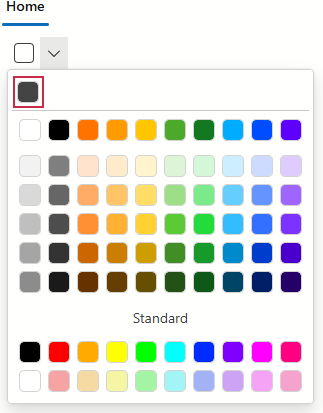
To specify the label displayed next to the automatic color swatch, use the AutomaticColorCaption property.
Implements
See Also