DxChartSeriesLabel.TextOverflow Property
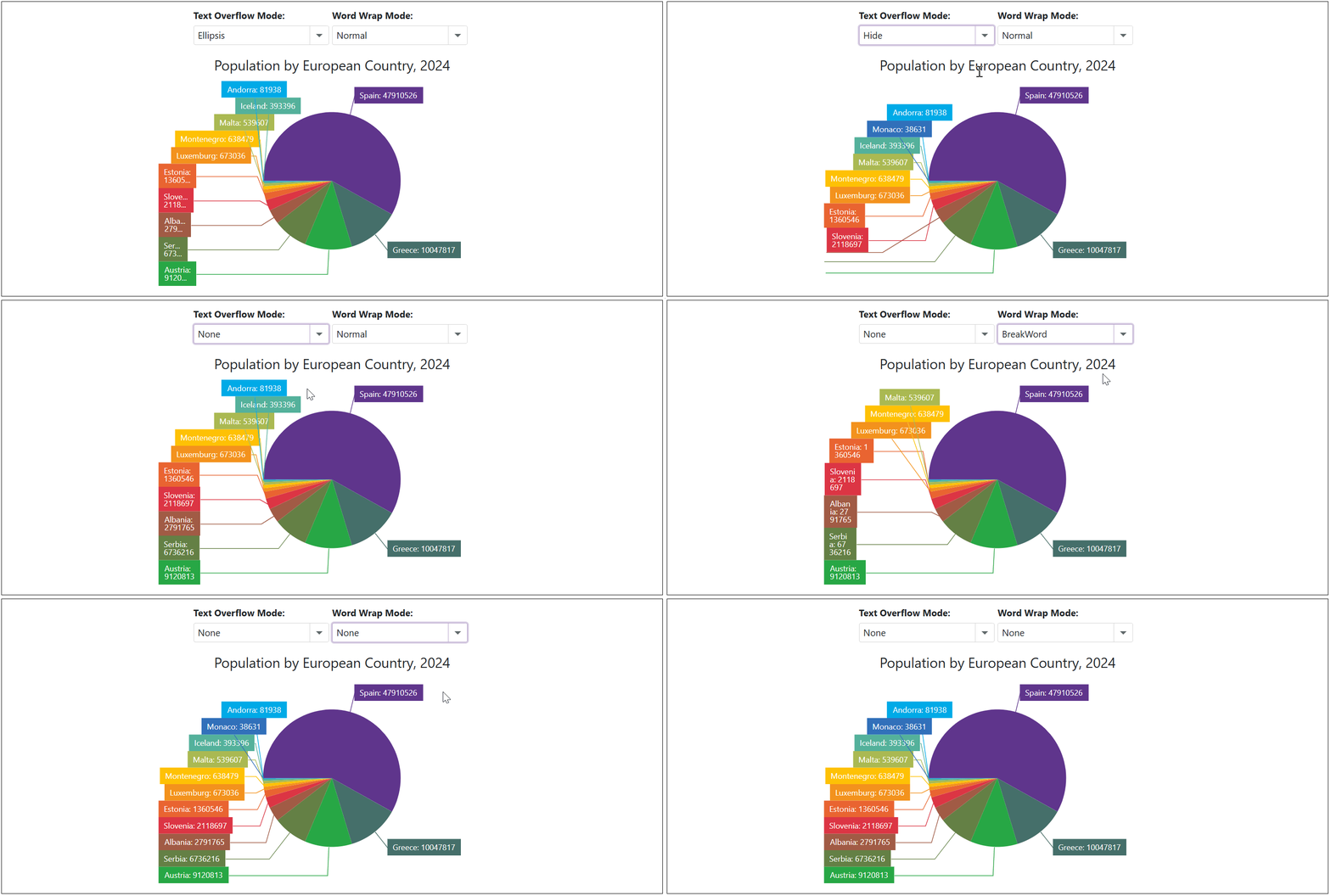
Specifies how the chart displays overflowing pie series labels.
Namespace: DevExpress.Blazor
Assembly: DevExpress.Blazor.v26.1.dll
NuGet Package: DevExpress.Blazor
Declaration
[DefaultValue(ChartTextOverflow.Ellipsis)]
[Parameter]
public ChartTextOverflow TextOverflow { get; set; }
Property Value
| Type | Default | Description |
|---|---|---|
| ChartTextOverflow | Ellipsis | An enumeration value. |
Available values:
| Name | Description |
|---|---|
| Ellipsis | Truncates text with an ellipsis. |
| Hide | Hides overflowing text. |
| None | Truncates text at the boundary of the content area. |
Remarks
In some cases, the DxPieChart component treats series labels as overflowing and truncates label text with an ellipsis. Use the TextOverflow property to hide such labels or display them completely.
You can also use the WordWrap property to define how to wrap the text of overflowing series labels.
Note
TextOverflow and WordWrap property values apply to DxPieChartSeries labels only.
Example
The following code snippet uses drop-down menus to choose how to display overflowing series labels:
<label><strong>Text Overflow Mode: </strong></label>
<DxComboBox Text="TextOverflow" @bind-Value="@CurrentTextOverflowMode" Data="Enum.GetValues<ChartTextOverflow>()" />

<label><strong>Word Wrap Mode: </strong></label>
<DxComboBox Text="WordWrap" @bind-Value="@CurrentWordWrapMode" Data="Enum.GetValues<ChartWordWrap>()" />

<DxPieChart Data="@DataSource"
            Height="350px"
            StartAngle="180"
            LabelOverlap="PieChartLabelOverlap.Shift"
            PointSelectionMode="ChartSelectionMode.Multiple">
    <DxPieChartSeries ArgumentField="@((StatisticPoint v) => v.Country)"
                      ValueField="@((StatisticPoint v) => v.Population24)"
                      Name="2024">
        <DxChartSeriesLabel Visible="true"
                            TextOverflow="@CurrentTextOverflowMode"
                            WordWrap="@CurrentWordWrapMode"
                            FormatPattern="{argument}: {value}">
            <DxChartSeriesLabelConnector Visible="true" />
        </DxChartSeriesLabel>
    </DxPieChartSeries>
    <DxChartLegend HorizontalAlignment="HorizontalAlignment.Right"
                   Orientation="Orientation.Vertical"
                   Visible="false" />
    <DxChartTitle Text="Population by European Country, 2024" />
</DxPieChart>

@code {
    TextOverflow CurrentTextOverflowMode { get; set; } = ChartTextOverflow.Ellipsis;
    WordWrap CurrentWordWrapMode { get; set; } = ChartWordWrap.Normal;

    IEnumerable<StatisticPoint> DataSource = Enumerable.Empty<StatisticPoint>();
    protected override void OnInitialized() {
        DataSource = GenerateData();
    }
}