GridXlExportOptions.SelectedRowsExportMode Property
In ExportSelectedRowsOnly mode, specifies whether to export parent group rows.
Namespace: DevExpress.Blazor
Assembly: DevExpress.Blazor.Grid.v26.1.dll
NuGet Package: DevExpress.Blazor
Declaration
[DefaultValue(GridSelectedRowsExportMode.Flat)]
public GridSelectedRowsExportMode SelectedRowsExportMode { get; set; }
Property Value
| Type | Default | Description |
|---|---|---|
| GridSelectedRowsExportMode | Flat | An enumeration value. |
Available values:
| Name | Description |
|---|---|
| Flat | The Grid exports selected rows as a flat list. |
| KeepGrouping | The Grid exports selected records and corresponding group rows. |
Remarks
Note
This property is not in effect if ExportSelectedRowsOnly is set to false (default).
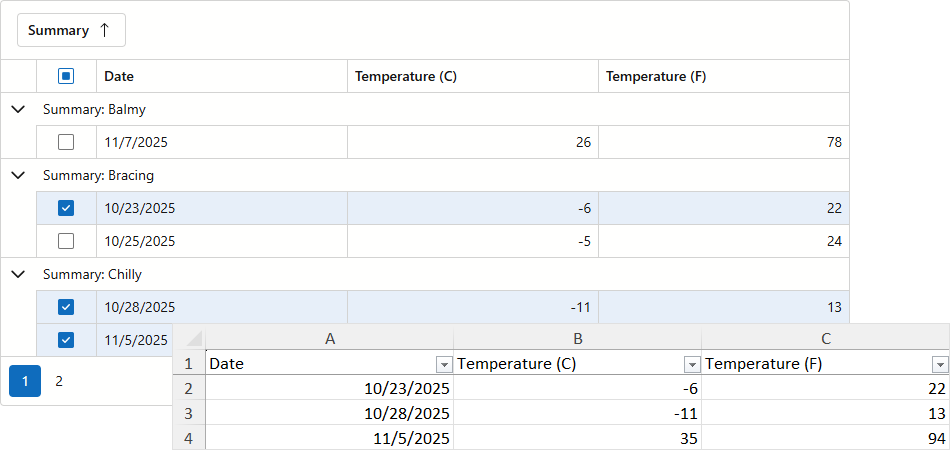
When exporting Grid data to an Excel format, you can activate the ExportSelectedRowsOnly option. If active, the Grid component ignores group settings and exports selected rows as flat data.
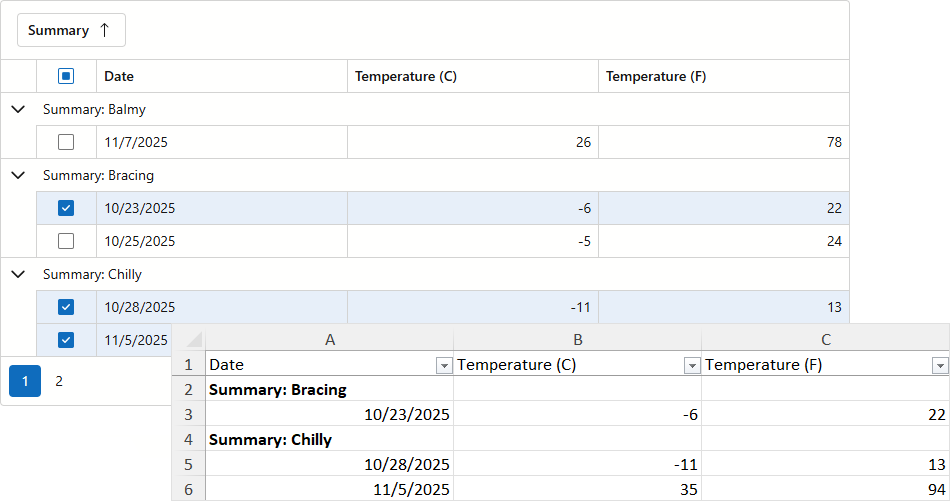
Set SelectedRowsExportMode to KeepGrouping to export selected records and their parent group rows:
@rendermode InteractiveServer
@inject WeatherForecastService ForecastService

<DxGrid @ref="Grid" Data="@forecasts" ShowGroupPanel="true">
    <Columns>
        <DxGridSelectionColumn Width="60px" AllowSelectAll="true" />
        <DxGridDataColumn Caption="Date" FieldName="Date" />
        <DxGridDataColumn Caption="Temperature (C)" FieldName="TemperatureC" />
        <DxGridDataColumn Caption="Temperature (F)" FieldName="TemperatureF" />
        <DxGridDataColumn Caption="Summary" FieldName="Summary" GroupIndex="0" />
    </Columns>
    <ToolbarTemplate>
        <DxToolbar>
            <DxToolbarItem Text="Export to XLSX" Click="ExportXlsx_Click" BeginGroup="true" />
        </DxToolbar>
    </ToolbarTemplate>
</DxGrid>

@code {
    IGrid Grid;
    object forecasts;

    protected override async Task OnInitializedAsync() {
        forecasts = await ForecastService.GetForecastAsync();
    }
    async Task ExportXlsx_Click() {
        await Grid.ExportToXlsxAsync("ExportResult", new GridXlExportOptions() {
            ExportSelectedRowsOnly = true,
            SelectedRowsExportMode = GridSelectedRowsExportMode.KeepGrouping
        });
    }
}