GridContextMenuDefaultItemNames.ClearColumnSorting Field
The Clear Sorting item’s name.
Namespace: DevExpress.Blazor
Assembly: DevExpress.Blazor.Grid.v26.1.dll
NuGet Package: DevExpress.Blazor
Declaration
public const string ClearColumnSorting = "ClearColumnSorting"Field Value
| Type | Description |
|---|---|
| String | The “ClearColumnSorting” string. |
Remarks
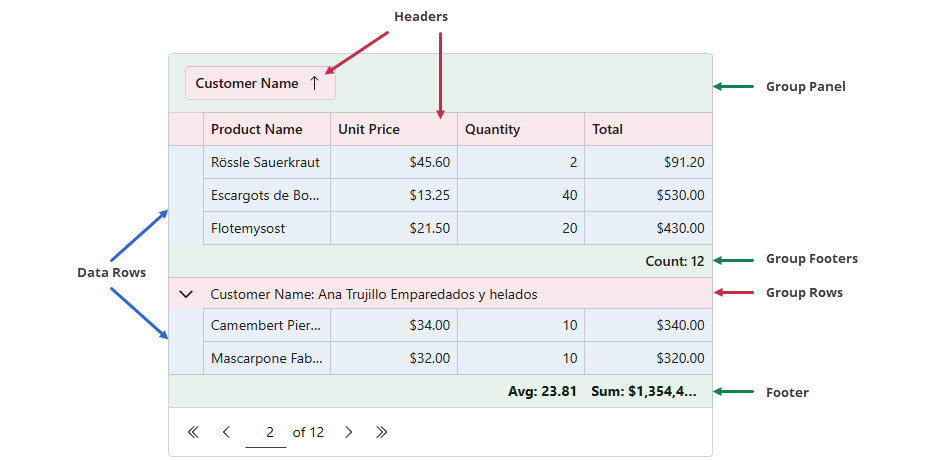
Specify the ContextMenus property to display context menus for the following Grid elements:
Clear Sorting is a Grid context menu item that clears sorting for the target column. This item is available in a header context menu only if sorting is enabled at both Grid and column levels. The item is disabled when the target column is not sorted.
Use the ClearColumnSorting field to apply the following customizations:
- Access and customize the Clear Sorting item.
- Add this item to data row, footer, or group footer context menus. Group panel and group row menus do not support this item and will not display it.
- Remove the item from the header context menu.
Example
The following code snippet removes the Clear Sorting command from the context menu associated with the Date header cell:
@inject WeatherForecastService ForecastService

<DxGrid Data="@Data"
        ContextMenus="GridContextMenus.Header"
        CustomizeContextMenu="CustomizeContextMenu">
    <Columns>
        <DxGridDataColumn FieldName="Date" DisplayFormat="D" SortIndex=0 />
        <DxGridDataColumn FieldName="TemperatureC" Caption="@("Temp. (\x2103)")" Width="120px" />
        <DxGridDataColumn FieldName="TemperatureF" Caption="@("Temp. (\x2109)")" Width="120px" />
        <DxGridDataColumn FieldName="Forecast" />
        <DxGridDataColumn FieldName="CloudCover" />
    </Columns>
</DxGrid>

@code {
    object Data { get; set; }

    protected override void OnInitialized() {
        Data = ForecastService.GetForecast();
    }
    void CustomizeContextMenu(GridCustomizeContextMenuEventArgs args) {
        if (args.Context is GridHeaderCommandContext headerContext) {
            if (headerContext.Column is IGridDataColumn dataColumn && dataColumn.FieldName == "Date") {
                args.Items.Remove(GridContextMenuDefaultItemNames.ClearColumnSorting);
            }
        }
    }
}