DxFilterBuilderField.ValueDisplayTemplate Property
Specifies a template used to display field values or their placeholders.
Namespace: DevExpress.Blazor
Assembly: DevExpress.Blazor.v26.1.dll
NuGet Package: DevExpress.Blazor
Declaration
[DefaultValue(null)]
[Parameter]
public RenderFragment<FilterBuilderValueDisplayTemplateContext> ValueDisplayTemplate { get; set; }
Property Value
| Type | Default | Description |
|---|---|---|
| RenderFragment<FilterBuilderValueDisplayTemplateContext> | null | Template markup. |
Remarks
The ValueDisplayTemplate property allows you to specify custom content and change the appearance of field values or their placeholders.
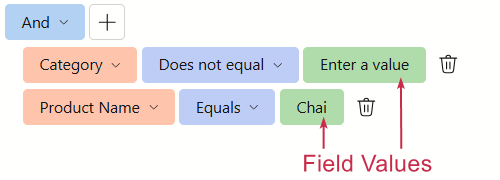
The ValueDisplayTemplate property accepts a FilterBuilderValueDisplayTemplateContext object as the context parameter. You can use the parameter’s DisplayText and Value properties to obtain a field value and its display text.
Note
Field values are rendered as button HTML elements. According to the HTML specification, a button must not contain interactive elements or elements with the tabindex attribute specified.
You can also use the ValueEditTemplate property to replace an autogenerated value editor with custom content.
Example
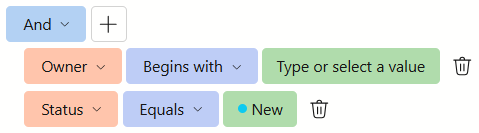
The following code snippet uses ValueDisplayTemplate properties:
- Shows placeholder text if no value is selected (for both Owner and Status fields).
- Shows selected values with icons (for the Status field).
<DxFilterBuilder @bind-FilterCriteria="FilterCriteria" SizeMode="Params.SizeMode">
    <Fields>
        <DxFilterBuilderField FieldName="Name" Caption="Subject" Type="@typeof(string)"/>
        <DxFilterBuilderField FieldName="Creator" Caption="Owner" Type="@typeof(string)">
        @* ... *@
            <ValueDisplayTemplate>
                @if(string.IsNullOrEmpty(context.DisplayText)) {
                    <span>Type or select a value</span>
                } else {
                    @context.DisplayText
                }
            </ValueDisplayTemplate>
        </DxFilterBuilderField>
        <DxFilterBuilderField FieldName="Status" Caption="Status" Type="@typeof(IssueStatus)">
        @* ... *@
            <ValueDisplayTemplate>
                @if(context.Value != null) {
                    <div class="d-flex align-items-center">
                        @DemoTemplateIconUtils.GetIssueStatusIconHtml((IssueStatus)context.Value)
                        @context.DisplayText
                    </div>
                } else {
                    <span>Select a status</span>
                }
            </ValueDisplayTemplate>
        </DxFilterBuilderField>
        @* ... *@
    </Fields>
</DxFilterBuilder>
Collection Fields
Enable the IsCollection property to define a collection field. Such a field stores an object collection and supports aggregate operators (functions). Aggregate functions calculate collection summaries and allow users to create filter conditions based on aggregated results. For example, users can filter out invoices containing fewer than 5 items in the Products field.
The following aggregate functions are available:
ExistsCountAvgSumMinMax
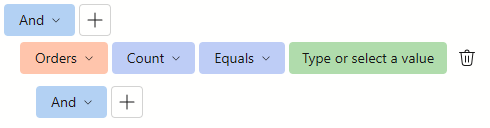
A collection field’s ValueDisplayTemplate affects only the field value displayed for the Count function.
The following code snippet displays placeholder text if no value is selected for the Orders collection’s Count function:
<DxFilterBuilder @bind-FilterCriteria="FilterCriteria">
    <Fields>
        <DxFilterBuilderField FieldName="ProductName" Caption="Product" Type="@typeof(string)" />
        <DxFilterBuilderField FieldName="UnitPrice" Caption="Unit Price" Type="@typeof(decimal)" />
        <DxFilterBuilderField FieldName="UnitsInStock" Caption="Units In Stock" Type="@typeof(int)" />
        <DxFilterBuilderField FieldName="Orders" Caption="Orders" IsCollection="true">
            <ValueDisplayTemplate>
                @if (string.IsNullOrEmpty(context.DisplayText)) {
                    <span>Type or select a value</span>
                } else {
                    @context.DisplayText
                }
            </ValueDisplayTemplate>
            <Fields>
                <DxFilterBuilderField FieldName="OrderDate" Caption="Order Date" Type="@typeof(DateTime?)" />
                <DxFilterBuilderField FieldName="CustomerName" Caption="Customer" Type="@typeof(string)" />
                <DxFilterBuilderField FieldName="Quantity" Caption="Quantity" Type="@typeof(int)" />
            </Fields>
        </DxFilterBuilderField>
    </Fields>
</DxFilterBuilder>