DxFilterBuilderField.EditSettings Property
Allows you to customize the editor associated with this field.
Namespace: DevExpress.Blazor
Assembly: DevExpress.Blazor.v26.1.dll
NuGet Package: DevExpress.Blazor
Declaration
[DefaultValue(null)]
[Parameter]
public RenderFragment EditSettings { get; set; }
Property Value
| Type | Default | Description |
|---|---|---|
| RenderFragment | null | Editor settings. |
Remarks
The Filter Builder component generates and configures value editors for individual fields based on associated data types. You can use the EditSettings property for the following tasks:
- Access the editor’s API.
- Specify a different editor (choose from compatible DevExpress types such as DxComboBoxSettings or DxCheckBoxSettings).
If your customization tasks go beyond what’s possible with the built-in API, use the DxFilterBuilderField.ValueEditTemplate property.
The table below lists classes that define value editor settings and the corresponding data types:
Editor Settings | Generated for Data Type | Supported Data Types |
|---|---|---|
All data types | ||
All data types | ||
Never generated | Numeric, String, TimeSpan, TimeOnly, | |
Never generated | ||
If the editor does not support the associated data type, the Filter Builder replaces it with a read-only text box.
Example
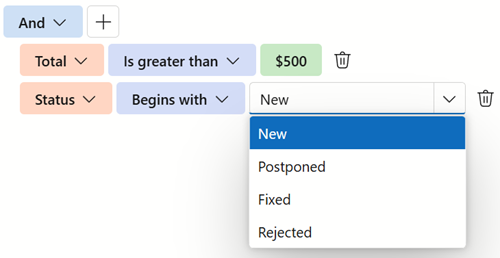
The following code snippet applies a mask to the Total currency field and configures a ComboBox for the Status enum field:
<DxFilterBuilder>
    <Fields>
        <DxFilterBuilderField FieldName="Total" Type="typeof(decimal)">
            <EditSettings>
                <DxSpinEditSettings Mask="c0" DisplayFormat="c0" />
            </EditSettings>
        </DxFilterBuilderField>
        <DxFilterBuilderField FieldName="Status" Type="typeof(string)">
            <EditSettings>
                <DxComboBoxSettings Data="StatusList" />
            </EditSettings>
        </DxFilterBuilderField>
    </Fields>
</DxFilterBuilder>

@code {
    IEnumerable<string> StatusList = new List<string>() {
        "New",
        "Postponed",
        "Fixed",
        "Rejected"
    };
}
Collection Fields
Enable the IsCollection property to define a collection field. Such a field stores an object collection and supports aggregate operators (functions). Aggregate functions calculate collection summaries and allow users to create filter conditions based on aggregated results. For example, users can filter out invoices containing fewer than 5 items in the Products field.
The following aggregate functions are available:
ExistsCountAvgSumMinMax
A collection field’s EditSettings affect only the editor displayed for the Count function. In this editor, users can select the target number of items in the collection (an integer value).
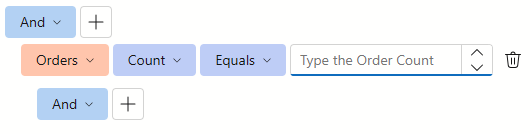
The following example customizes a spin editor displayed for the Orders collection’s Count function:
<DxFilterBuilder @bind-FilterCriteria="FilterCriteria">
    <Fields>
        <DxFilterBuilderField FieldName="ProductName" Caption="Product" Type="@typeof(string)" />
        <DxFilterBuilderField FieldName="UnitPrice" Caption="Unit Price" Type="@typeof(decimal)" />
        <DxFilterBuilderField FieldName="UnitsInStock" Caption="Units In Stock" Type="@typeof(int)" />
        <DxFilterBuilderField FieldName="Orders" Caption="Orders" IsCollection="true">
            <EditSettings>
                <DxSpinEditSettings MinValue="1" NullText="Type the Order Count" />
            </EditSettings>
            <Fields>
                <DxFilterBuilderField FieldName="OrderDate" Caption="Order Date" Type="@typeof(DateTime?)" />
                <DxFilterBuilderField FieldName="CustomerName" Caption="Customer" Type="@typeof(string)" />
                <DxFilterBuilderField FieldName="Quantity" Caption="Quantity" Type="@typeof(int)" />
            </Fields>
        </DxFilterBuilderField>
    </Fields>
</DxFilterBuilder>