DxContextMenu.DropDownMaxHeight Property
Limits the maximum height of a context menu and all its submenus.
Namespace: DevExpress.Blazor
Assembly: DevExpress.Blazor.v26.1.dll
NuGet Package: DevExpress.Blazor
Declaration
[Parameter]
public string DropDownMaxHeight { get; set; }
Property Value
| Type | Description |
|---|---|
| String | The height in CSS units. |
Remarks
Use the DropDownMaxHeight property to limit the maximum height of a context menu and all its submenus. Includes padding and border.
The height is specified in CSS units. Numeric value without a unit will be interpreted as pixels.
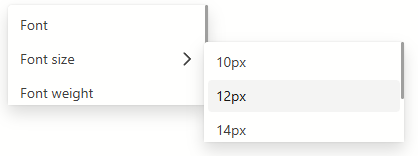
When the content of a context menu exceeds the specified DropDownMaxHeight, a scrollbar is added to ensure all items remain accessible. If the total height of the context menu items is less than the DropDownMaxHeight, this property will not have a visible effect.
The following code snippet limits the maximum height of a context menu and its submenus to 100 pixels:
<div class="h-400" @oncontextmenu="@OnContextMenu" @oncontextmenu:preventDefault>
<p> </p>
</div>
<DxContextMenu @ref="@ContextMenu"
DropDownMaxHeight="100px">
<Items>
<DxContextMenuItem Text="Font" />
<DxContextMenuItem Text="Font size">
<Items>
<DxContextMenuItem Text="10px" />
<DxContextMenuItem Text="12px" />
<DxContextMenuItem Text="14px" />
<DxContextMenuItem Text="16px" />
<DxContextMenuItem Text="20px" />
</Items>
</DxContextMenuItem>
<DxContextMenuItem Text="Font weight" />
<DxContextMenuItem Text="Color" />
<DxContextMenuItem Text="Style" />
</Items>
</DxContextMenu>
@code {
DxContextMenu ContextMenu { get; set; }
async void OnContextMenu(MouseEventArgs args)
{
await ContextMenu.ShowAsync(args);
}
}