GridCommandColumnCellEditTemplateContext.VisibleIndex Property
Returns the visible index of the current row.
Namespace: DevExpress.Blazor
Assembly: DevExpress.Blazor.Grid.v26.1.dll
NuGet Package: DevExpress.Blazor
Declaration
public int VisibleIndex { get; }Property Value
| Type | Description |
|---|---|
| Int32 | The row’s visible index. |
Remarks
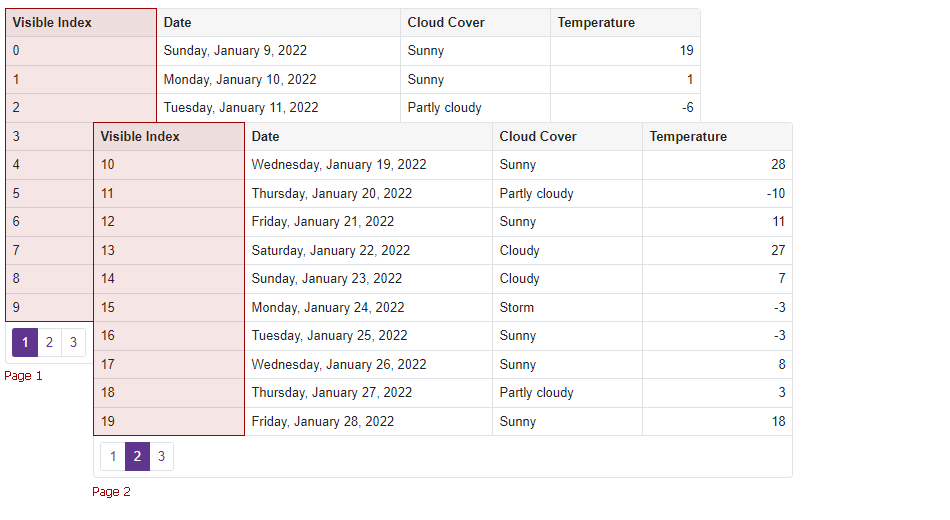
The Grid component assigns indexes to visible data and group rows to indicate row order. Indexes are zero-based and sequential across all Grid pages.
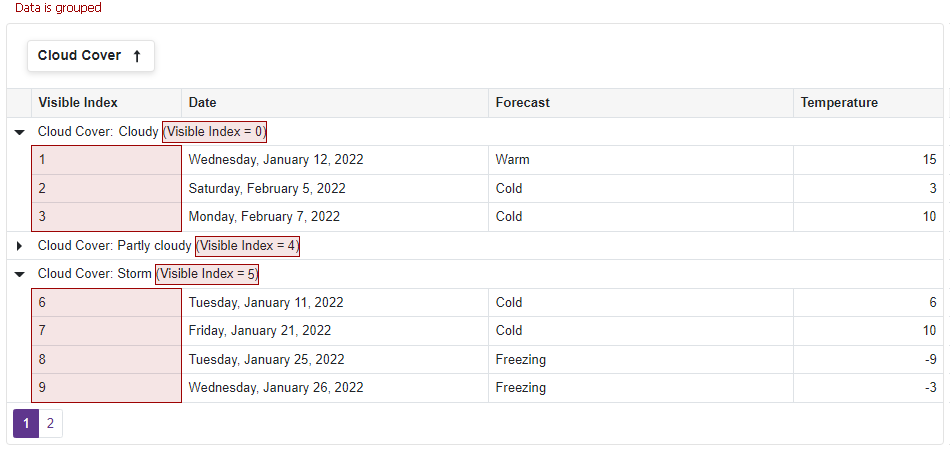
DxGrid reassigns row indexes each time users sort, filter, group data, or expand or collapse group rows. Filtered-out rows and rows in collapsed groups do not have indexes. In the following image, the Grid component does not assign indexes to data rows in the collapsed Partly cloudy group.
The following code snippet does the following:
- Creates a grid column that displays visible indexes for data rows. It uses the CellDisplayTemplate property to specify the column content.
- Uses the DataColumnGroupRowTemplate property to display visible indexes for group rows.
@inject WeatherForecastService ForecastService

<DxGrid Data="@Data">
    <Columns>
        <DxGridDataColumn Caption="Visible Index">
            <CellDisplayTemplate>@context.VisibleIndex</CellDisplayTemplate>
        </DxGridDataColumn>
        <DxGridDataColumn FieldName="Date"
                          DisplayFormat="D" />
        <DxGridDataColumn FieldName="Forecast" />
        <DxGridDataColumn FieldName="CloudCover" />
        <DxGridDataColumn FieldName="TemperatureC"
                          Caption="Temperature" />
    </Columns>
    <DataColumnGroupRowTemplate>
        @context.DisplayText (Visible Index = @context.VisibleIndex)
    </DataColumnGroupRowTemplate>
</DxGrid>

@code {
    object Data { get; set; }

    protected override void OnInitialized() {
        Data = ForecastService.GetForecast();
    }
}
Refer to the following property description for additional information and an example: DxGridCommandColumn.CellEditTemplate.