GridColumnHeaderCaptionTemplateContext.IsVirtualized Property
Returns whether the column is being virtualized.
Namespace: DevExpress.Blazor
Assembly: DevExpress.Blazor.Grid.v26.1.dll
NuGet Package: DevExpress.Blazor
Declaration
public bool IsVirtualized { get; }Property Value
| Type | Description |
|---|---|
| Boolean |
|
Remarks
You can activate horizontal virtual scrolling for the Grid component as follows:
- Set VirtualScrollingEnabled to
true. - Set VirtualScrollingMode to
ColumnsorRowsAndColumns.
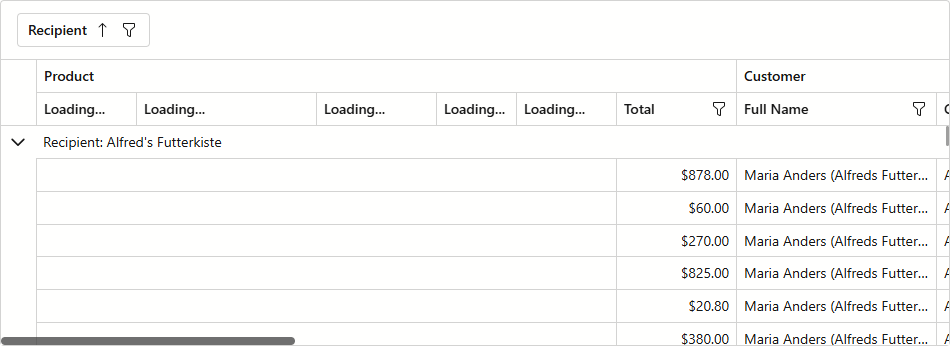
Once activated, the Grid displays only columns that are in the viewport and virtualizes all other columns. For virtualized data columns, the Grid component does not render column filter menus and sort glyphs. Use the IsVirtualized context property to render a specific caption while a column is virtualized.
The following code snippet displays Loading… captions for all virtualized columns:
<DxGrid @ref="MyGrid"
        Data="GridData"
        FilterMenuButtonDisplayMode="GridFilterMenuButtonDisplayMode.Always"
        VirtualScrollingMode="GridVirtualScrollingMode.RowsAndColumns"
        VirtualScrollingEnabled="true">
    <Columns>
        <DxGridCommandColumn Width="80px">
            <HeaderTemplate Context="CaptionContext">
                @{
                    if (CaptionContext.IsVirtualized) {
                        <span>Loading...</span>
                    }
                    else {
                        <a class="oi oi-plus" @onclick="@(() => MyGrid.StartEditNewRowAsync())"
                           class="link-decoration" href="javascript:void(0);"></a>
                    }
                }
            </HeaderTemplate>
        </DxGridCommandColumn>

        <DxGridSelectionColumn Width="80px">
            <HeaderTemplate Context="CaptionContext">
                @{
                    if (CaptionContext.IsVirtualized) {
                        <span>Loading...</span>
                    }
                    else {
                        <DxButton Click="() => MyGrid.SelectAllOnPage()" Text="Select All" />
                    }
                }
            </HeaderTemplate>
        </DxGridSelectionColumn>
        @* ... *@
    </Columns>
    <ColumnHeaderCaptionTemplate Context="CaptionContext">
    @{
        if (CaptionContext.IsVirtualized) {
            <span>Loading...</span>
        }
        else {
            <span title="Click the header to sort data by this column.">
                @CaptionContext.Caption
            </span>
        }
    }
    </ColumnHeaderCaptionTemplate>
</DxGrid>

@code {
    IGrid MyGrid;
    object GridData;
    // ...
}
See Also