DxRibbonComboBoxItem<TData, TValue>.EditTextChanged Event
Fires when a user updates a text in the edit box of the Ribbon’s combo box.
Namespace: DevExpress.Blazor
Assembly: DevExpress.Blazor.v26.1.dll
NuGet Package: DevExpress.Blazor
Declaration
[DefaultValue(null)]
[Parameter]
public EventCallback<string> EditTextChanged { get; set; }
Parameters
| Type | Description |
|---|---|
| String | The new text. |
Remarks
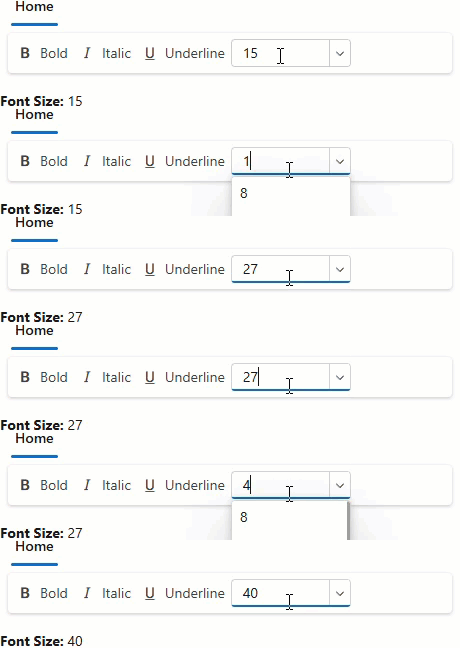
Set AllowUserInput to true to allow users type custom values into the Ribbon’s combo box. The combo box fires the EditTextChanged event when a user does one of the following:
- Changes the text and removes focus from the combo box.
- Changes the text and presses Enter.
- Selects an item in the drop-down list.
Note
Typed values are not inserted into the bound data source or added to the drop-down list. If a user enters a value equal to an existing item, the combo box selects that item.
The following code snippet displays the value typed in the Ribbon’s combo box:
<DxRibbon>
    <DxRibbonTab Text="Home">
        <DxRibbonGroup Text="Style">
            <DxRibbonItem Text="Bold" IconCssClass="dx-icon-bold" />
            <DxRibbonItem Text="Italic" IconCssClass="dx-icon-italic" />
            <DxRibbonItem Text="Underline" IconCssClass="dx-icon-underline" />
            <DxRibbonComboBoxItem Data="FontSizes"
                                  Value="@CurrentFontSize"
                                  TextFieldName="@nameof(FontSizeInfo.Size)"
                                  AllowUserInput="true"
                                  EditText="@FontSize"
                                  EditTextChanged="OnEditTextChanged"
                                  NullText="Font Size"
                                  Width="120px" />
        </DxRibbonGroup>
    </DxRibbonTab>
</DxRibbon>

<p><b>Font Size:</b> @FontSize</p>

@code {
    string FontSize = "15";
    private FontSizeInfo CurrentFontSize { get; set; }
    private IEnumerable<FontSizeInfo> FontSizes => FontSizeInfo.DefaultFontSizes;

    void OnEditTextChanged(string newValue) {
        FontSize = newValue;
    }
}
Implements
DevExpress.Blazor.Ribbon.IRibbonComboBox<TData, TValue>.EditTextChanged
See Also