DxMemoSettings.ResizeMode Property
Specifies how users can resize the memo.
Namespace: DevExpress.Blazor
Assembly: DevExpress.Blazor.v25.2.dll
NuGet Package: DevExpress.Blazor
Declaration
[DefaultValue(MemoResizeMode.Vertical)]
[Parameter]
public MemoResizeMode ResizeMode { get; set; }
Property Value
| Type | Default | Description |
|---|---|---|
| MemoResizeMode | Vertical | An enumeration value. |
Available values:
| Name | Description |
|---|---|
| Disabled | Users cannot resize the component. |
| Vertical | Users can resize the component vertically. |
| Horizontal | Users can resize the component horizontally. |
| Auto | The Memo changes its height automatically based on content. Users cannot resize the component. |
| VerticalAndHorizontal | Users can resize the component in both directions. |
Remarks
Use the ResizeMode property to specify how the Memo component can be resized.
Note
We recommend that you use the memo editor in inline or pop-up edit form only. In the edited row, the memo can stretch row height and thus make the layout inconsistent.
@inject EmployeeService EmployeeData

<DxGrid Data="@employees" PageSize="4" KeyFieldName="ID"
        EditMode="GridEditMode.EditForm">
    <Columns>
        <DxGridCommandColumn />
        <DxGridDataColumn FieldName="FirstName" />
        <DxGridDataColumn FieldName="LastName" />
        <DxGridDataColumn FieldName="BirthDate" />
        <DxGridDataColumn FieldName="HireDate" />
        <DxGridDataColumn FieldName="Notes" Visible="false" >
            <EditSettings>
                <DxMemoSettings Rows="3"
                                TextAreaCssClass="my-memo-style"
                                ResizeMode="MemoResizeMode.Disabled" />
            </EditSettings>
        </DxGridDataColumn>
    </Columns>
    <EditFormTemplate Context="EditFormContext">
        <DxFormLayout >
            <DxFormLayoutItem Caption="First Name:" ColSpanMd="6">
                @EditFormContext.GetEditor("FirstName")
            </DxFormLayoutItem>
            <DxFormLayoutItem Caption="Last Name:" ColSpanMd="6">
                @EditFormContext.GetEditor("LastName")
            </DxFormLayoutItem>
            <DxFormLayoutItem Caption="Birth Date:" ColSpanMd="6">
                @EditFormContext.GetEditor("BirthDate")
            </DxFormLayoutItem>
            <DxFormLayoutItem Caption="Hire Date:" ColSpanMd="6">
                @EditFormContext.GetEditor("HireDate")
            </DxFormLayoutItem>
            <DxFormLayoutItem Caption="Notes:" ColSpanMd="12">
                @EditFormContext.GetEditor("Notes")
            </DxFormLayoutItem>
        </DxFormLayout>
    </EditFormTemplate>
</DxGrid>
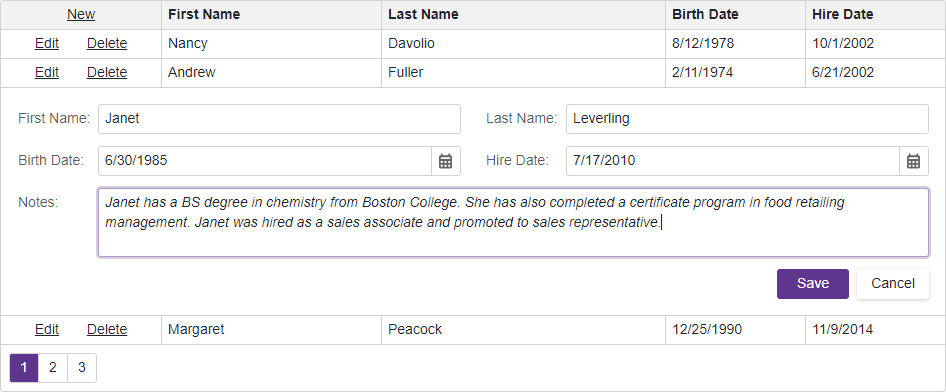
To change the resize mode at runtime, use the IMemoSettings.ResizeMode property instead.