DxTreeList.LayoutAutoSaving Event
Fires when the TreeList layout changes.
Namespace: DevExpress.Blazor
Assembly: DevExpress.Blazor.Grid.v26.1.dll
NuGet Package: DevExpress.Blazor
Declaration
[Parameter]
public Func<TreeListPersistentLayoutEventArgs, Task> LayoutAutoSaving { get; set; }
Parameters
| Type | Description |
|---|---|
| TreeListPersistentLayoutEventArgs | An object that defines data for this event. |
Remarks
The TreeList allows you to save and restore the component’s layout when necessary. You can use SaveLayout() and LoadLayout(TreeListPersistentLayout) methods for this purpose. The saved layout object includes the current page, page size, column sort order/direction, column position, and filter values. Information about row expanded states is not saved.
Handle the LayoutAutoSaving event to save the TreeList’s layout when users change component UI characteristics mentioned above.
Read the TreeList event argument and its members to obtain information about the TreeList. Use Layout argument to obtain the new layout. Keep it in an appropriate storage. You can later pass this object to any of the following members (restore the saved layout):
- The LayoutAutoLoading event’s Layout argument.
- The LoadLayout(TreeListPersistentLayout) method’s parameter.
Important
DevExpress components can incorrectly serialize custom enumeration values in criteria operators. Refer to the following troubleshooting topic for additional information: The XXX enumeration type is not registered for the parse operation…
You can use the following approach to implement different default layouts for mobile and desktop devices:
- Save layouts to a database instead of a browser storage in the
LayoutAutoSavingevent handler. - In the LayoutAutoLoading event handler, use the DxLayoutBreakpoint component to load the layout based on the screen size.
Example
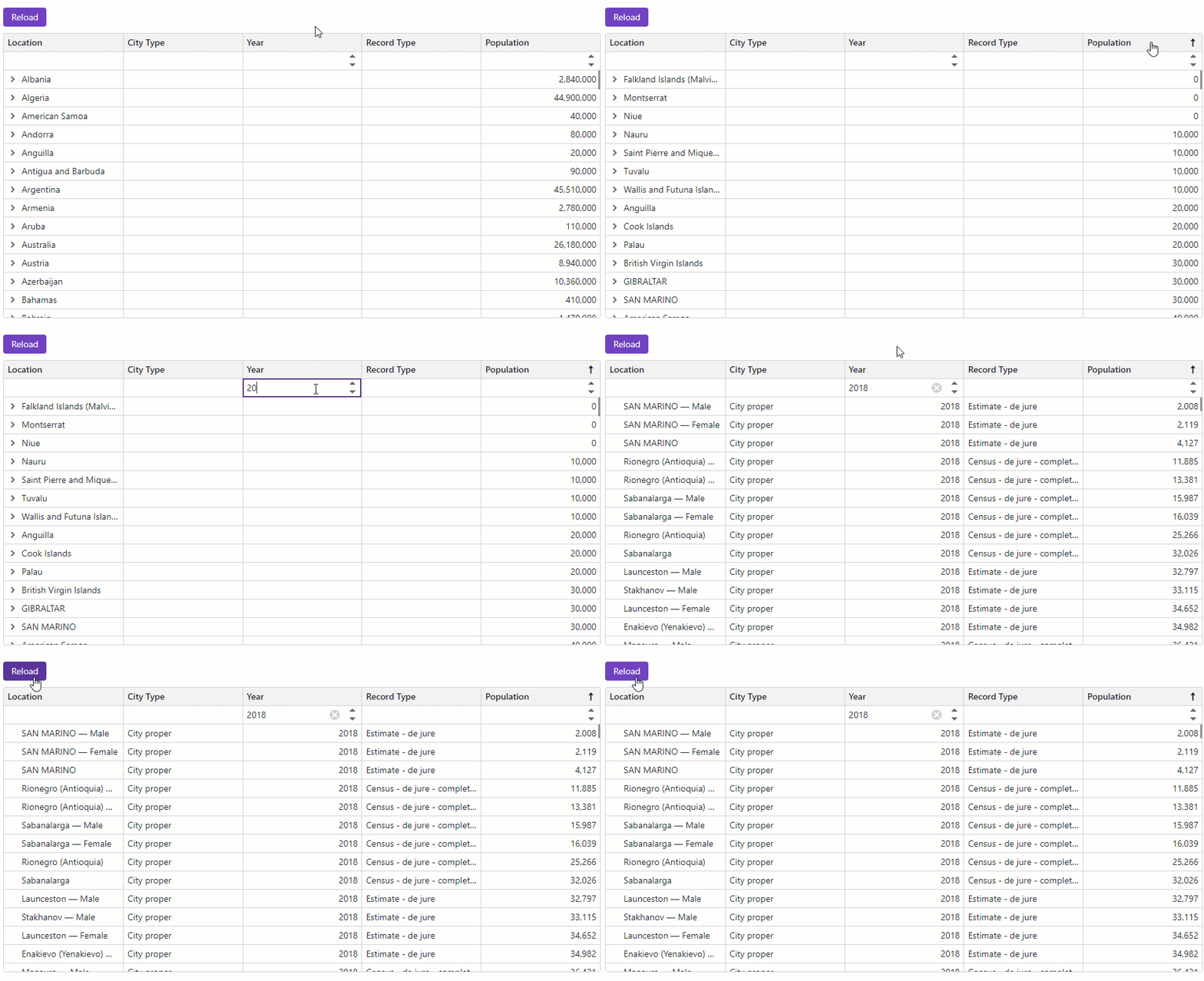
The following code snippet implements basic layout persistence. When the component layout changes, the LayoutAutoSaving event handler saves the updated layout to the browser’s local storage. Once the page is reloaded or restored, the LayoutAutoLoading event handler loads the most recently saved layout from the local storage and applies it to the TreeList.
@using System.Text.Json
@inject ISpaceObjectDataProvider SpaceObjectDataProvider
@inject IJSRuntime JSRuntime
@if (PreRendered) {
<DxTreeList @ref="TreeList"
Data="TreeListData"
ChildrenFieldName="Satellites"
ShowAllRows="true"
LayoutAutoLoading="TreeList_LayoutAutoLoading"
LayoutAutoSaving="TreeList_LayoutAutoSaving"
ShowFilterRow="true"
AutoExpandAllNodes="true">
<Columns>
<DxTreeListDataColumn FieldName="Name" />
<DxTreeListDataColumn FieldName="TypeOfObject" Caption="Type" FilterRowOperatorType="TreeListFilterRowOperatorType.Equal">
<EditSettings>
<DxComboBoxSettings Data="TreeListRenderHelper.SpaceObjectTypes" SearchMode="@ListSearchMode.AutoSearch"
SearchFilterCondition="@ListSearchFilterCondition.Contains" />
</EditSettings>
</DxTreeListDataColumn>
<DxTreeListDataColumn FieldName="Mass10pow21kg" Caption="Mass, kg" DisplayFormat="N2">
<HeaderCaptionTemplate>Mass, 10<sup>21</sup> × kg</HeaderCaptionTemplate>
</DxTreeListDataColumn>
<DxTreeListDataColumn FieldName="MeanRadiusInKM" Caption="Radius, km" DisplayFormat="N2">
<HeaderCaptionTemplate>Radius, km</HeaderCaptionTemplate>
</DxTreeListDataColumn>
<DxTreeListDataColumn FieldName="Volume10pow9KM3" DisplayFormat="N2" Caption="Volume">
<HeaderCaptionTemplate>Volume, 10<sup>9</sup> × km<sup>3</sup></HeaderCaptionTemplate>
</DxTreeListDataColumn>
<DxTreeListDataColumn FieldName="SurfaceGravity" Caption="Gravity" DisplayFormat="N2">
<HeaderCaptionTemplate>Gravity, m/s<sup>2</sup></HeaderCaptionTemplate>
</DxTreeListDataColumn>
</Columns>
<ToolbarTemplate>
<DxToolbar ItemRenderStyleMode="ToolbarRenderStyleMode.Contained">
<Items>
<DxToolbarItem Text="Reload Page" Click="ReloadPageButton_ClickAsync" BeginGroup="true" />
</Items>
</DxToolbar>
</ToolbarTemplate>
</DxTreeList>
} else {
<em>Loading...</em>
}
@code {
const string LocalStorageKey = "TreeList-LayoutPersistence-Data";
bool PreRendered { get; set; }
ITreeList TreeList { get; set; }
object TreeListData { get; set; }
protected override void OnInitialized() {
TreeListData = SpaceObjectDataProvider.GenerateData();
}
protected override void OnAfterRender(bool firstRender) {
if (firstRender) {
PreRendered = true;
StateHasChanged();
}
}
async Task TreeList_LayoutAutoLoading(TreeListPersistentLayoutEventArgs e) {
e.Layout = await LoadLayoutFromLocalStorageAsync();
}
async Task TreeList_LayoutAutoSaving(TreeListPersistentLayoutEventArgs e) {
await SaveLayoutToLocalStorageAsync(e.Layout);
}
// Refer to https://learn.microsoft.com/en-us/aspnet/core/blazor/state-management/
// to learn more about Blazor state management
// In Blazor Server apps, prefer ASP.NET Core Protected Browser Storage
async Task<TreeListPersistentLayout> LoadLayoutFromLocalStorageAsync() {
try {
var json = await JSRuntime.InvokeAsync<string>("localStorage.getItem", LocalStorageKey);
return JsonSerializer.Deserialize<TreeListPersistentLayout>(json);
} catch {
// Mute exceptions for the server prerender stage
return null;
}
}
async Task SaveLayoutToLocalStorageAsync(TreeListPersistentLayout layout) {
try {
var json = JsonSerializer.Serialize(layout);
await JSRuntime.InvokeVoidAsync("localStorage.setItem", LocalStorageKey, json);
} catch {
// Mute exceptions for the server prerender stage
}
}
async Task RemoveLayoutFromLocalStorageAsync() {
try {
await JSRuntime.InvokeVoidAsync("localStorage.removeItem", LocalStorageKey);
} catch {
// Mute exceptions for the server prerender stage
}
}
async Task ReloadPageButton_ClickAsync() {
await JSRuntime.InvokeVoidAsync("location.reload");
}
}