DxGrid.LayoutAutoLoading Event
Fires when the DxGrid component is initialized and starts to load its layout.
Namespace: DevExpress.Blazor
Assembly: DevExpress.Blazor.Grid.v26.1.dll
NuGet Package: DevExpress.Blazor
Declaration
[Parameter]
public Func<GridPersistentLayoutEventArgs, Task> LayoutAutoLoading { get; set; }
Parameters
| Type | Description |
|---|---|
| GridPersistentLayoutEventArgs | A GridPersistentLayoutEventArgs object that defines data for this event. |
Remarks
The Grid allows you to save and restore the component’s layout when necessary. The saved layout object includes the current page, column sort order/direction, column position, filter values, and grouped columns (information about expanded rows in groups is not included).
Handle the LayoutAutoLoading event to restore a grid’s layout when the component is initialized. The component starts loading the layout after the initial component state specified in the markup is applied. As an alternative, call the LoadLayout(GridPersistentLayout) method to restore the layout on demand (for example, on a button click).
Use the Grid event argument and its members to obtain additional information about the Grid. The Layout argument specifies the layout applied to the grid.
Complete any of the following steps to obtain an object that stores the Grid layout:
- Use the LayoutAutoSaving event’s e.Layout argument.
- Use the object returned by the SaveLayout() method.
- Create an object that stores the Grid layout manually and convert it to the GridPersistentLayout type using the Deserialize method.
Note: When <DxGrid> loads a saved layout, it validates the layout against the current Grid configuration. If the column collection has changed, the Grid does not restore column settings. Instead, it loads only Grid-level settings, such as search text, page size, and the current page. Handle the LayoutAutoLoading event to restore column settings.
You can use the following approach to implement different default layouts for mobile and desktop devices:
- Handle the LayoutAutoSaving event. Save layouts to a database instead of browser storage.
- Handle the
LayoutAutoLoadingevent. Use the DxLayoutBreakpoint component to determine the screen size and load the corresponding layout.
You can save and restore properties that the GridPersistentLayout class does not include. Create a structure that stores a GridPersistentLayout instance and additional property values, and use Grid APIs to retrieve and save those values:
namespace ExtendedGridLayout.Data {
    public class GridExtendedLayout {
        public GridPersistentLayout Layout { get; }
        public bool FilterRowVisible { get; }
        public bool GroupPanelVisible { get; }
        public bool SearchBoxVisible { get; }

        public GridExtendedLayout(GridPersistentLayout layout, bool filterRowVisible, bool groupPanelVisible, bool searchBoxVisible) {
            Layout = layout;
            FilterRowVisible = filterRowVisible;
            GroupPanelVisible = groupPanelVisible;
            SearchBoxVisible = searchBoxVisible;
        }
    }
}
Example
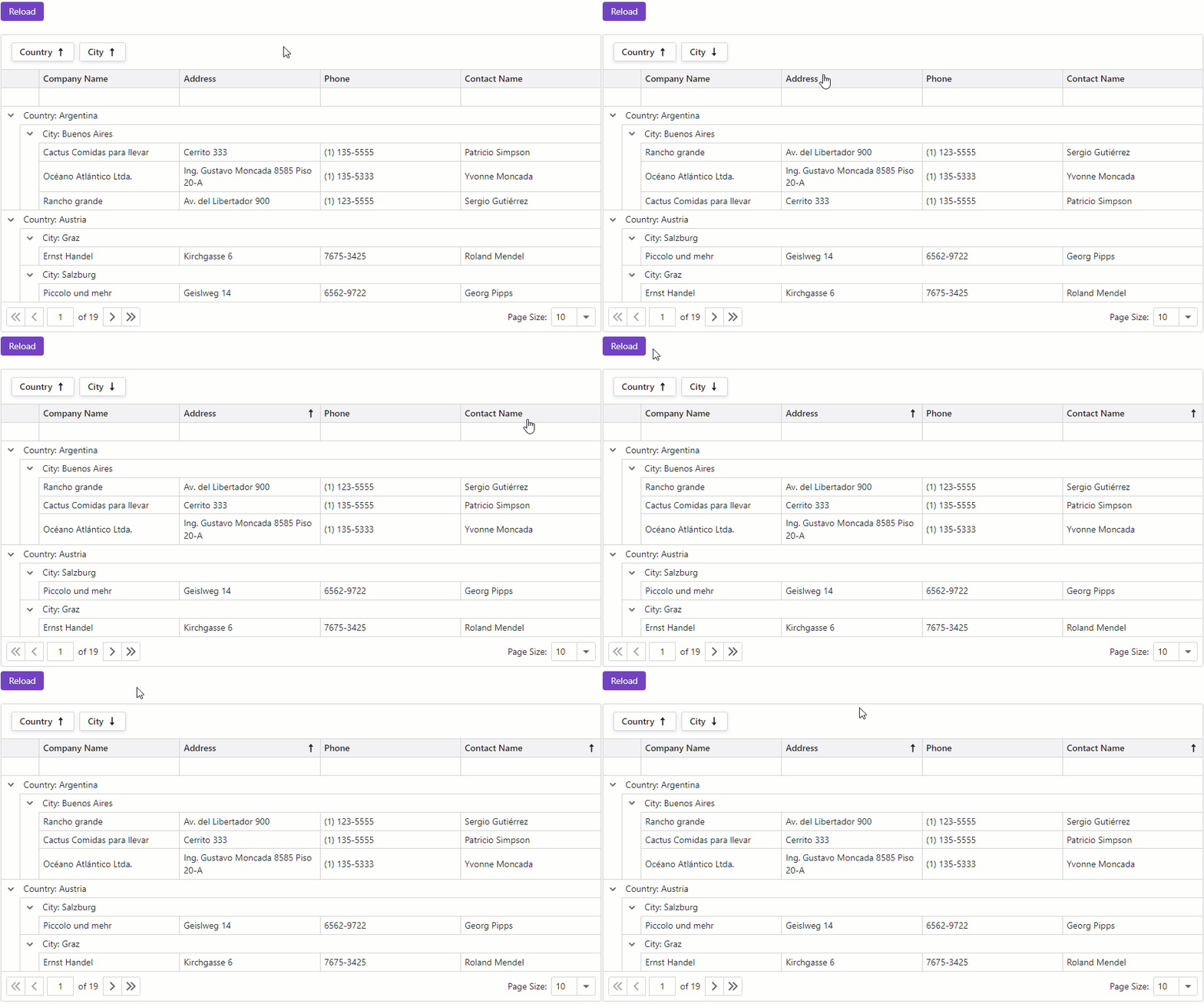
The following code snippet implements basic layout persistence. When the component layout changes, the LayoutAutoSaving event handler saves the updated layout to the browser’s local storage. Once the page is reloaded or restored, the LayoutAutoLoading event handler loads the most recently saved layout from the local storage and applies it to the Grid.
@using System.Text.Json
@inject NwindDataService NwindDataService
@inject IJSRuntime JSRuntime

@if(PreRendered) {
    <DxGrid @ref="Grid" Data="@GridData" AutoExpandAllGroupRows="true"
        ColumnResizeMode="GridColumnResizeMode.NextColumn"
        ShowGroupPanel="true" ShowFilterRow="true"
        PageSizeSelectorVisible="true" PageSizeSelectorAllRowsItemVisible="true"
        LayoutAutoLoading="Grid_LayoutAutoLoading"
        LayoutAutoSaving="Grid_LayoutAutoSaving">
        <Columns>
            <DxGridDataColumn FieldName="Country" GroupIndex="0" />
            <DxGridDataColumn FieldName="City" GroupIndex="1" />
            <DxGridDataColumn FieldName="CompanyName" />
            <DxGridDataColumn FieldName="Address" />
            <DxGridDataColumn FieldName="Phone" />
            <DxGridDataColumn FieldName="ContactName" />
        </Columns>
    </DxGrid>
} else {
    <em>Loading...</em>
}

@code {
    const string LocalStorageKey = "Grid-LayoutPersistence-Data";

    bool PreRendered { get; set; }
    IGrid Grid { get; set; }
    object GridData { get; set; }

    protected override async Task OnInitializedAsync() {
        GridData = await NwindDataService.GetCustomersAsync();
    }

    protected override void OnAfterRender(bool firstRender) {
        if(firstRender) {
            PreRendered = true;
            StateHasChanged();
        }
    }

    async Task Grid_LayoutAutoLoading(GridPersistentLayoutEventArgs e) {
        e.Layout = await LoadLayoutFromLocalStorageAsync();
    }

    async Task Grid_LayoutAutoSaving(GridPersistentLayoutEventArgs e) {
        await SaveLayoutToLocalStorageAsync(e.Layout);
    }

    async Task<GridPersistentLayout> LoadLayoutFromLocalStorageAsync() {
        try {
            var json = await JSRuntime.InvokeAsync<string>("localStorage.getItem", LocalStorageKey);
            return JsonSerializer.Deserialize<GridPersistentLayout>(json);
        } catch {
            // Mute exceptions for the server prerender stage
            return null;
        }
    }

    async Task SaveLayoutToLocalStorageAsync(GridPersistentLayout layout) {
        try {
            var json = JsonSerializer.Serialize(layout);
            await JSRuntime.InvokeVoidAsync("localStorage.setItem", LocalStorageKey, json);
        } catch {
            // Mute exceptions for the server prerender stage
        }
    }
}