DxSchedulerDateNavigatorToolbarItem Class
The drop-down item that allows you to navigate to a specific date.
Namespace: DevExpress.Blazor
Assembly: DevExpress.Blazor.v25.2.dll
NuGet Package: DevExpress.Blazor
Declaration
public class DxSchedulerDateNavigatorToolbarItem :
    SchedulerToolbarItemBase
Remarks
Users can click the Date Navigator button to move to another time interval that contains a specific date:
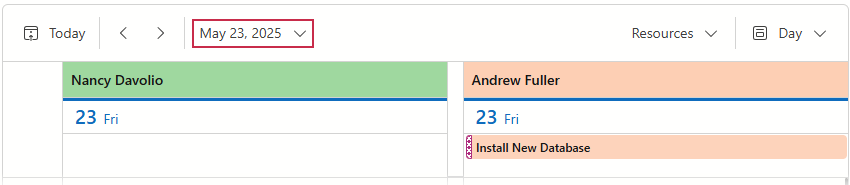
The DxSchedulerDateNavigatorToolbarItem partly supports toolbar item functionality. Refer to the following list for more information on available options: API Reference.
Note that a Date Navigator item starts a new group by default, unlike standard toolbar items:
| Property | Toolbar Item Default Value | Date Navigator Default Value |
|---|---|---|
| BeginGroup | false |
true |
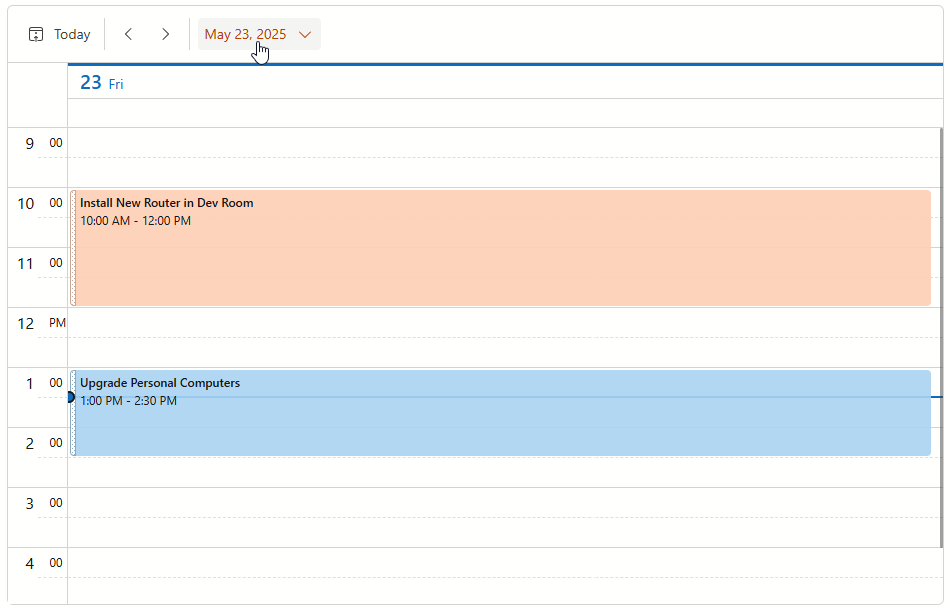
The following adds a Date Navigator item to the toolbar and changes its render style to Warning:
<DxScheduler StartDate="DateTime.Today"
             DataStorage="DataStorage">
    <Views>
        <DxSchedulerDayView />
    </Views>
    <ToolbarItems>
        <DxSchedulerTodayToolbarItem />
        <DxSchedulerPreviousIntervalToolbarItem />
        <DxSchedulerNextIntervalToolbarItem />
        <DxSchedulerDateNavigatorToolbarItem RenderStyle="ButtonRenderStyle.Warning" />
    </ToolbarItems>
</DxScheduler>
Inheritance
Object
ComponentBase
DxComponentBase
DxModelComponent
DxToolbarItemBase
DxToolbarItem
DevExpress.Blazor.Scheduler.Internal.SchedulerToolbarItemBase
DxSchedulerDateNavigatorToolbarItem
See Also