DxGrid.LoadLayout(GridPersistentLayout) Method
Namespace: DevExpress.Blazor
Assembly:
DevExpress.Blazor.Grid.v26.1.dll
NuGet Package:
DevExpress.Blazor
Declaration
public void LoadLayout(
    GridPersistentLayout layout
)
Parameters
The Grid allows you to save and restore the component’s layout when necessary. The saved layout object includes the current page, column sort order/direction, column position, filter values, and grouped columns (information about expanded rows in groups is not included).
Use the LoadLayout method to restore the grid’s layout on demand. As an alternative, handle the LayoutAutoLoading event to restore the layout when the component is initialized.
Complete any of the following steps to obtain an object that stores the Grid layout:
Note: When <DxGrid> loads a saved layout, it validates the layout against the current Grid configuration. If the column collection has changed, the Grid does not restore column settings. Instead, it loads only Grid-level settings, such as search text, page size, and the current page. Handle the LayoutAutoLoading event to restore column settings.
You can save and restore properties that the GridPersistentLayout class does not include. Create a structure that stores a GridPersistentLayout instance and additional property values, and use Grid APIs to retrieve and save those values:
namespace ExtendedGridLayout.Data {
    public class GridExtendedLayout {
        public GridPersistentLayout Layout { get; }
        public bool FilterRowVisible { get; }
        public bool GroupPanelVisible { get; }
        public bool SearchBoxVisible { get; }

        public GridExtendedLayout(GridPersistentLayout layout, bool filterRowVisible, bool groupPanelVisible, bool searchBoxVisible) {
            Layout = layout;
            FilterRowVisible = filterRowVisible;
            GroupPanelVisible = groupPanelVisible;
            SearchBoxVisible = searchBoxVisible;
        }
    }
}
@using ExtendedGridLayout.Data
@inject WeatherForecastService ForecastService
@inject LocalStorageHelper LocalStorage

<DxGrid @ref="GridRef"
        Data="Forecasts"
        ColumnResizeMode="GridColumnResizeMode.NextColumn"
        PageSizeSelectorVisible="true"
        PageSizeSelectorAllRowsItemVisible="true"
        ShowGroupPanel="ShowGroupPanel"
        ShowSearchBox="ShowSearchBox"
        ShowFilterRow="ShowFilterRow">
        <Columns>
            <DxGridDataColumn FieldName="Date" />
            <DxGridDataColumn FieldName="TemperatureC" />
            <DxGridDataColumn FieldName="TemperatureF" Visible="false" />
            <DxGridDataColumn FieldName="Summary" />
        </Columns>
        <ToolbarTemplate>
            <DxToolbar>
                <DxToolbarItem @bind-Checked="@ShowFilterRow" Text="Filter Row" GroupName="FilterRow" />
                <DxToolbarItem @bind-Checked="@ShowGroupPanel" Text="Group Panel" GroupName="GroupPanel" />
                <DxToolbarItem @bind-Checked="@ShowSearchBox" Text="Search Box" GroupName="SearchBox" />
                <DxToolbarItem Text="Column Chooser" BeginGroup="true" Click="OnShowColumnChooser" />
                <DxToolbarItem Text="Save Layout" BeginGroup="true" Click="OnSaveLayout" Alignment="ToolbarItemAlignment.Right" />
                <DxToolbarItem Text="Load Layout" Click="OnLoadLayout" />
            </DxToolbar>
        </ToolbarTemplate>
</DxGrid>

@code {
    WeatherForecast[] Forecasts { get; set; }
    IGrid GridRef { get; set; }
    bool ShowFilterRow { get; set; }
    bool ShowGroupPanel { get; set; }
    bool ShowSearchBox { get; set; }
    GridExtendedLayout GridLayout { get; set; }
    const string LocalStorageItemsKey = "sampleItemsKey";

    protected override async Task OnInitializedAsync() {
        Forecasts = await ForecastService.GetForecastAsync(DateOnly.FromDateTime(DateTime.Now));
        var json = await LocalStorage.GetItemAsync(LocalStorageItemsKey);
        if (!string.IsNullOrEmpty(json)) {
            GridLayout = JsonSerializer.Deserialize<GridExtendedLayout>(json);
        }
    }
    void OnShowColumnChooser() {
        GridRef.ShowColumnChooser();
    }
    async Task OnSaveLayout() {
        GridLayout = new GridExtendedLayout(GridRef.SaveLayout(), ShowFilterRow, ShowGroupPanel, ShowSearchBox);
        await LocalStorage.SetItemAsync(LocalStorageItemsKey, JsonSerializer.Serialize(GridLayout));
    }
    void OnLoadLayout() {
        if (GridLayout != null) {
            GridRef.LoadLayout(GridLayout.Layout);
            ShowFilterRow = GridLayout.FilterRowVisible;
            ShowGroupPanel = GridLayout.GroupPanelVisible;
            ShowSearchBox = GridLayout.SearchBoxVisible;
        }
    }
}
View Example: Save and load extended information about the Grid layout
Example
The following code snippet displays two buttons: Save Layout and Load Layout. When a user clicks Save Layout, the component saves the current Grid layout to the Layout parameter. When the user clicks Load Layout, the component loads the most recently saved layout from the Layout parameter and applies it to the Grid.
@using System.Text.Json
@inject NwindDataService NwindDataService
@inject IJSRuntime JSRuntime

<DxButton Text="Save Layout" Click="OnSaveClick" />
<DxButton Text="Load Layout" Click="OnLoadClick" />

<DxGrid @ref="Grid"
        Data="@GridData"
        AutoExpandAllGroupRows="true"
        ColumnResizeMode="GridColumnResizeMode.NextColumn"
        ShowGroupPanel="true"
        ShowFilterRow="true"
        PageSizeSelectorVisible="true"
        PageSizeSelectorAllRowsItemVisible="true">
    <Columns>
        <DxGridDataColumn FieldName="Country" GroupIndex="0" />
        <DxGridDataColumn FieldName="City" GroupIndex="1" />
        <DxGridDataColumn FieldName="CompanyName" />
        <DxGridDataColumn FieldName="Address" />
        <DxGridDataColumn FieldName="Phone" />
        <DxGridDataColumn FieldName="ContactName" />
    </Columns>
</DxGrid>

@code {
    IGrid Grid { get; set; }
    object GridData { get; set; }
    GridPersistentLayout Layout { get; set; }

    protected override async Task OnInitializedAsync() {
        GridData = await NwindDataService.GetCustomersAsync();
    }

    void OnSaveClick() {
        Layout = Grid.SaveLayout();
    }

    void OnLoadClick() {
        Grid.LoadLayout(Layout);
    }
}
using System;
using System.Collections.Generic;
using System.Runtime.InteropServices;

namespace BlazorDemo.Data.Northwind {
    public class Invoice {
        public string ShipName { get; set; }
        public string ShipAddress { get; set; }
        public string ShipCity { get; set; }
        public string ShipRegion { get; set; }
        public string ShipPostalCode { get; set; }
        public string ShipCountry { get; set; }
        public string CustomerId { get; set; }
        public string CustomerName { get; set; }
        public string Address { get; set; }
        public string City { get; set; }
        public string Region { get; set; }
        public string PostalCode { get; set; }
        public string Country { get; set; }
        public string Salesperson { get; set; }
        public int OrderId { get; set; }
        public DateTime? OrderDate { get; set; }
        public DateTime? RequiredDate { get; set; }
        public DateTime? ShippedDate { get; set; }
        public string ShipperName { get; set; }
        public int ProductId { get; set; }
        public string ProductName { get; set; }
        public decimal UnitPrice { get; set; }
        public short Quantity { get; set; }
        public float Discount { get; set; }
        public decimal? ExtendedPrice { get; set; }
        public decimal? Freight { get; set; }
    }
}
using System;
using System.Collections.Generic;
using System.Runtime.InteropServices;

namespace BlazorDemo.Data.Northwind {
    public partial class Customer {
        public Customer() {
            Orders = new HashSet<Order>();
        }

        public string CustomerId { get; set; }
        public string CompanyName { get; set; }
        public string ContactName { get; set; }
        public string ContactTitle { get; set; }
        public string Address { get; set; }
        public string City { get; set; }
        public string Region { get; set; }
        public string PostalCode { get; set; }
        public string Country { get; set; }
        public string Phone { get; set; }
        public string Fax { get; set; }

        public virtual ICollection<Order> Orders { get; set; }
    }
}
using System.Collections.Generic;
using System.Linq;
using System.Threading;
using System.Threading.Tasks;
using BlazorDemo.Data.Northwind;
using BlazorDemo.DataProviders;

namespace BlazorDemo.Services {
    public partial class NwindDataService {
        public Task<IEnumerable<Invoice>> GetInvoicesAsync(CancellationToken ct = default) {
            // Return your data here
        }
    }
}
using System.Collections.Generic;
using System.Linq;
using System.Threading;
using System.Threading.Tasks;
using BlazorDemo.Data.Northwind;
using BlazorDemo.DataProviders;

namespace BlazorDemo.Services {
    public partial class NwindDataService {
        public Task<IEnumerable<Customer>> GetCustomersAsync(CancellationToken ct = default) {
            // Return your data here
        }
    }
}
// ...
builder.Services.AddScoped<NwindDataService>();
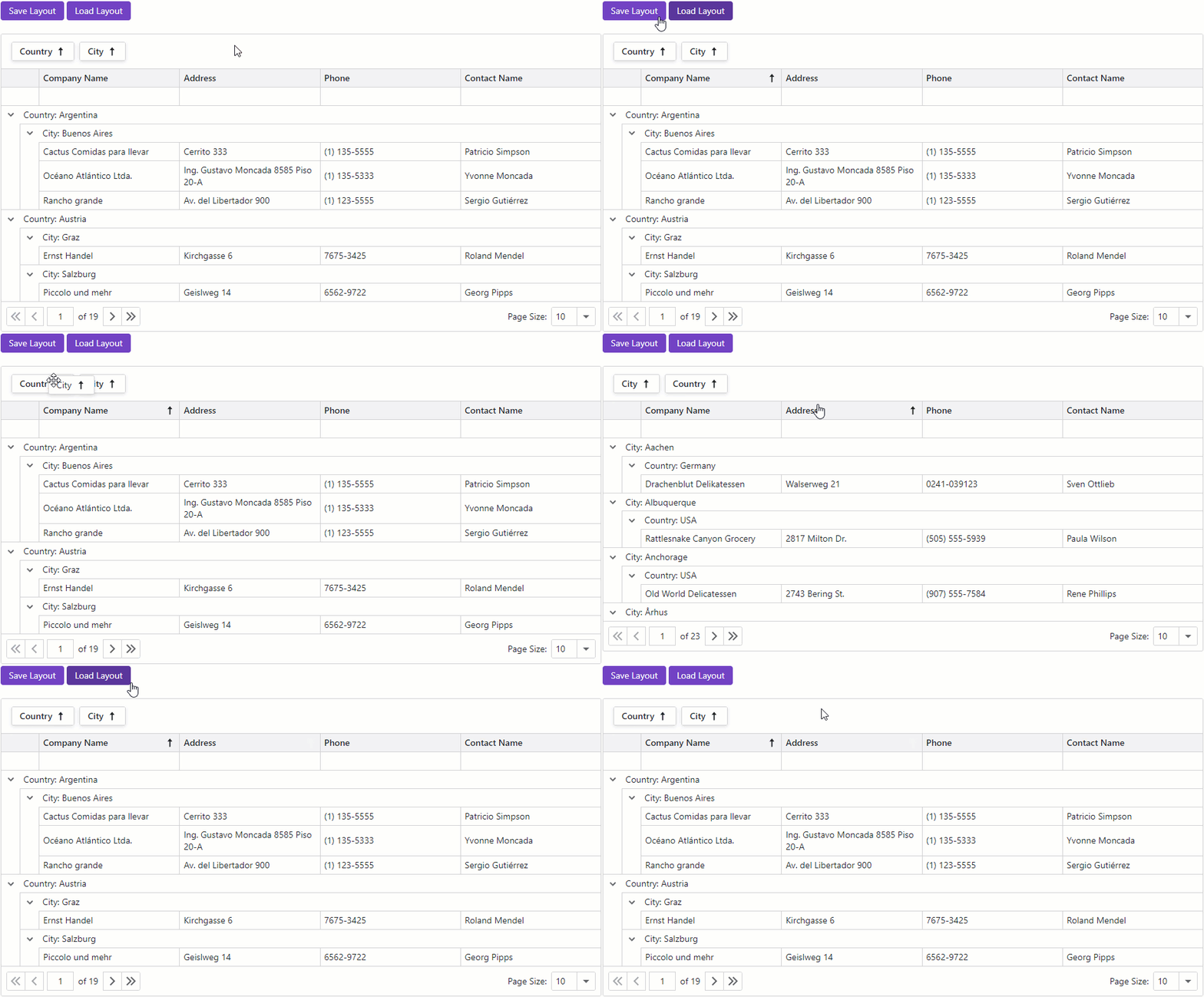
Run Demo: Save and Restore the Layout
View Example: Save and Load Layout Information
See Also