DxChartValueAxis.SynchronizedValue Property
Gets or sets a value at which the value axis is synchronized with other axes.
Namespace: DevExpress.Blazor
Assembly: DevExpress.Blazor.v26.1.dll
NuGet Package: DevExpress.Blazor
Declaration
[DefaultValue(null)]
[Parameter]
public double? SynchronizedValue { get; set; }
Property Value
| Type | Default | Description |
|---|---|---|
| Nullable<Double> | null | An axis value used to synchronize the axis with other axes. |
Remarks
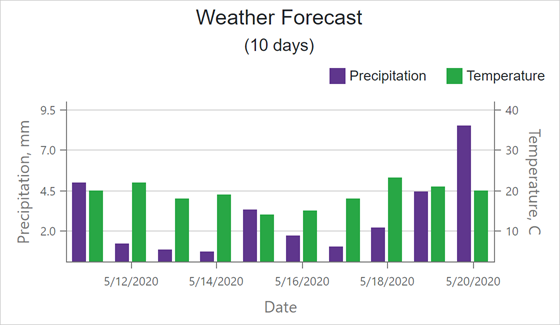
The chart positions synchronized values of multiple axes on the same line. The SynchronizedValue is only in effect when the SynchronizeAxes property is enabled.
The following example synchronizes the Precipitation axis with the Temperature axis at values 2 and 10, respectively:
<DxChart SynchronizeAxes=true>
    <DxChartValueAxis SynchronizedValue=2>
        <DxChartAxisTitle Text="Precipitation, mm" />
    </DxChartValueAxis>
    <DxChartValueAxis Name="Temperature"
                      Alignment="ChartAxisAlignment.Far"
                      SynchronizedValue=10>
        <DxChartAxisTitle Text="Temperature, C" />
    </DxChartValueAxis>
    <DxChartBarSeries ArgumentField="@((WeatherForecast i) => i.Date)"
                      ValueField="@((WeatherForecast i) => i.Precipitation)"
                      Name="Precipitation">
    </DxChartBarSeries>
    <DxChartBarSeries ArgumentField="@((WeatherForecast i) => i.Date)"
                      ValueField="@((WeatherForecast i) => i.TemperatureC)"
                      Name="Temperature"
                      Axis="Temperature">
    </DxChartBarSeries>
</DxChart>
For full-stacked series (for example, DxChartFullStackedBarSeries), the SynchronizedValue property accepts a value from 0 to 1, where 0 denotes 0% and 1 denotes 100%.
See Also