DxChartScrollBarSettings.ArgumentAxisScrollBarPosition Property
Specifies the scrollbar’s position.
Namespace: DevExpress.Blazor
Assembly: DevExpress.Blazor.v26.1.dll
NuGet Package: DevExpress.Blazor
Declaration
[Parameter]
public ChartScrollBarPosition ArgumentAxisScrollBarPosition { get; set; }
Property Value
| Type | Description |
|---|---|
| ChartScrollBarPosition | A ChartScrollBarPosition enumeration value. |
Available values:
| Name | Description |
|---|---|
| Bottom | Places the scrollbar below the chart. |
| Left | Places the scrollbar to the left of the chart. |
| Right | Places the scrollbar to the right of the chart. |
| Top | Places the scrollbar above the chart. |
Remarks
When the chart displays the argument axis horizontally, use the Top and Bottom values to specify the scrollbar position.
If you set the DxChart.Rotated property to true, the chart displays the argument axis vertically. In this case, use the Right and Left values to specify the scrollbar position.
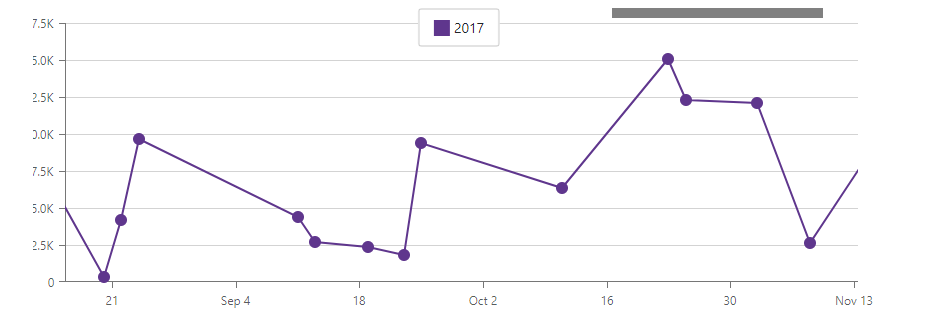
The following code snippet does the following:
- Enables zoom and pan.
- Adds a scrollbar to the chart’s argument axis.
- Sets the scrollbar’s position to
Top.
@using Chart.Data

<DxChart Data="@SalesData">
    <DxChartLineSeries Name="2017"
                       Filter="@((SaleInfo s) => s.Date.Year == 2017)"
                       ArgumentField="@(s => s.Date)"
                       ValueField="@(s => s.Amount)">
        <DxChartAggregationSettings Enabled="true" Method="ChartAggregationMethod.Sum" />
    </DxChartLineSeries>
    <DxChartZoomAndPanSettings ArgumentAxisZoomAndPanMode="ChartAxisZoomAndPanMode.Both"
                               ValueAxisZoomAndPanMode="ChartAxisZoomAndPanMode.Pan" />
    <DxChartScrollBarSettings ArgumentAxisScrollBarVisible="true"
                              ArgumentAxisScrollBarPosition="ChartScrollBarPosition.Top" />
</DxChart>

@code {
    IEnumerable<SaleInfo> SalesData;

    protected override async Task OnInitializedAsync() {
        SalesData = await Sales.GetSalesAsync();
    }
}