ToastOptions.RenderStyle Property
Specifies the toast’s predefined style.
Namespace: DevExpress.Blazor
Assembly: DevExpress.Blazor.v26.1.dll
NuGet Package: DevExpress.Blazor
Declaration
[DefaultValue(null)]
public ToastRenderStyle? RenderStyle { get; set; }
Property Value
| Type | Default | Description |
|---|---|---|
| Nullable<ToastRenderStyle> | null | The render style; |
Available values:
| Name | Description |
|---|---|
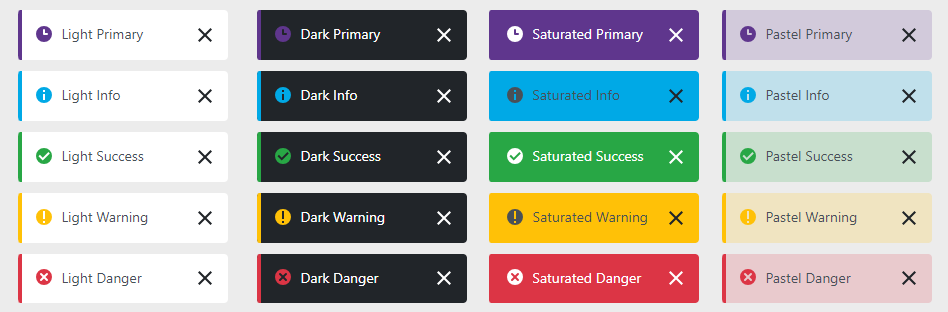
| Primary | Applies the primary style to a toast. |
| Info | Applies the info style to a toast. |
| Success | Applies the success style to a toast. |
| Warning | Applies the warning style to a toast. |
| Danger | Applies the danger style to a toast. |
Remarks
Use RenderStyle and ThemeMode properties to specify the toast style.
<DxButton Text="Show a toast" Click="CreateToast" />
<DxToastProvider />

@code {
    [Inject] IToastNotificationService ToastService { get; set; }

    private void CreateToast() {
        ToastService.ShowToast(new ToastOptions {
              Title = "Notification",
              Text = "The process is completed.",
              RenderStyle = ToastRenderStyle.Info,
              ThemeMode = ToastThemeMode.Saturated,
        });
    }
}
If the RenderStyle property is not specified, the DxToastProvider.RenderStyle property determines the toast render style.
See Also