DxTabs.TabClick Event
Fires when a user clicks a tab.
Namespace: DevExpress.Blazor
Assembly: DevExpress.Blazor.v26.1.dll
NuGet Package: DevExpress.Blazor
Declaration
[Parameter]
public EventCallback<TabClickEventArgs> TabClick { get; set; }
Event Data
The TabClick event's data class is TabClickEventArgs. The following properties provide information specific to this event:
| Property | Description |
|---|---|
| MouseEventArgs | The Blazor’s built-in MouseEventArgs event arguments. |
| TabIndex | Gets the clicked tab’s index. |
| TabInfo | Returns information about a tab related to the event. |
Remarks
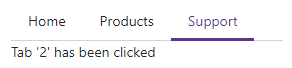
Use the TabClick event to specify a click handler for all tabs. You can also use the DxTabBase.Click event to specify individual click handlers for tabs.
<DxTabs TabClick="OnTabClick">
    <DxTab Text="Home"></DxTab>
    <DxTab Text="Products"></DxTab>
    <DxTab Text="Support"></DxTab>
</DxTabs>

@ClickedTab

@code  {
    public string ClickedTab { get; set; } = "";

    void OnTabClick(TabClickEventArgs e) {
        ClickedTab = $"Tab '{e.TabIndex}' has been clicked";
    }
}
See Also