ManualDateTimeScaleOptions.AggregateFunction Property
Gets or sets the function that is used to aggregate date-time axis data when one of the AxisX2D.DateTimeScaleOptions, AxisX3D.DateTimeScaleOptions, or RadarAxisX2D.DateTimeScaleOptions properties is set to ManualDateTimeScaleOptions.
Namespace: DevExpress.Xpf.Charts
Assembly: DevExpress.Xpf.Charts.v26.1.dll
NuGet Package: DevExpress.Wpf.Charts
Declaration
Property Value
| Type | Description |
|---|---|
| AggregateFunction | An AggregateFunction enumeration value. |
Available values:
| Name | Description |
|---|---|
| None | The aggregate function is not applied. |
| Average | Aggregates data by calculating the average value for a selected numeric or date-time interval. |
| Minimum | Aggregates data by calculating the minimum value for a selected numeric or date-time interval. |
| Maximum | Aggregates data by calculating the maximum value for a selected numeric or date-time interval. |
| Sum | Aggregates data by calculating the summary for a selected numeric or date-time interval. |
| Count | Aggregates data by calculating the number of non-null values for a selected numeric or date-time interval. |
| Histogram | Aggregates data by calculating the number of all points for a selected numeric or date-time interval. |
| Financial | Aggregates financial data for a selected interval into a single high-low-open-close data point, so that the high value equals the highest value of all data points in this interval; the low value equals the lowest value of all data points; the open value equals the value of the first data point and the close value equals the value of the last data point. |
| Custom | Aggregates data using the custom CustomAggregateFunction calculator. |
Remarks
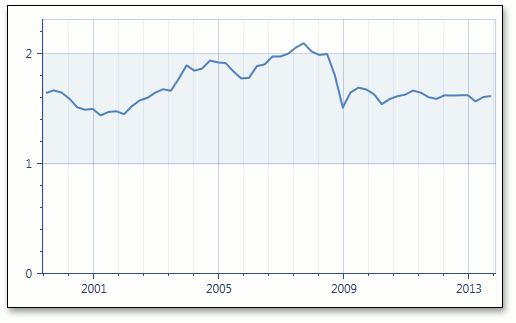
The image below shows date-time data aggregation in the Manual scale mode using the Maximum function.
Note
The AggregateFunction property is set to AggregateFunction.Average by default.
To disable date-time data aggregation, set the AggregateFunction property to AggregateFunction.None.
To learn more, see Data Aggregation.
Example
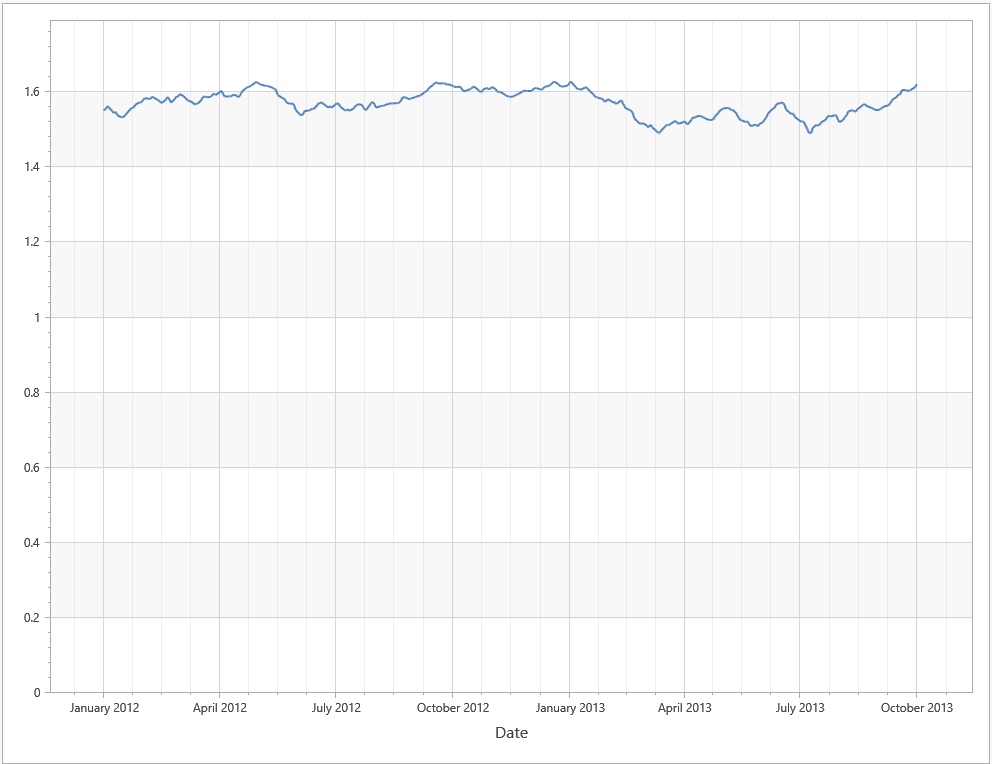
This example uses manual date-time scale options of the X-axis. It sets the AxisX2D.DateTimeScaleOptions property to ManualDateTimeScaleOptions and specifies GridAlignment, MeasureUnit, and AggregateFunction properties.
This example obtains data from the GbpUsdRate.xml file. Download GbpUsdRate.xml
<dx:ThemedWindow
    xmlns="http://schemas.microsoft.com/winfx/2006/xaml/presentation"
    xmlns:x="http://schemas.microsoft.com/winfx/2006/xaml"
    xmlns:dx="http://schemas.devexpress.com/winfx/2008/xaml/core"
    xmlns:dxc="http://schemas.devexpress.com/winfx/2008/xaml/charts"
    x:Class="DXWPFCharts.MainWindow"
    Title="MainWindow" Height="800" Width="1000">
    <Grid>
        <dxc:ChartControl>
            <dxc:XYDiagram2D >
                <dxc:XYDiagram2D.AxisX>
                    <dxc:AxisX2D GridLinesMinorVisible="True" GridLinesVisible="True" MinorCount="3">
                        <dxc:AxisX2D.Title>
                            <dxc:AxisTitle Content="Date"/>
                        </dxc:AxisX2D.Title>
                        <dxc:AxisX2D.DateTimeScaleOptions>
                            <dxc:ManualDateTimeScaleOptions AggregateFunction="Maximum" AutoGrid="False"
                                                            GridAlignment="Month" MeasureUnit="Day"
                                                            GridSpacing="3" GridOffset="1"/>
                        </dxc:AxisX2D.DateTimeScaleOptions>
                    </dxc:AxisX2D>
                </dxc:XYDiagram2D.AxisX>
                <dxc:LineSeries2D DataSource="{Binding Path=Rate}"
                                  ArgumentDataMember="Argument" ValueDataMember="Value" />
            </dxc:XYDiagram2D>
        </dxc:ChartControl>
    </Grid>
</dx:ThemedWindow>
Tip
To use automatic date-time scale options, set the AxisX2D.DateTimeScaleOptions property to AutomaticDateTimeScaleOptions and select the appropriate AutomaticDateTimeScaleOptions.AggregateFunction.