ManualDateTimeScaleOptions.AutoGrid Property
Gets or sets a value that specifies whether the spacing of grid lines is calculated automatically based upon the major tickmarks of the axis.
Namespace: DevExpress.Xpf.Charts
Assembly: DevExpress.Xpf.Charts.v26.1.dll
NuGet Package: DevExpress.Wpf.Charts
Declaration
Property Value
| Type | Description |
|---|---|
| Boolean |
|
Remarks
The AutoGrid property is tightly interrelated to the ManualDateTimeScaleOptions.GridSpacing property. Changing the value of one property affects the other. By default, the AutoGrid property is set to true and the grid line spacing is calculated automatically.
The following images demonstrate how the AutoGrid property works.
AutoGrid = true, GridSpacing=4 | AutoGrid = false, GridSpacing=1 |
|---|---|
|
|


Example
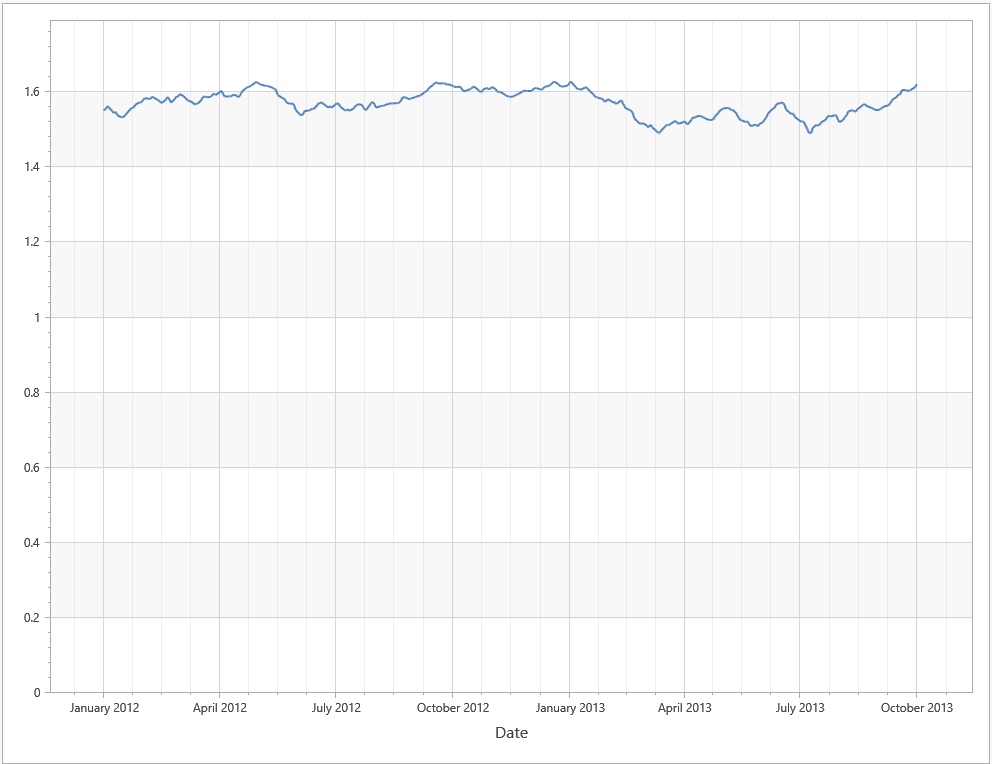
This example uses manual date-time scale options of the X-axis. It sets the AxisX2D.DateTimeScaleOptions property to ManualDateTimeScaleOptions and specifies GridAlignment, MeasureUnit, and AggregateFunction properties.
This example obtains data from the GbpUsdRate.xml file. Download GbpUsdRate.xml
<dx:ThemedWindow
    xmlns="http://schemas.microsoft.com/winfx/2006/xaml/presentation"
    xmlns:x="http://schemas.microsoft.com/winfx/2006/xaml"
    xmlns:dx="http://schemas.devexpress.com/winfx/2008/xaml/core"
    xmlns:dxc="http://schemas.devexpress.com/winfx/2008/xaml/charts"
    x:Class="DXWPFCharts.MainWindow"
    Title="MainWindow" Height="800" Width="1000">
    <Grid>
        <dxc:ChartControl>
            <dxc:XYDiagram2D >
                <dxc:XYDiagram2D.AxisX>
                    <dxc:AxisX2D GridLinesMinorVisible="True" GridLinesVisible="True" MinorCount="3">
                        <dxc:AxisX2D.Title>
                            <dxc:AxisTitle Content="Date"/>
                        </dxc:AxisX2D.Title>
                        <dxc:AxisX2D.DateTimeScaleOptions>
                            <dxc:ManualDateTimeScaleOptions AggregateFunction="Maximum" AutoGrid="False"
                                                            GridAlignment="Month" MeasureUnit="Day"
                                                            GridSpacing="3" GridOffset="1"/>
                        </dxc:AxisX2D.DateTimeScaleOptions>
                    </dxc:AxisX2D>
                </dxc:XYDiagram2D.AxisX>
                <dxc:LineSeries2D DataSource="{Binding Path=Rate}"
                                  ArgumentDataMember="Argument" ValueDataMember="Value" />
            </dxc:XYDiagram2D>
        </dxc:ChartControl>
    </Grid>
</dx:ThemedWindow>
Tip
To use automatic date-time scale options, set the AxisX2D.DateTimeScaleOptions property to AutomaticDateTimeScaleOptions and select the appropriate AutomaticDateTimeScaleOptions.AggregateFunction.