TileControl.ItemCheckMode Property
Gets or sets the way TileItems within the current TileControl can be checked by an end-user.
Namespace: DevExpress.XtraEditors
Assembly: DevExpress.XtraEditors.v26.1.dll
NuGet Package: DevExpress.Win.Navigation
Declaration
[DefaultValue(TileItemCheckMode.None)]
[DXCategory("Behavior")]
public TileItemCheckMode ItemCheckMode { get; set; }Property Value
| Type | Default | Description |
|---|---|---|
| TileItemCheckMode | None | A TileItemCheckMode enumerator value specifying the way TileItems within the current TileControl can be checked by an end-user. |
Available values:
| Name | Description |
|---|---|
| None | Disables checking tile items within a TileControl. |
| Single | Allows an end-user to check only one tile item within a TileControl at a time. |
| Multiple | Allows an end-user to check multiple tile items in a single TileControl. |
Remarks
End-users can check or uncheck tile items at runtime by pressing the right mouse button (PC users) or dragging it down (touch-input devices users). Checked items are marked by displaying a check sign at the right top corner.
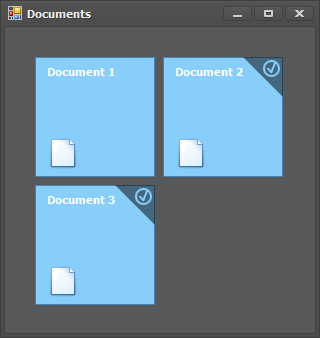
The ItemCheckMode property specifies which tile check mode should be used. Depending on the ItemCheckMode property value, an end-user can keep either single or multiple TileItems checked at the same time.
Note
Setting the Single tile items check mode means an end-user can check only one tile within an entire tile control, not within each of TileGroups that exists.