XtraInputBox.Show(String, String, String) Method
Displays an input box with the specified title, prompt, and default response.
Namespace: DevExpress.XtraEditors
Assembly: DevExpress.XtraEditors.v26.1.dll
NuGet Package: DevExpress.Win.Navigation
Declaration
Parameters
| Name | Type | Description |
|---|---|---|
| prompt | String | The text above the editor. |
| title | String | The text in the title bar. |
| defaultResponse | String | The text that is the editor’s default value. |
Returns
| Type | Description |
|---|---|
| String | The entered value, or |
Example
The following code snippet displays a dialog box with default settings:
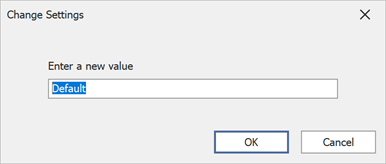
using DevExpress.XtraEditors;

// Display an input box with the specified prompt, title, and default response.
XtraInputBox.Show("Enter a new value", "Change Settings", "Default");

// Display an input box with the specified owner, prompt, title, and default response.
XtraInputBox.Show(this, "Enter a new value", "Change Settings", "Default");
The following code snippet displays an input box with the specified text, caption, and editor:
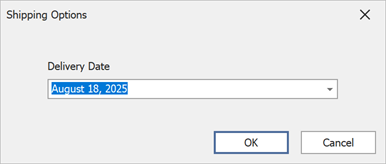
using DevExpress.XtraEditors;

// Create a DateEdit and customize its settings.
DateEdit dateEditor = new DateEdit();

dateEditor.Properties.CalendarView = DevExpress.XtraEditors.Repository.CalendarView.TouchUI;
dateEditor.Properties.Mask.EditMask = "MMMM d, yyyy";

// Initialize a new XtraInputBoxArgs instance with the specified settings.
XtraInputBoxArgs args = new XtraInputBoxArgs()
{
    Caption = "Shipping Options",
    Prompt = "Delivery Date",
    DefaultButtonIndex = 0,
    Editor = dateEditor,
    DefaultResponse = DateTime.Now.Date.AddDays(3) // The date editor's default value
};

// Display the input box and assign the dialog result to a variable.
var result = XtraInputBox.Show(args);
Related GitHub Examples
The following code snippets (auto-collected from DevExpress Examples) contain references to the Show(String, String, String) method.
Note
The algorithm used to collect these code examples remains a work in progress. Accordingly, the links and snippets below may produce inaccurate results. If you encounter an issue with code examples below, please use the feedback form on this page to report the issue.