MemoEdit.LayoutControlAutoHeightMode Property
Gets or sets how the height adjusts to fit the text when the MemoEdit is placed within a LayoutControl.
Namespace: DevExpress.XtraEditors
Assembly: DevExpress.XtraEditors.v26.1.dll
NuGet Package: DevExpress.Win.Navigation
Declaration
[DefaultValue(MemoEditLayoutControlAutoHeightMode.Default)]
[DXCategory("Layout")]
public MemoEditLayoutControlAutoHeightMode LayoutControlAutoHeightMode { get; set; }Property Value
| Type | Default | Description |
|---|---|---|
| MemoEditLayoutControlAutoHeightMode | Default | The auto height mode. |
Available values:
| Name | Description |
|---|---|
| None | MemoEdit height remains fixed and does not adjust to content. A scrollbar appears if the content exceeds the available height. |
| Default | Equivalent to |
| GrowOnly | MemoEdit height increases to fit content but does not decrease when content is reduced. |
| GrowAndShrink | MemoEdit height increases or decreases automatically to fit content. |
Remarks
When displayed within a LayoutControl, The MemoEdit control displays a vertical scrollbar when its text height exceeds the MemoEdit height (the default behavior). Use the LayoutControlAutoHeightMode property to specify the required behavior.
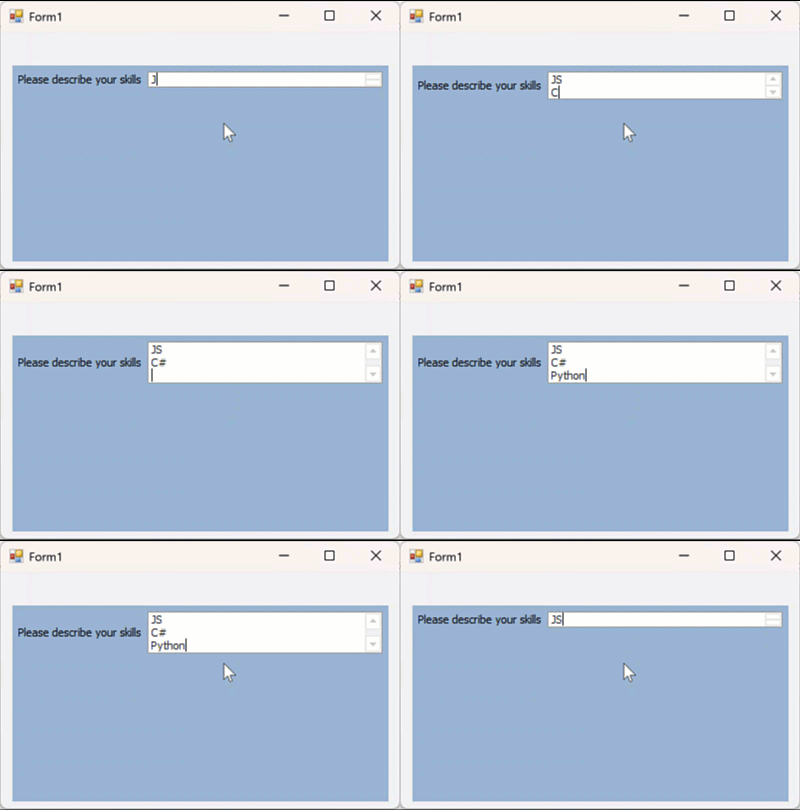
The following code snippet sets LayoutControlAutoHeightMode to GrowAndShrink:
using DevExpress.XtraEditors;

memoEdit1.LayoutControlAutoHeightMode = MemoEditLayoutControlAutoHeightMode.GrowAndShrink;
The following animation demonstrates the result: